> ## Documentation Index
> Fetch the complete documentation index at: https://docs.lindy.ai/llms.txt
> Use this file to discover all available pages before exploring further.
# Routines
> Saved instructions that tell Lindy to do recurring work on its own: daily briefs, meeting follow-ups, weekly digests, and anything you set up.
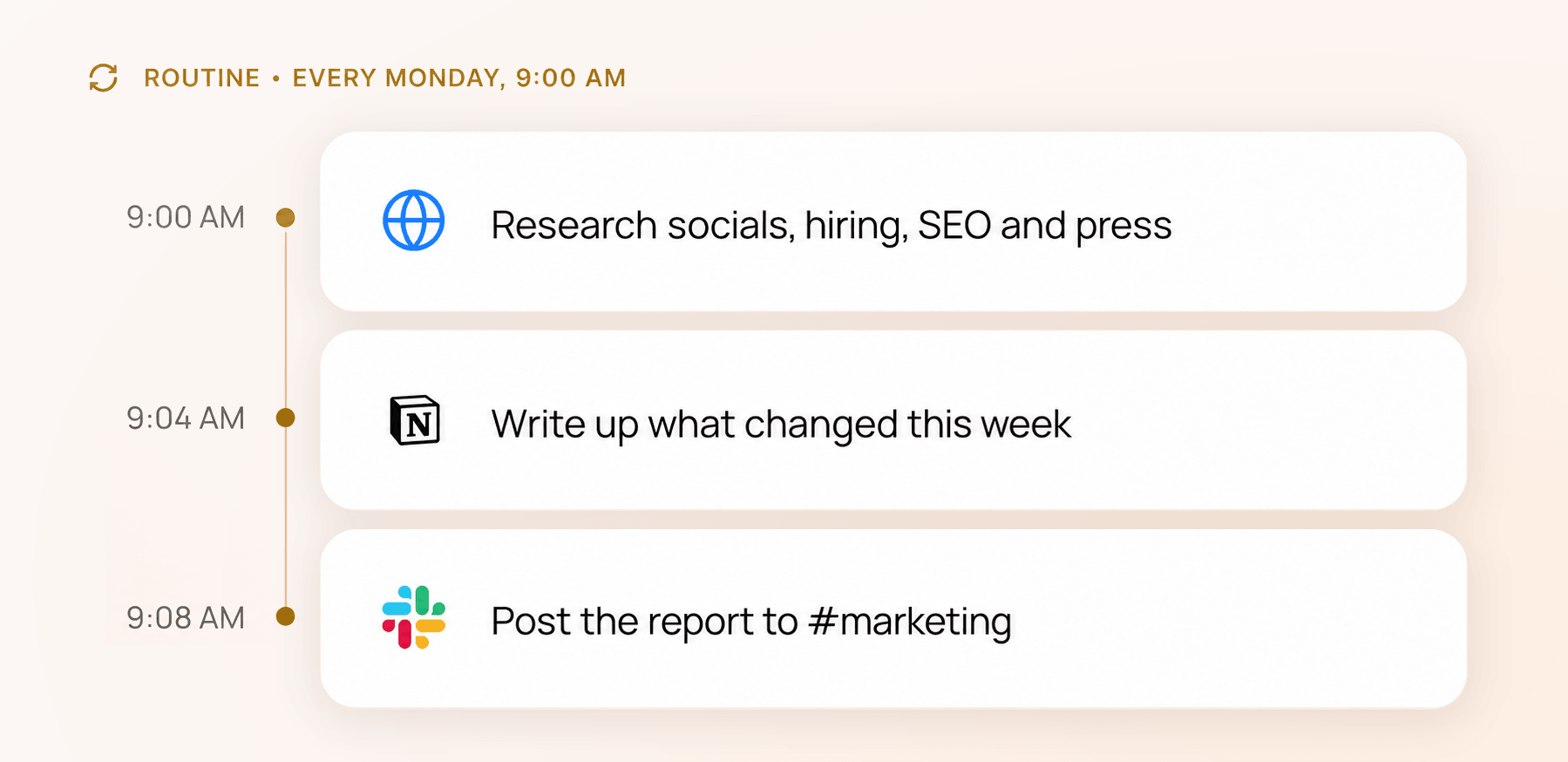 A routine is a saved instruction that tells Lindy to do recurring work on its own. Each one is three parts: a **trigger** (when it runs), a **prompt** (what to do, in plain English), and a **destination** (where the result goes). It isn't a separate bot, it's automation attached to your Lindy, which is what makes Lindy proactive: briefing you, prepping you for meetings, and tracking follow-ups without being asked.
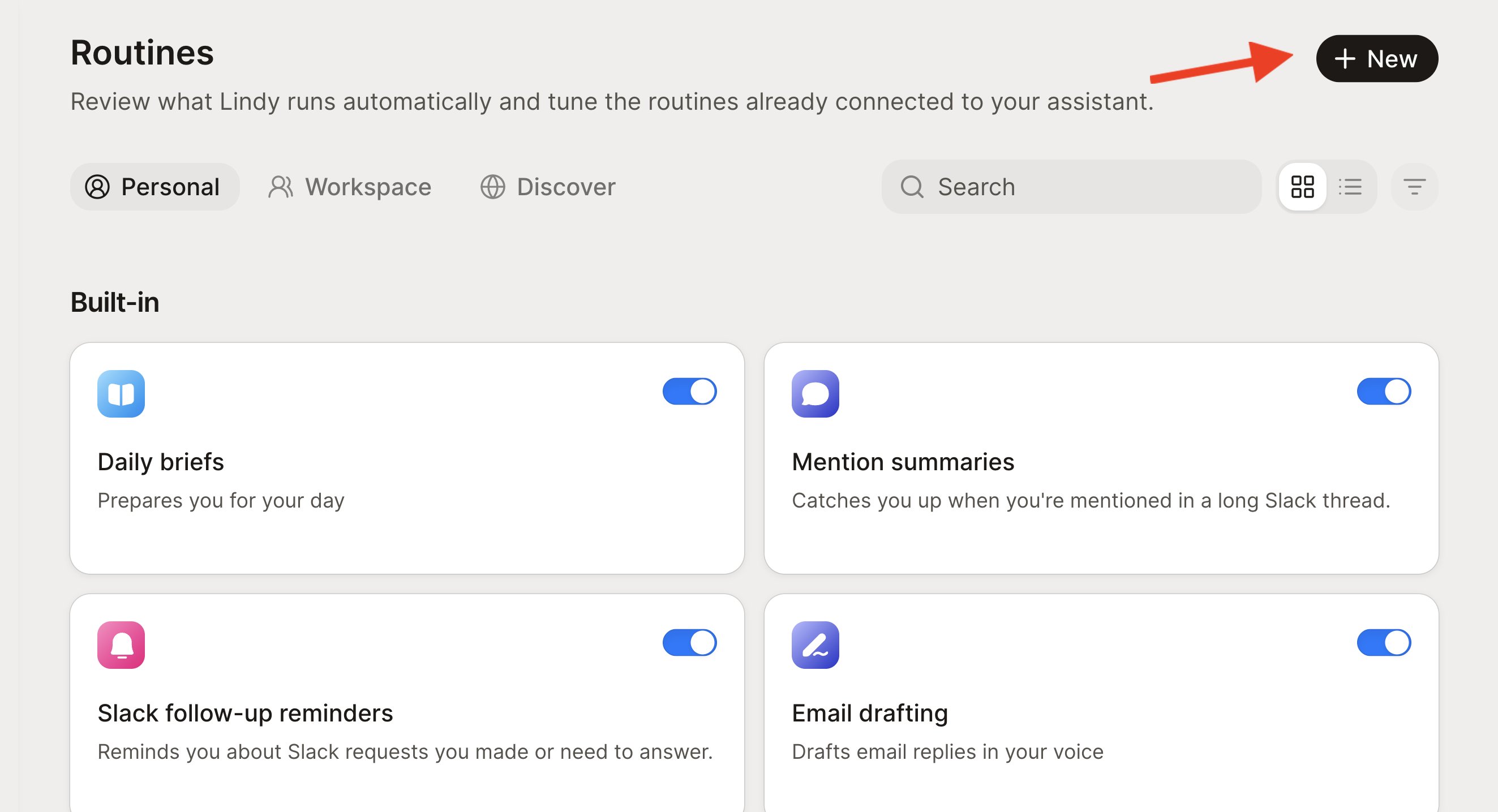
Open the **Routines** page from the left sidebar to review what's running, toggle routines on or off, and add your own with **New**.
## Personal, Workspace, and Discover
Three tabs at the top of the page:
* **Personal** — run just for you, by your own Lindy. Anyone can create them.
* **Workspace** — run for the whole team through Lindy Teammate in Slack. Only workspace admins can create and manage these (everyone else sees them marked *"Needs admin"*), and Teammate has to be set up first.
* **Discover** — a library of ready-made templates you can add in one click.
## Built-in routines
Lindy ships with a set of routines you can turn on or off with a toggle, per connected account:
| Routine | What it does |
| ------------------------- | ------------------------------------------- |
| **Daily briefs** | Prepares you for your day |
| **Email drafting** | Drafts email replies in your voice |
| **Email labeling** | Keeps your inbox organized |
| **Urgent email alerting** | Alerts you to time-sensitive emails |
| **Follow-up bumps** | Drafts a bump when sent emails get no reply |
| **Meeting note taking** | Joins your meetings and takes notes |
| **Meeting prep** | Gives context on your meetings |
| **Meeting scheduling** | Coordinates meetings and proposes times |
Flip any of them on or off any time. Turning one off stops it without removing it.
## Add a template from Discover
Discover has ready-made templates, grouped by area (Recommended, Email & comms, Calendar & meetings, Work, Workspace). Each card shows a status:
* **Ready** — add it in one click.
* **Needs setup** — shows exactly what's missing (like Gmail, Google Calendar, Slack, or meetings) with a **Connect** action right there.
* **Needs admin** — a team template you can add once a workspace admin sets it up.
Click any card to preview its trigger, scope, and prompt before you add it. A few good ones to start with:
* **Morning briefing** — preps you for the day
* **End-of-day review** — wraps today, preps tomorrow
* **Weekly wrap** — summarizes your week
* **Promise tracker** — tracks follow-ups you promise in email
* **Post-meeting follow-ups** — drafts a follow-up after client meetings
* **Calendar audit** — suggests meetings to decline or move on heavy days
* **Channel digest** — posts a combined digest of Slack channels to the team
## Create your own
Click **New** to open the create drawer. The easiest path is to type it in the **Describe your routine** box, like *"Every weekday at 9, summarize my unread email and Slack mentions."* Lindy fills in the name, trigger, and schedule for you. Suggestion chips and a shuffle button are there if you want ideas, and **Advanced settings** lets you set the trigger, schedule, delivery channel, and name by hand.
A routine is a saved instruction that tells Lindy to do recurring work on its own. Each one is three parts: a **trigger** (when it runs), a **prompt** (what to do, in plain English), and a **destination** (where the result goes). It isn't a separate bot, it's automation attached to your Lindy, which is what makes Lindy proactive: briefing you, prepping you for meetings, and tracking follow-ups without being asked.
Open the **Routines** page from the left sidebar to review what's running, toggle routines on or off, and add your own with **New**.
## Personal, Workspace, and Discover
Three tabs at the top of the page:
* **Personal** — run just for you, by your own Lindy. Anyone can create them.
* **Workspace** — run for the whole team through Lindy Teammate in Slack. Only workspace admins can create and manage these (everyone else sees them marked *"Needs admin"*), and Teammate has to be set up first.
* **Discover** — a library of ready-made templates you can add in one click.
## Built-in routines
Lindy ships with a set of routines you can turn on or off with a toggle, per connected account:
| Routine | What it does |
| ------------------------- | ------------------------------------------- |
| **Daily briefs** | Prepares you for your day |
| **Email drafting** | Drafts email replies in your voice |
| **Email labeling** | Keeps your inbox organized |
| **Urgent email alerting** | Alerts you to time-sensitive emails |
| **Follow-up bumps** | Drafts a bump when sent emails get no reply |
| **Meeting note taking** | Joins your meetings and takes notes |
| **Meeting prep** | Gives context on your meetings |
| **Meeting scheduling** | Coordinates meetings and proposes times |
Flip any of them on or off any time. Turning one off stops it without removing it.
## Add a template from Discover
Discover has ready-made templates, grouped by area (Recommended, Email & comms, Calendar & meetings, Work, Workspace). Each card shows a status:
* **Ready** — add it in one click.
* **Needs setup** — shows exactly what's missing (like Gmail, Google Calendar, Slack, or meetings) with a **Connect** action right there.
* **Needs admin** — a team template you can add once a workspace admin sets it up.
Click any card to preview its trigger, scope, and prompt before you add it. A few good ones to start with:
* **Morning briefing** — preps you for the day
* **End-of-day review** — wraps today, preps tomorrow
* **Weekly wrap** — summarizes your week
* **Promise tracker** — tracks follow-ups you promise in email
* **Post-meeting follow-ups** — drafts a follow-up after client meetings
* **Calendar audit** — suggests meetings to decline or move on heavy days
* **Channel digest** — posts a combined digest of Slack channels to the team
## Create your own
Click **New** to open the create drawer. The easiest path is to type it in the **Describe your routine** box, like *"Every weekday at 9, summarize my unread email and Slack mentions."* Lindy fills in the name, trigger, and schedule for you. Suggestion chips and a shuffle button are there if you want ideas, and **Advanced settings** lets you set the trigger, schedule, delivery channel, and name by hand.
 You can also just ask Lindy in chat: *"Every Monday at 9, check my inbox for emails from investors and alert me."*
## Triggers and delivery
* **Triggers.** Run a routine on a **schedule** (daily, weekly, or monthly, the most common), or on an **event**: an email received or sent, a Slack message, a calendar event about to start, a meeting ending, and more. A **Smart Filter** narrows event triggers in plain English, like *"only emails that promise a follow-up,"* so it doesn't fire on everything.
* **Where results go.** Personal routines deliver to your default proactive channel, Lindy chat, a text message (if your phone is verified), or a Slack DM. Workspace routines post to a Slack thread reply or a specific channel.
Defaults: new routines run **daily at 9:00 AM** until you change it, and deliver to your default proactive channel. Team routines default to a Slack thread reply, and scheduled team digests must target a channel.
## Edit and manage
Tune a routine from the Routines page, or just ask Lindy:
* *"Change my morning routine to 9am instead of 8am."*
* *"Pause my follow-up bumps."*
* *"What routines are active?"*
## Relevant Docs
Reusable playbooks Lindy picks up on its own
Where you talk to Lindy and see what it's done
You can also just ask Lindy in chat: *"Every Monday at 9, check my inbox for emails from investors and alert me."*
## Triggers and delivery
* **Triggers.** Run a routine on a **schedule** (daily, weekly, or monthly, the most common), or on an **event**: an email received or sent, a Slack message, a calendar event about to start, a meeting ending, and more. A **Smart Filter** narrows event triggers in plain English, like *"only emails that promise a follow-up,"* so it doesn't fire on everything.
* **Where results go.** Personal routines deliver to your default proactive channel, Lindy chat, a text message (if your phone is verified), or a Slack DM. Workspace routines post to a Slack thread reply or a specific channel.
Defaults: new routines run **daily at 9:00 AM** until you change it, and deliver to your default proactive channel. Team routines default to a Slack thread reply, and scheduled team digests must target a channel.
## Edit and manage
Tune a routine from the Routines page, or just ask Lindy:
* *"Change my morning routine to 9am instead of 8am."*
* *"Pause my follow-up bumps."*
* *"What routines are active?"*
## Relevant Docs
Reusable playbooks Lindy picks up on its own
Where you talk to Lindy and see what it's done