> ## Documentation Index
> Fetch the complete documentation index at: https://docs.lindy.ai/llms.txt
> Use this file to discover all available pages before exploring further.
# Email Drafting
> AI-drafted replies that land in your drafts folder, ready to review and send
## Replies That Sound Like You
After [Email Triage](/features/inbox-management/email-triage) sorts your inbox, Lindy drafts replies for emails that need a response. Every draft lands in your drafts folder for you to review, edit, and send. Nothing goes out without your approval.
## How to Set It Up
Open Lindy, click your **workspace name** in the top-left, and choose **Settings**. In the left sidebar, click **Emails**, then scroll to **Email drafting**.
## How It Works
Enable email drafting in your settings at [chat.lindy.ai](https://chat.lindy.ai). Look for **Email drafting** in the settings panel. Once on, Lindy will:
1. Read incoming emails that need a response
2. Draft a reply based on your drafting instructions
3. Save it as a draft in your email client
From there, you review, tweak if needed, and hit send.
## Drafting Instructions
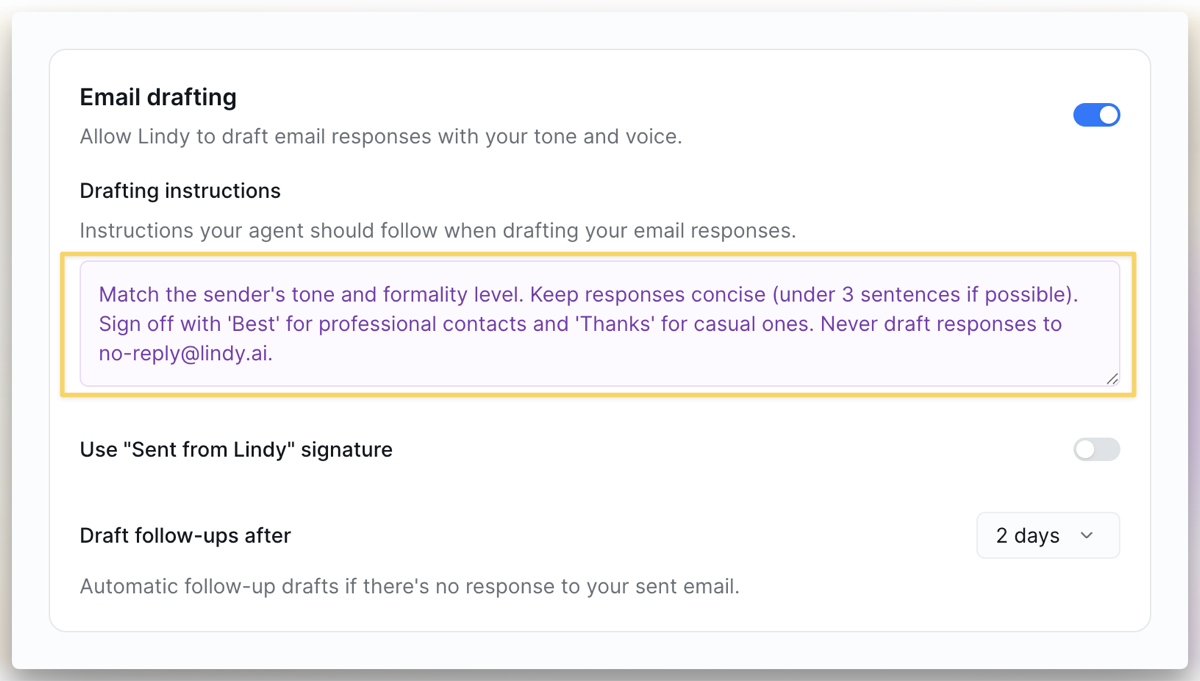
Tell Lindy how you write. In your settings, you'll see a text field for **Drafting Instructions** where you describe your style. For example:
> Match the sender's tone and formality level. Keep responses concise (under 3 sentences if possible). Sign off with 'Best' for professional contacts and 'Thanks' for casual ones. Never draft responses to no-reply emails.
 The more specific you are, the better Lindy's drafts will sound. You can mention:
* **Tone**: formal, casual, friendly, direct
* **Length**: short and punchy, or thorough and detailed
* **Sign-offs**: "Best," "Thanks," "Cheers," your custom signature
* **Rules**: who to never reply to, what topics to escalate
Lindy learns from your feedback. If a draft isn't quite right, edit it before sending. Lindy picks up on your changes and improves over time.
## Signature
Customize what shows up at the bottom of every Lindy draft.
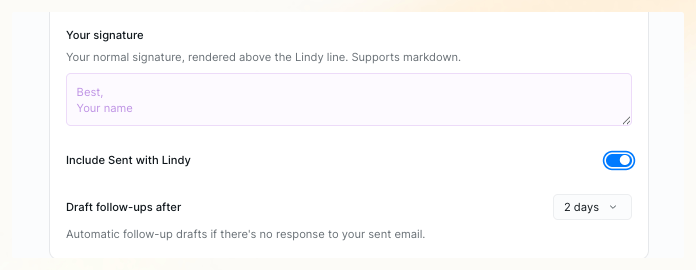
**Your signature** is your standard sign-off, rendered above the Lindy line. Add plain text or markdown — paste in your Gmail signature, or write something new.
**Include Sent with Lindy** adds a small "Sent with Lindy" tagline below your signature. It's on by default — toggle it off in settings if you'd rather not include it.
The more specific you are, the better Lindy's drafts will sound. You can mention:
* **Tone**: formal, casual, friendly, direct
* **Length**: short and punchy, or thorough and detailed
* **Sign-offs**: "Best," "Thanks," "Cheers," your custom signature
* **Rules**: who to never reply to, what topics to escalate
Lindy learns from your feedback. If a draft isn't quite right, edit it before sending. Lindy picks up on your changes and improves over time.
## Signature
Customize what shows up at the bottom of every Lindy draft.
**Your signature** is your standard sign-off, rendered above the Lindy line. Add plain text or markdown — paste in your Gmail signature, or write something new.
**Include Sent with Lindy** adds a small "Sent with Lindy" tagline below your signature. It's on by default — toggle it off in settings if you'd rather not include it.
 ## Automatic Follow-ups
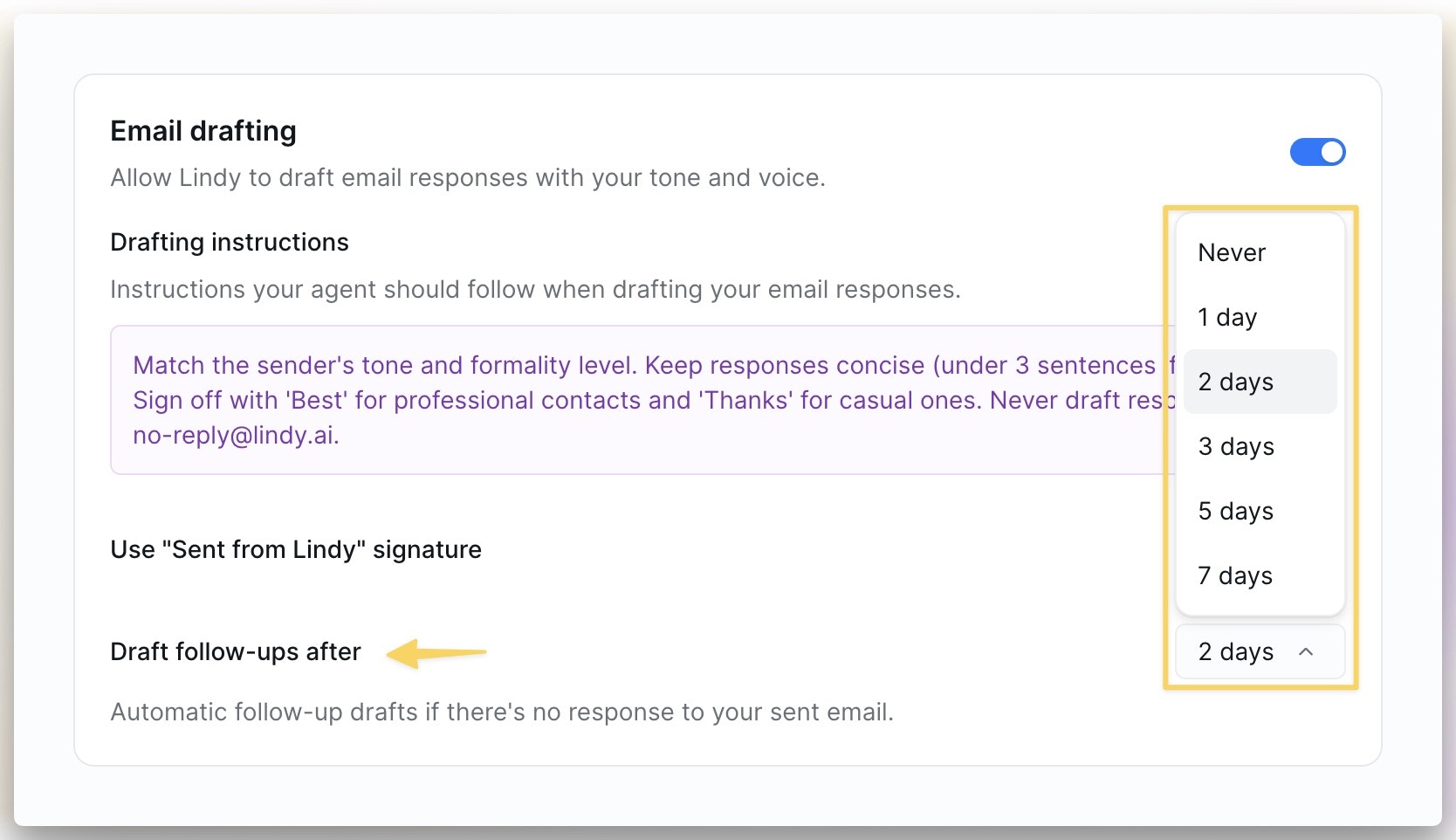
Lindy tracks emails you've sent that haven't gotten a reply. After a set number of days (default: **2 days**), Lindy drafts a follow-up and saves it in your drafts for review. Adjust the timing in your settings. You always have the final say before anything sends.
## Automatic Follow-ups
Lindy tracks emails you've sent that haven't gotten a reply. After a set number of days (default: **2 days**), Lindy drafts a follow-up and saves it in your drafts for review. Adjust the timing in your settings. You always have the final say before anything sends.
 Looking for post-meeting follow-ups? That's a separate feature. See [Meeting Follow-ups](/features/meeting-assistant/follow-ups).
## Next Steps
How Lindy organizes your inbox
Automatic follow-ups after meetings
Looking for post-meeting follow-ups? That's a separate feature. See [Meeting Follow-ups](/features/meeting-assistant/follow-ups).
## Next Steps
How Lindy organizes your inbox
Automatic follow-ups after meetings