> ## Documentation Index
> Fetch the complete documentation index at: https://docs.lindy.ai/llms.txt
> Use this file to discover all available pages before exploring further.
# Follow-up Bumps
> Lindy drafts a follow-up when a sent email gets no reply, so nothing slips through the cracks
 ## Chase the Replies You're Owed
Follow-up bumps is a built-in **routine** that tracks the emails you've sent and, if one gets no reply, drafts a bump for you to review. You keep the final say before anything sends.
## Before you start
* A connected **Gmail or Outlook** inbox.
* A plan with Assistant features.
* Not turned off by your workspace admin. If it is, the card shows **Disabled by admin**.
## Turn it on
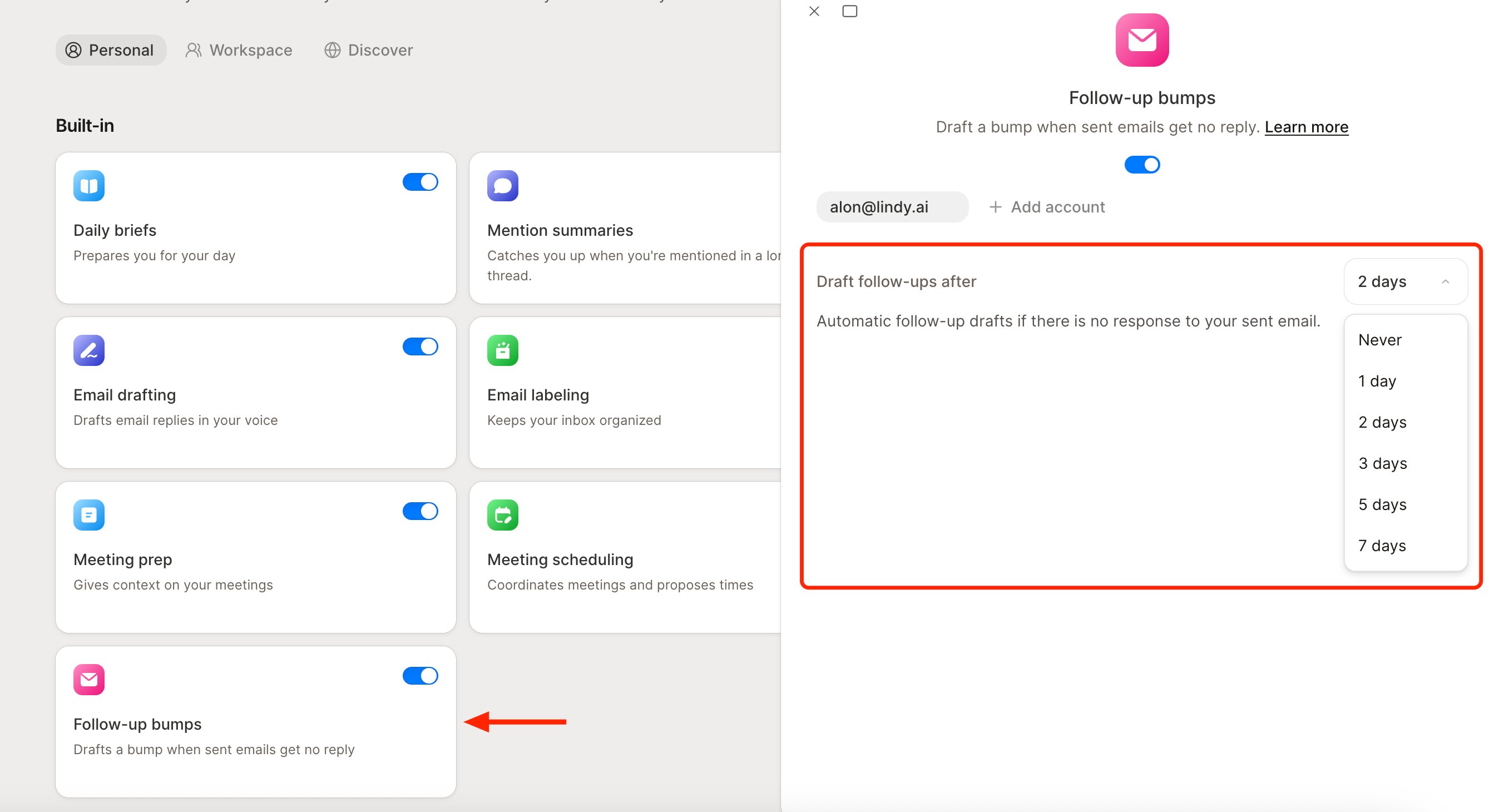
Go to the **Routines** page. On the **Personal** tab, find the **Follow-up bumps** card ("Drafts a bump when sent emails get no reply") and click it to open its drawer.
Use the enable switch. While the routine is off, its settings are greyed out.
## Set the timing
Set **Draft follow-ups after** to **Never**, **1**, **2**, **3**, **5**, or **7 days**. If a sent email gets no reply in that window, Lindy drafts a bump and saves it to your drafts for review.
This routine is independent of [Email drafting](/features/inbox-management/email-drafting), so you can run one without the other.
## Connect another inbox
At the top of the drawer, each connected inbox shows as a chip, with a **+ Add account** button beside them. Click **+ Add account**, choose **Google** or **Outlook**, and follow the prompts to link another inbox. Settings are per-account, so pick the chip first, then set the timing.
Looking for post-meeting follow-ups? That's part of meeting note-taking. See [Meeting Notes](/features/meeting-assistant/meeting-notes#post-meeting-follow-ups).
## Next Steps
How Lindy drafts replies in your voice
Manage follow-up bumps and your other routines
## Chase the Replies You're Owed
Follow-up bumps is a built-in **routine** that tracks the emails you've sent and, if one gets no reply, drafts a bump for you to review. You keep the final say before anything sends.
## Before you start
* A connected **Gmail or Outlook** inbox.
* A plan with Assistant features.
* Not turned off by your workspace admin. If it is, the card shows **Disabled by admin**.
## Turn it on
Go to the **Routines** page. On the **Personal** tab, find the **Follow-up bumps** card ("Drafts a bump when sent emails get no reply") and click it to open its drawer.
Use the enable switch. While the routine is off, its settings are greyed out.
## Set the timing
Set **Draft follow-ups after** to **Never**, **1**, **2**, **3**, **5**, or **7 days**. If a sent email gets no reply in that window, Lindy drafts a bump and saves it to your drafts for review.
This routine is independent of [Email drafting](/features/inbox-management/email-drafting), so you can run one without the other.
## Connect another inbox
At the top of the drawer, each connected inbox shows as a chip, with a **+ Add account** button beside them. Click **+ Add account**, choose **Google** or **Outlook**, and follow the prompts to link another inbox. Settings are per-account, so pick the chip first, then set the timing.
Looking for post-meeting follow-ups? That's part of meeting note-taking. See [Meeting Notes](/features/meeting-assistant/meeting-notes#post-meeting-follow-ups).
## Next Steps
How Lindy drafts replies in your voice
Manage follow-up bumps and your other routines