> ## Documentation Index
> Fetch the complete documentation index at: https://docs.lindy.ai/llms.txt
> Use this file to discover all available pages before exploring further.
# Memory
## Quick Overview
Context and Memory ensure your agents have the right information to make correct decisions. They work together to provide both immediate task awareness and long-term knowledge retention.
There are different forms of context and memory that help your agent during individual task runs and across multiple runs. This system lets your agent stay informed about current work while building on past experiences.
What makes Lindy special is automatic context accrual - your agent is aware of everything that happens during a task run. As your agent takes actions, all the data and results automatically become part of the context for future decisions within that task.
## Understanding Memory vs Context
### Context
There are two types of context that inform your agent's decisions:
* **Context that accrues per task run**: Lindy automatically builds context as your agent works, including all actions, data, and results from the current task. This helps your agent make informed decisions based on what's happened so far in the workflow.
* **Context you set in settings**: Personality and core directives that guide your agent's behavior across all tasks. This defines who your agent is and how it should consistently behave.
Key difference: Per-run context is unique to each task and resets when a new task starts. Settings context is used every time and remains consistent across all task runs.
### Memory
Memories are little snippets of information that you can save to Lindy's memory, which gets added into the context and persists across all task runs. They're a really helpful tool for you to build self-improving Lindys.
Examples:
* "Don't schedule meetings before 11am for this user"
* "Customer prefers email communication over phone calls"
* "Last outreach to this lead was on March 15th about pricing"
Memories persist across all future task runs. When your agent creates or updates a memory during a workflow, that information becomes part of the context for all subsequent tasks.
## Configuring Memory and Context
Access these settings through the Settings tab in your Flow Editor.
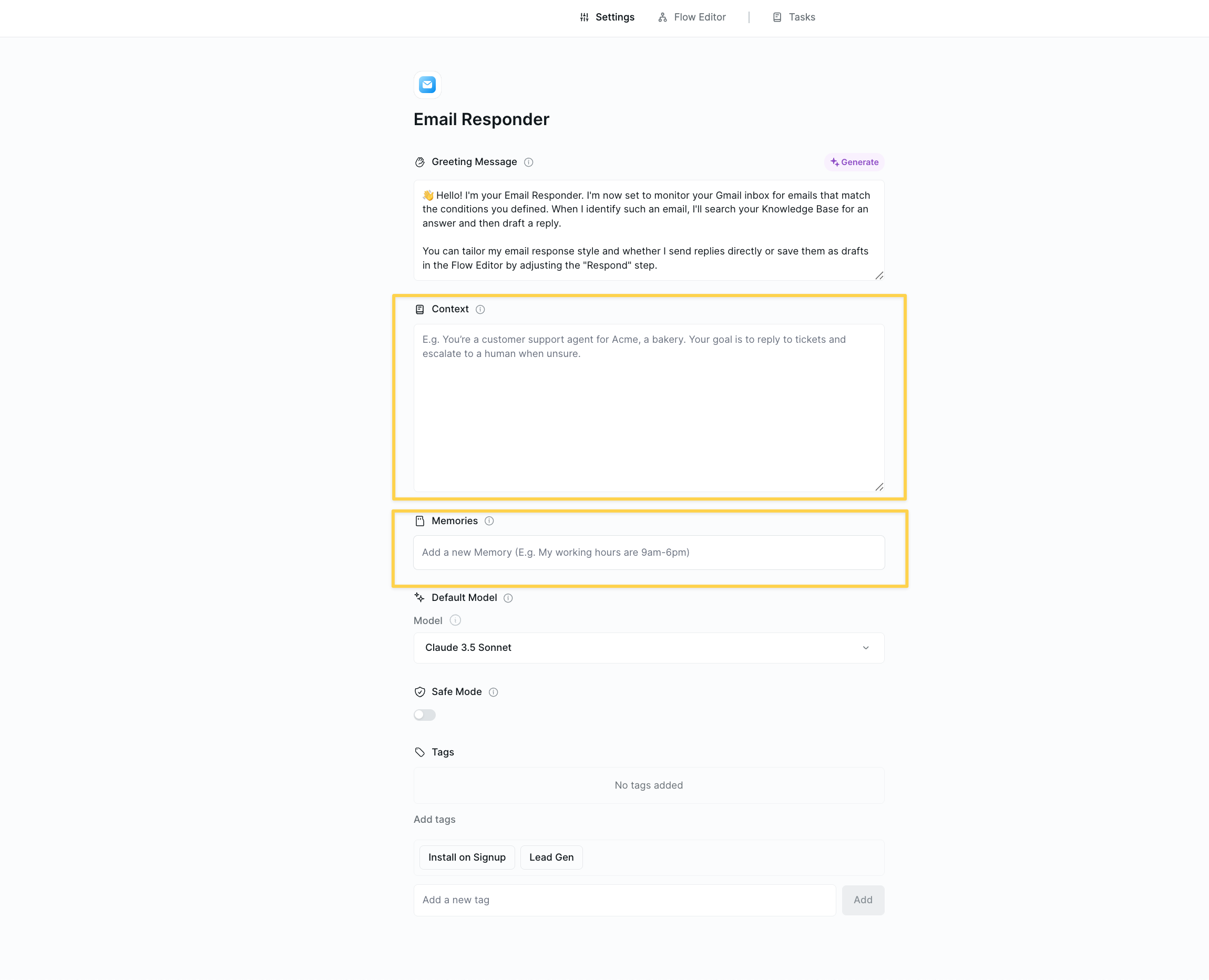 ### Setting Context
In the Context field, provide clear instructions that define your agent's role and behavior:
```
You are a sales development representative for TechCorp, a B2B SaaS company.
Your role is to qualify leads and schedule demos with our sales team.
Key guidelines:
- Always be professional but conversational
- Focus on understanding the prospect's pain points
- Don't be pushy - education over selling
- Our target customers are companies with 50-500 employees
```
### Managing Memories
Memories can be:
* **Pre-configured** - Set initial memories when building your agent
* **User-defined** - Users can add memories like "I prefer morning meetings"
* **Agent-updated** - Your agent can create/update memories during execution
Memory format examples:
* "User timezone: PST"
* "Preferred meeting length: 30 minutes"
* "Do not contact list: competitor1.com, competitor2.com"
## How Memory Works in Practice
### Memory Actions
Your agent can interact with memories using memory actions:
* **Read memories** - Access stored information
* **Create memories** - Store new learnings
* **Update memories** - Modify existing information
* **Delete memories** - Remove outdated data
### Automatic Memory Injection
Both Context and Memory are automatically included in every AI call. When your agent makes decisions, it has access to:
1. The Context instructions
2. All current memories
3. The immediate task data
This ensures consistent behavior aligned with both fixed rules and learned preferences.
## Best Practices
Set clear personality and behavioral guidelines in context settings that should apply to every task. This defines who your agent is across all interactions.
Use memories to store learnings that help your agent get better over time. Save user preferences, successful strategies, and important discoveries that should influence future behavior.
Long context accrual can increase costs. If tasks get expensive, consider using memory actions to store key information and clear context, or break complex workflows into smaller tasks.
Use context settings for unchanging rules and personality. Use memories for dynamic learnings that should persist. Let context accrual happen automatically - don't try to manage it manually.
## Next Steps
Master these related concepts to build more sophisticated agents:
Combine memory with agent steps for adaptive workflows
Supplement memory with structured knowledge repositories
Use memories in conditional logic for dynamic routing
Add confirmation steps for memory updates
### Setting Context
In the Context field, provide clear instructions that define your agent's role and behavior:
```
You are a sales development representative for TechCorp, a B2B SaaS company.
Your role is to qualify leads and schedule demos with our sales team.
Key guidelines:
- Always be professional but conversational
- Focus on understanding the prospect's pain points
- Don't be pushy - education over selling
- Our target customers are companies with 50-500 employees
```
### Managing Memories
Memories can be:
* **Pre-configured** - Set initial memories when building your agent
* **User-defined** - Users can add memories like "I prefer morning meetings"
* **Agent-updated** - Your agent can create/update memories during execution
Memory format examples:
* "User timezone: PST"
* "Preferred meeting length: 30 minutes"
* "Do not contact list: competitor1.com, competitor2.com"
## How Memory Works in Practice
### Memory Actions
Your agent can interact with memories using memory actions:
* **Read memories** - Access stored information
* **Create memories** - Store new learnings
* **Update memories** - Modify existing information
* **Delete memories** - Remove outdated data
### Automatic Memory Injection
Both Context and Memory are automatically included in every AI call. When your agent makes decisions, it has access to:
1. The Context instructions
2. All current memories
3. The immediate task data
This ensures consistent behavior aligned with both fixed rules and learned preferences.
## Best Practices
Set clear personality and behavioral guidelines in context settings that should apply to every task. This defines who your agent is across all interactions.
Use memories to store learnings that help your agent get better over time. Save user preferences, successful strategies, and important discoveries that should influence future behavior.
Long context accrual can increase costs. If tasks get expensive, consider using memory actions to store key information and clear context, or break complex workflows into smaller tasks.
Use context settings for unchanging rules and personality. Use memories for dynamic learnings that should persist. Let context accrual happen automatically - don't try to manage it manually.
## Next Steps
Master these related concepts to build more sophisticated agents:
Combine memory with agent steps for adaptive workflows
Supplement memory with structured knowledge repositories
Use memories in conditional logic for dynamic routing
Add confirmation steps for memory updates