> ## Documentation Index
> Fetch the complete documentation index at: https://docs.lindy.ai/llms.txt
> Use this file to discover all available pages before exploring further.
# Phone Calls
## Quick Overview
Lindy Phone Calls enables AI-powered voice automation for both inbound and outbound calls. Build agents that can handle customer support, sales outreach, appointment booking, and more — all with natural conversation abilities.
Key capabilities:
* **Inbound & outbound** - Receive calls with triggers, make calls with actions
* **30+ languages** - Support for global communication
* **Natural voices** - Human-like conversation flow
* **Call transfers** - Route to humans or other agents
* **Concurrent calls** - Handle multiple calls simultaneously
* **100+ countries** - Global reach with competitive pricing
Want to learn more about how to use Lindy Phone or see example prompts? Check out our [Lindy Phone guide](/skills/by-lindy/lindy-phone) for detailed setup instructions and practical examples.
Phone calls are available on Pro, Business, and Enterprise plans. Pro plans are limited to 30 calls/month, English only, and one call at a time. Business and Enterprise plans offer unlimited concurrent calls and support all languages.
## Types of Voice Agents
### Inbound Call Handling
Uses the "Call Received" trigger to answer incoming calls automatically.
**Best for:**
* Customer support automation
* Booking and scheduling
* Lead qualification
* After-hours answering
**Available actions:**
* End call
* Transfer call
* Press numbers (phone tree navigation)
### Outbound Call Campaigns
Uses the "Make Phone Call" action to initiate calls.
**Best for:**
* Sales outreach
* Appointment reminders
* Survey collection
* Follow-up campaigns
We recommend using Gemini Flash for simple phone actions or simple phone calls, and Claude Sonnet for more advanced phone behavior. These recommendations may change as new models emerge.
## Setting Up Phone Numbers
### Purchasing a Number
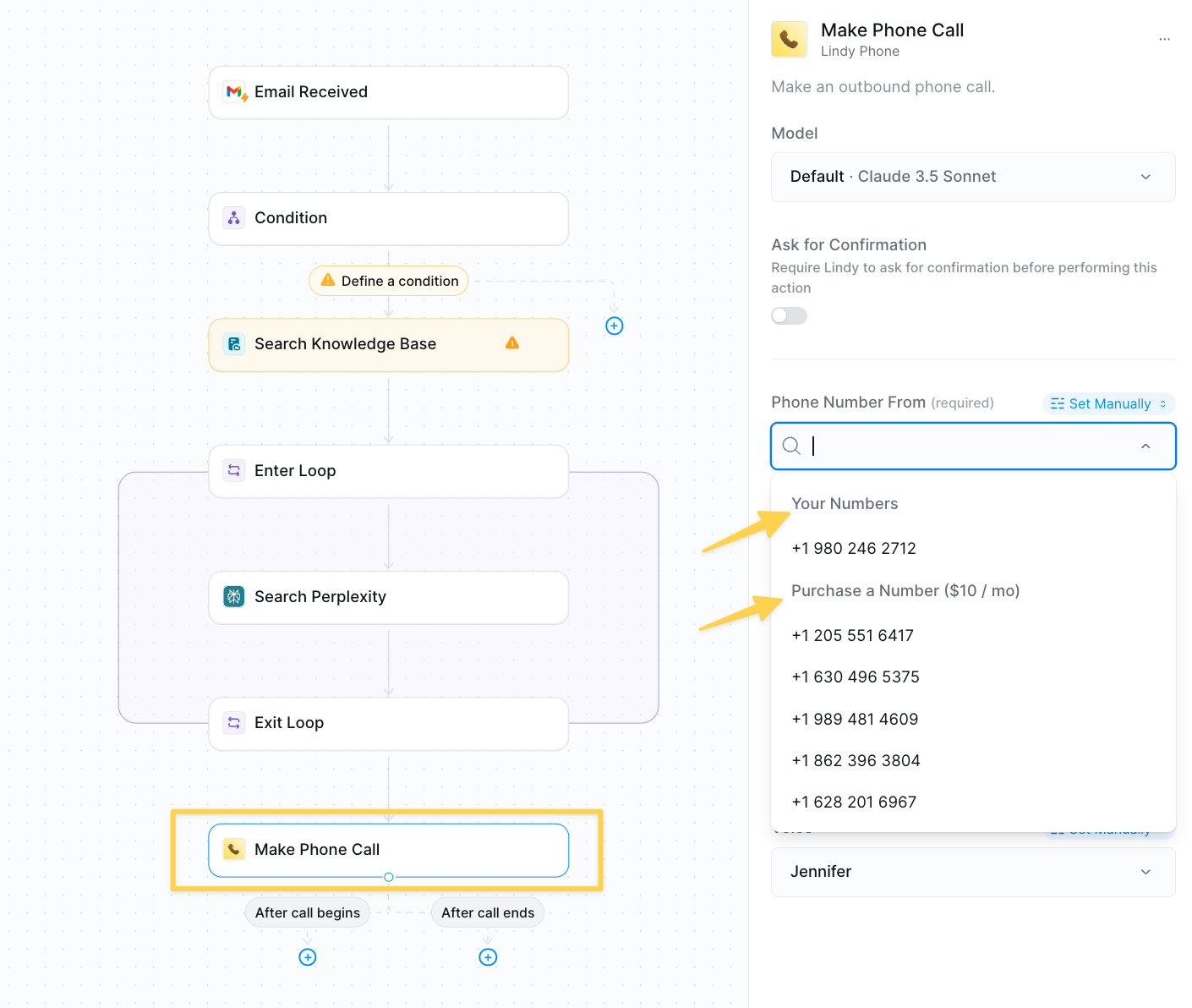 1. Add a **Call Received** trigger or **Make Phone Call** action
2. Click the "Phone number from" field
3. Select from available numbers or search for specific area codes
4. Each number costs \$10/month
### Managing Phone Numbers
Access your numbers through Settings:
1. Click your user icon
2. Select **Settings**
3. Navigate to **Phone Numbers**
4. Options: Disconnect or Release numbers
## Language Configuration
Lindy supports over 30 languages for natural conversation:
**Popular languages:**
* English, Spanish, French, German
* Chinese (Mandarin/Cantonese)
* Japanese, Korean
* Hindi, Arabic
* And 25+ more
To configure:
1. Open your phone trigger or action
2. Find the "Language" dropdown
3. Select your desired language
## Call Transfer
Enable your agents to transfer calls to humans or other departments when needed.
### As a Workflow Step
1. Add a **Call Received** trigger or **Make Phone Call** action
2. Click the "Phone number from" field
3. Select from available numbers or search for specific area codes
4. Each number costs \$10/month
### Managing Phone Numbers
Access your numbers through Settings:
1. Click your user icon
2. Select **Settings**
3. Navigate to **Phone Numbers**
4. Options: Disconnect or Release numbers
## Language Configuration
Lindy supports over 30 languages for natural conversation:
**Popular languages:**
* English, Spanish, French, German
* Chinese (Mandarin/Cantonese)
* Japanese, Korean
* Hindi, Arabic
* And 25+ more
To configure:
1. Open your phone trigger or action
2. Find the "Language" dropdown
3. Select your desired language
## Call Transfer
Enable your agents to transfer calls to humans or other departments when needed.
### As a Workflow Step
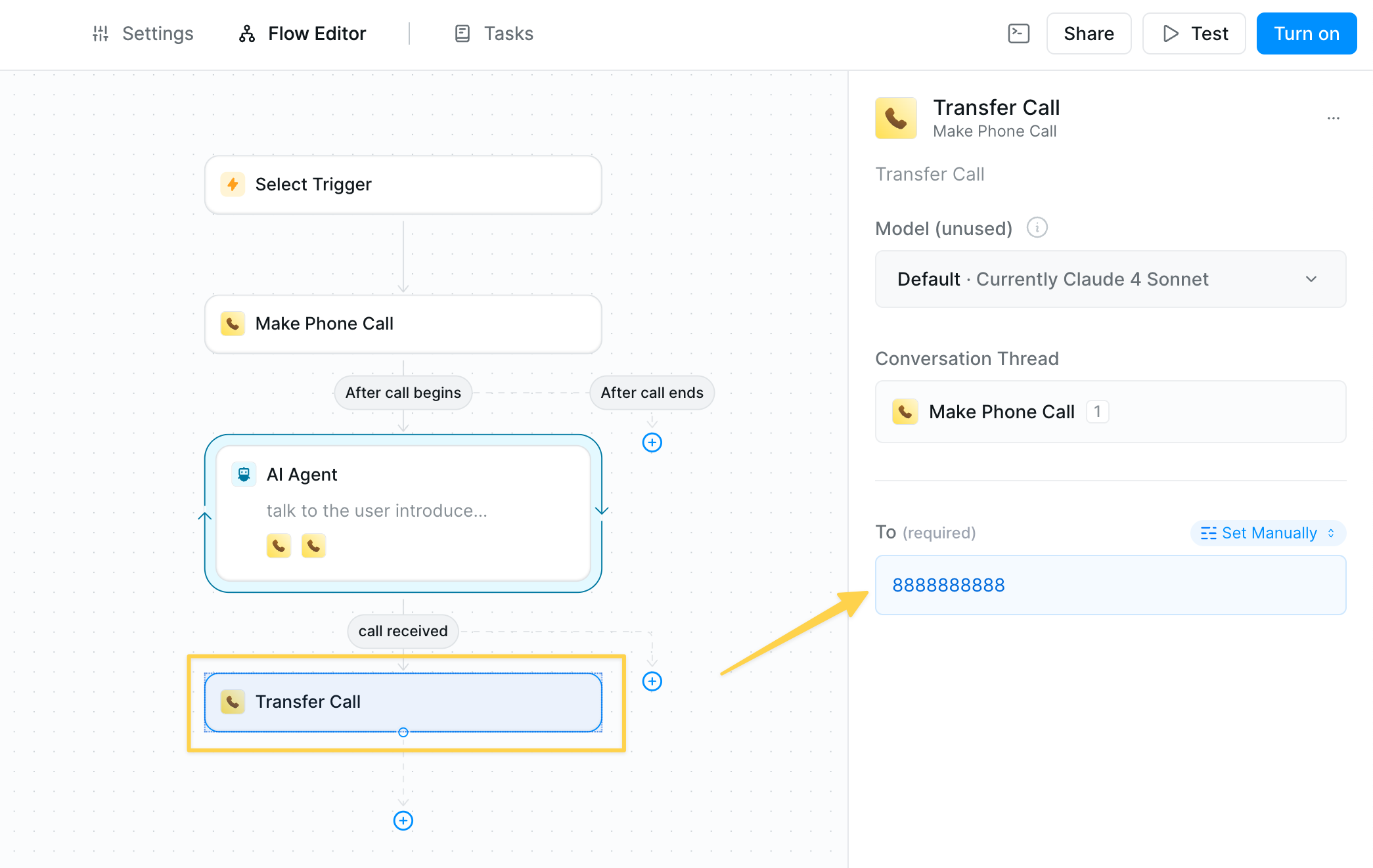 1. Select **Lindy Phone** → **Transfer Call**
2. Set "To" field to destination number
### As an Agent Skill
1. Select **Lindy Phone** → **Transfer Call**
2. Set "To" field to destination number
### As an Agent Skill
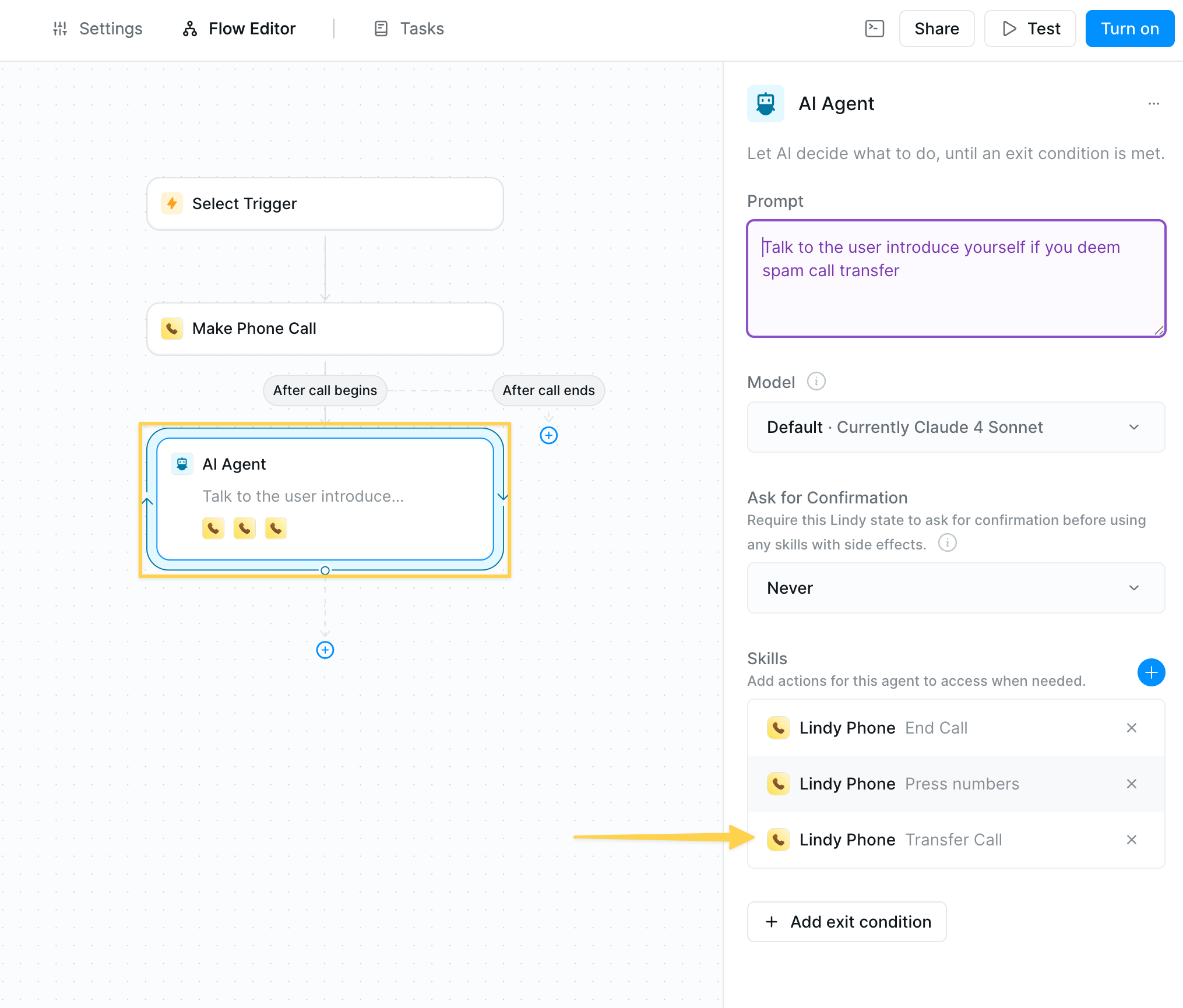 Add transfer capability to AI agents:
1. In your agent prompt, include transfer instructions:
```
If the customer asks for a human or you determine transfer is needed,
transfer to: +1-555-0123
```
2. Add **Transfer Call** as an agent skill
3. Agent will intelligently decide when to transfer
Add conditions before transfers to route calls based on area code, time of day, or conversation content.
## Pricing Structure
### Phone Number Costs
* **\$10/month** per number
* Supports concurrent calls
* Available in 100+ countries
### Per-Minute Rates
Standard US configuration: 20 credits/minute (approximately \$0.19/min)
* **US & Canada**: 20 credits/min
* **UK Landline**: 20 credits/min
* **Australia Landline**: 20 credits/min
* **Germany Landline**: 20 credits/min
* **France Landline**: 20 credits/min
* **US Mobile**: 20 credits/min
* **UK Mobile**: 21 credits/min
* **Australia Mobile**: 26 credits/min
* **Germany Mobile**: 53 credits/min
* **France Mobile**: 34 credits/min
View full pricing for 100+ countries in Settings → Phone Numbers → Pricing
Forwarded calls stop charging for LLM usage once connected to a human.
## Best Practices
* **Test thoroughly** - Always test with real calls before going live
* **Clear prompts** - Provide specific instructions for conversation flow
* **Fallback options** - Include transfer options for complex requests
* **Monitor performance** - Review call logs and adjust prompts
* **Set expectations** - Let callers know they're speaking with AI when appropriate
## Next Steps
Enhance your phone agents with these advanced features:
Detailed examples and advanced phone setup
Route calls based on caller data or time
Build complex conversational flows
Build AI-powered customer support phone agents
Add transfer capability to AI agents:
1. In your agent prompt, include transfer instructions:
```
If the customer asks for a human or you determine transfer is needed,
transfer to: +1-555-0123
```
2. Add **Transfer Call** as an agent skill
3. Agent will intelligently decide when to transfer
Add conditions before transfers to route calls based on area code, time of day, or conversation content.
## Pricing Structure
### Phone Number Costs
* **\$10/month** per number
* Supports concurrent calls
* Available in 100+ countries
### Per-Minute Rates
Standard US configuration: 20 credits/minute (approximately \$0.19/min)
* **US & Canada**: 20 credits/min
* **UK Landline**: 20 credits/min
* **Australia Landline**: 20 credits/min
* **Germany Landline**: 20 credits/min
* **France Landline**: 20 credits/min
* **US Mobile**: 20 credits/min
* **UK Mobile**: 21 credits/min
* **Australia Mobile**: 26 credits/min
* **Germany Mobile**: 53 credits/min
* **France Mobile**: 34 credits/min
View full pricing for 100+ countries in Settings → Phone Numbers → Pricing
Forwarded calls stop charging for LLM usage once connected to a human.
## Best Practices
* **Test thoroughly** - Always test with real calls before going live
* **Clear prompts** - Provide specific instructions for conversation flow
* **Fallback options** - Include transfer options for complex requests
* **Monitor performance** - Review call logs and adjust prompts
* **Set expectations** - Let callers know they're speaking with AI when appropriate
## Next Steps
Enhance your phone agents with these advanced features:
Detailed examples and advanced phone setup
Route calls based on caller data or time
Build complex conversational flows
Build AI-powered customer support phone agents