> ## Documentation Index
> Fetch the complete documentation index at: https://docs.lindy.ai/llms.txt
> Use this file to discover all available pages before exploring further.
# Prompt Guide
## Quick Overview
Prompts are instructions you give to control how AI behaves and what it produces. Every time you use "AI Prompt" mode in field configuration or set up agent steps, you're writing prompts that tell Lindy exactly what to do.
Good prompts make the difference between agents that work reliably and ones that produce unpredictable results. You'll use them throughout Lindy - from simple field instructions like "write a friendly email subject line" to complex agent behaviors like "analyze customer sentiment and route to the appropriate department."
## Where to Prompt in Lindy
Lindy provides three key areas where you can add prompts, each serving a specific purpose in your automation workflow.
### 1. Agent-Level Settings
These are overarching instructions that Lindy keeps in mind throughout the entire automation process. They're added as a prefix to every LLM call made by this agent.
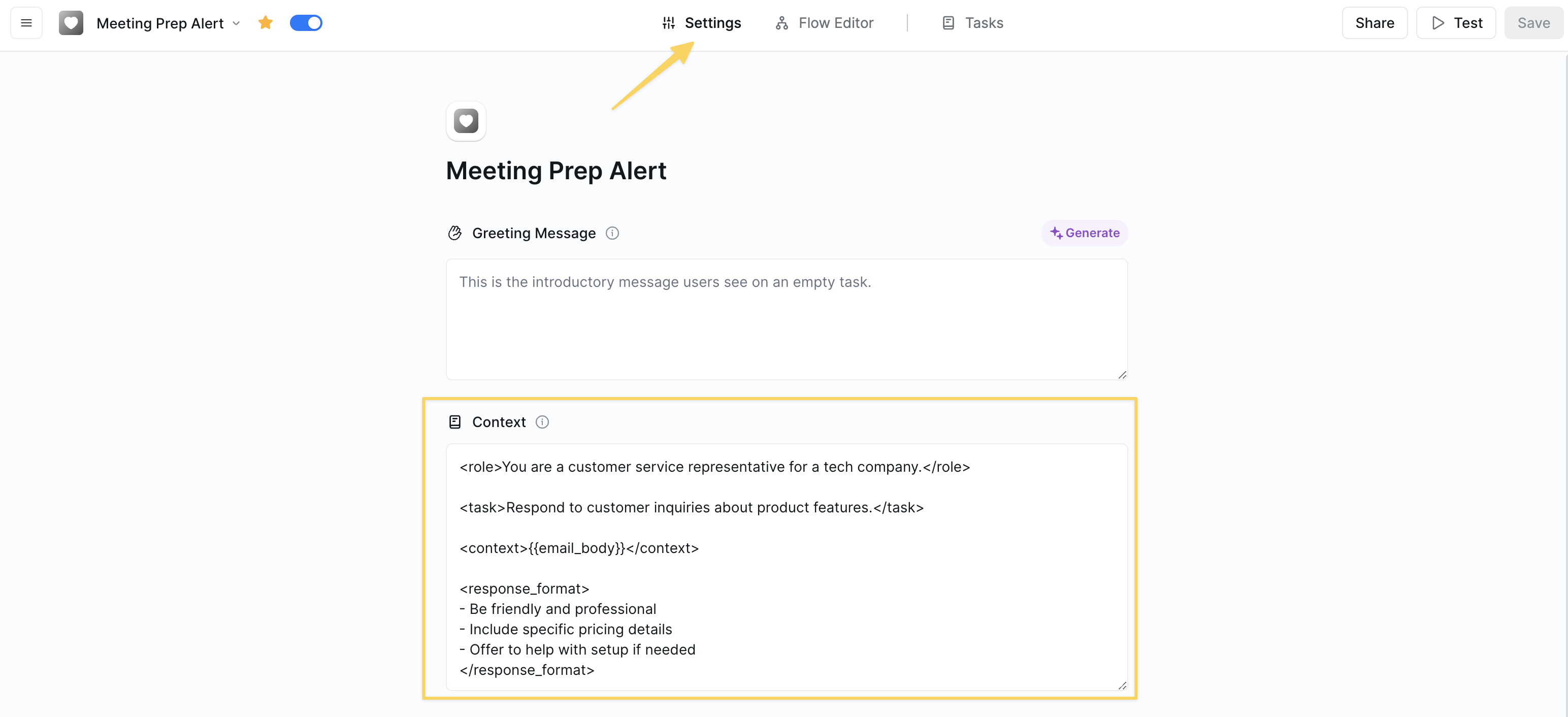 ```
You are an AI assistant for a marketing agency. Always maintain
a professional tone and focus on marketing-related tasks.
```
Agent-level prompts are perfect for setting personality, tone, domain expertise, and consistent behavior patterns across all actions.
### 2. Action Parameters
Specific instructions for completing particular fields within actions. These provide precise control over individual steps in your workflow.
```
You are an AI assistant for a marketing agency. Always maintain
a professional tone and focus on marketing-related tasks.
```
Agent-level prompts are perfect for setting personality, tone, domain expertise, and consistent behavior patterns across all actions.
### 2. Action Parameters
Specific instructions for completing particular fields within actions. These provide precise control over individual steps in your workflow.
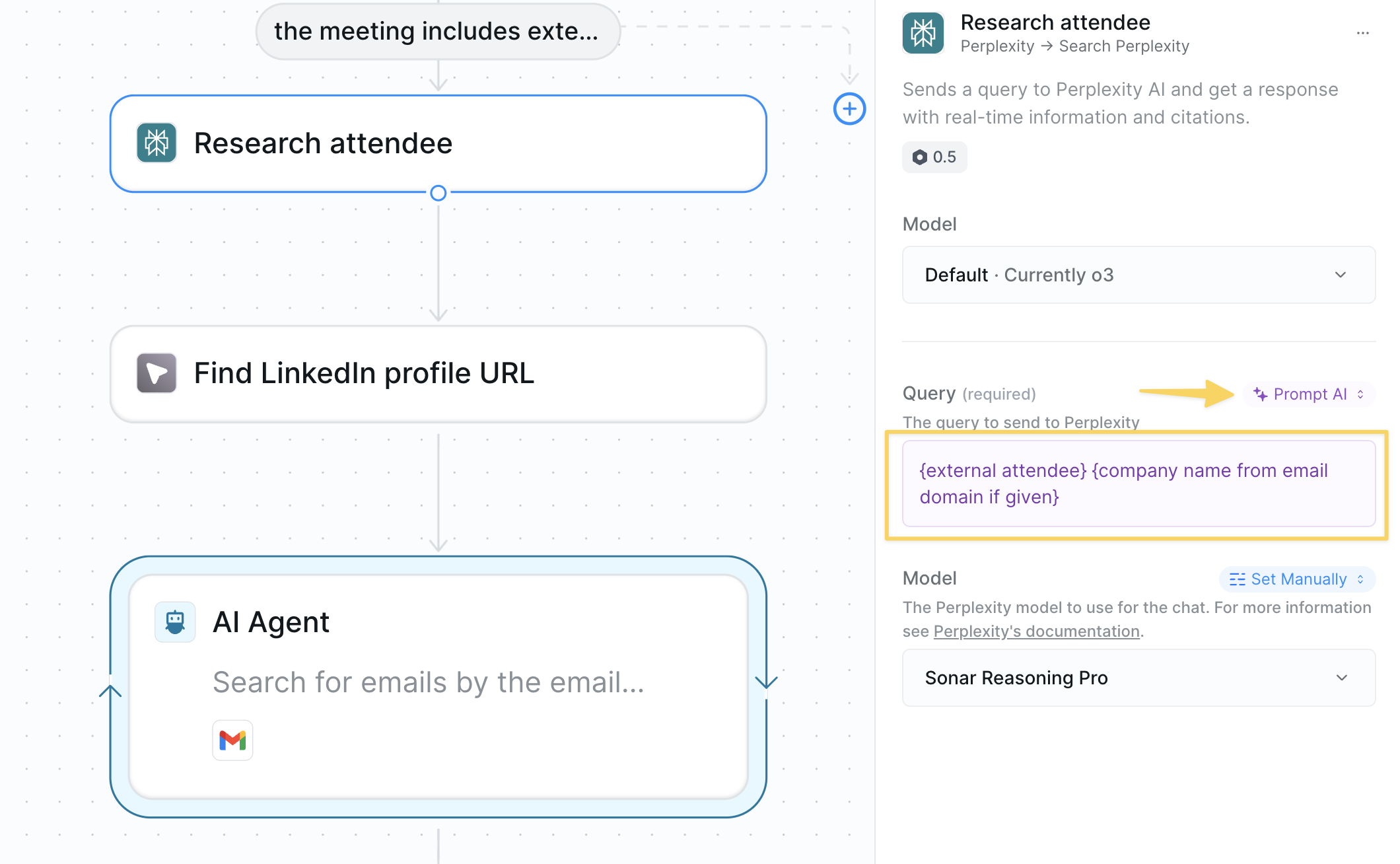 ```
Extract the customer's name and email address from the following text,
formatting them as 'Name: [name], Email: [email]'
```
### 3. AI Agent Actions
When next steps are uncertain or highly variable, AI Agents use broad guidelines and skills to determine the best course of action.
```
Extract the customer's name and email address from the following text,
formatting them as 'Name: [name], Email: [email]'
```
### 3. AI Agent Actions
When next steps are uncertain or highly variable, AI Agents use broad guidelines and skills to determine the best course of action.
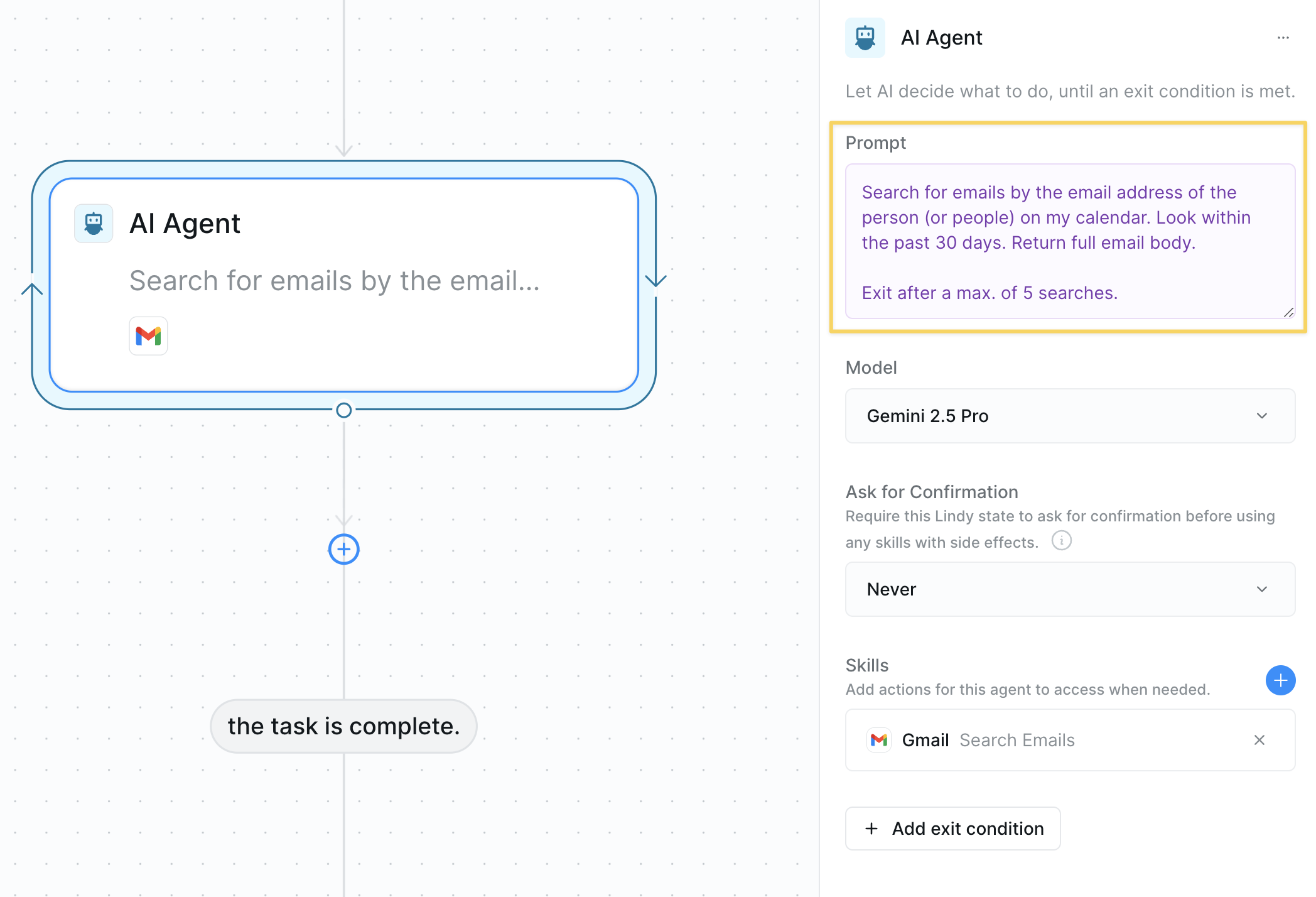 ```
You are a customer service agent. Your goal is to resolve customer
inquiries efficiently while maintaining a friendly tone. Choose the
appropriate skill based on the customer's needs.
```
## Core Prompting Principles
### Be Direct and Specific
Skip pleasantries and ambiguous language. Your agent executes direct commands most effectively.
```
Extract the customer email address from the message body.
Format as: email@domain.com
If no email found, return: "NO_EMAIL_FOUND"
```
```
Could you please try to find the customer's email address
somewhere in the message if possible?
```
### Use Action-Oriented Language
Prefer imperative verbs ("do") over passive suggestions ("don't").
```
Write a customer response following these requirements:
Length: Maximum 100 words
Tone: Friendly and professional
Language: Simple terms, avoid technical jargon
Structure:
1. Acknowledge their concern
2. Provide clear solution steps
3. Offer additional help
End with: "Let me know if you need anything else!"
```
```
The response shouldn't be too long and try not to include
technical jargon that might confuse the customer.
```
### Define Clear Personas
Give your agent a clear role and expertise level for consistent responses.
```
You are an expert B2B sales professional with 10 years of experience
in SaaS. Craft compelling follow-up emails that include a strong hook
and clear call-to-action (CTA). All communication should be
conversational yet professional.
```
### Step-by-Step Instructions
Break down complex tasks into simple, sequential steps, guiding your agent through each part of the process.
```
1. Analyze the webpage text
2. Identify all open job openings
3. Qualify the job openings, selecting only those that are remote positions
4. Format the results as a bulleted list with job title and location
```
## Advanced Prompting Techniques
### 1. Chain of Thought (CoT)
Guide your agent through complex reasoning by breaking down the thinking process.
```
Analyze this support ticket step by step:
1. First, identify the customer's primary issue
2. Then, check if it matches any known problems in our knowledge base
3. If yes, provide the solution. If no, escalate to human support
4. Finally, categorize the ticket type for reporting
```
### 2. Few-Shot Examples
Provide examples to demonstrate the exact format and style you want.
```
Categorize emails using these examples:
Email: "Your invoice is attached" → Category: Billing
Email: "How do I reset my password?" → Category: Support
Email: "Interested in enterprise pricing" → Category: Sales
Now categorize this email: {{email_body}}
```
### 3. Output Formatting
Specify exact output structure for consistent, parseable results.
```
Format your response as JSON:
{
"customer_name": "[extracted name]",
"sentiment": "[positive/negative/neutral]",
"priority": "[high/medium/low]",
"summary": "[one sentence summary]"
}
```
### 4. Constraints and Boundaries
Set clear limits to prevent unwanted behaviors.
```
Reply to customer inquiries following these rules:
- Maximum 150 words per response
- Never share internal pricing calculations
- Only discuss products listed in the knowledge base
- If asked about competitors, redirect to our strengths
- Always include one relevant help article link
```
### 5. Context Injection
Reference available data and previous interactions.
```
Using the customer's purchase history from {{hubspot_contact_data}}
and their last 3 support tickets, personalize your response to
acknowledge their loyalty and address their specific product usage.
```
### 6. Conditional Logic
Build prompts that adapt based on input conditions.
```
If the email sentiment is negative:
- Start with an empathy statement
- Offer immediate assistance
- Escalate to supervisor if requested
If the email sentiment is positive:
- Thank them for their feedback
- Ask for a review or testimonial
- Suggest relevant add-on products
```
### 7. Error Handling
Anticipate edge cases and provide fallback instructions.
```
Extract the order number from the email.
If no order number is found:
- Check for alternative identifiers (invoice #, reference #)
- If still not found, ask the customer to provide it
- Log this as "missing_order_number" for follow-up
```
## Essential Prompting Elements
### Keywords and Phrases
Incorporate essential words to emphasize important aspects and priorities:
* "Your task is..."
* "You MUST..."
* "It is crucial that..."
* "You will be penalized if..."
### Use Delimiters Effectively
Delimiters organize information and reduce ambiguity:
* Triple quotes: `"""example text"""`
* Triple backticks: ` ```example text``` `
* Triple dashes: `---example text---`
* XML-like tags: `example text`
* Hashtags: `###example text###`
**Example using XML tags:**
```
You are a customer service representative for a tech company.
Respond to customer inquiries about product features.
{{email_body}}
- Be friendly and professional
- Include specific pricing details
- Offer to help with setup if needed
```
### Consistency is Key
Instruct Lindy to maintain the flow and style of writing from previous steps in the workflow or examples you have added to the prompt. This ensures a cohesive output across the entire process.
### Clear Formatting
Separate instructions with line breaks for clarity. This visual organization helps Lindy process information more effectively.
```
First instruction here.
Second instruction here.
Third instruction here.
```
### Enhance Specificity
Provide complete information for tasks that require detailed responses or actions. Context is crucial for accurate results.
```
When responding to customer support tickets, consider:
- Customer tier (Free/Pro/Enterprise)
- Previous support history
- Product features they have access to
- Time zone and business hours
```
### Edit for Clarity
Every word matters! Proofread your prompts for grammar, punctuation, and vocabulary to ensure they are clear and consistent. Ambiguity can lead to unexpected results.
```
Analyze the incoming data and route it based on these rules:
SALES DATA (keywords: lead, prospect, demo, pricing, quote):
→ Send to HubSpot CRM with tag "new_lead"
SUPPORT REQUESTS (keywords: help, issue, bug, problem, broken):
→ Send to Zendesk with priority level based on urgency
BILLING INQUIRIES (keywords: invoice, payment, refund, billing, charge):
→ Send to Finance team email with subject prefix "[BILLING]"
UNKNOWN CATEGORY:
→ Send to general inbox for manual review
Always include the original sender and timestamp in the routing.
```
```
Process the data and send it to the right place based on what
type it is and who needs it
```
## Best Practices
Begin with basic instructions and add complexity as you test. Monitor agent behavior and refine based on actual outputs.
Define key terms once and use them consistently. If you call it "customer" in one place, don't switch to "client" elsewhere.
Try unusual inputs, empty fields, and unexpected formats. Build prompts that handle these gracefully.
Reference trigger data, previous actions, and knowledge base content. The more context, the better the response.
Keep track of prompt iterations and why changes were made. This helps troubleshooting and team collaboration.
## Troubleshooting
* Add more specific examples
* Define clearer boundaries and constraints
* Check for conflicting instructions between agent-level and action-level prompts
* Use structured formats (JSON, markdown)
* Provide exact templates to follow
* Add validation rules for critical fields
* Make extraction instructions more explicit
* Add fallback searches for alternative formats
* Use step-by-step extraction logic
* Set specific word/character limits
* Provide length examples
* Use "concise" or "detailed" qualifiers appropriately
* Simplify conditions to be mutually exclusive
* Use clear if-then-else structures
* Test each condition path separately
Remember that prompts in action parameters override agent-level prompts for that specific field. Ensure they complement rather than contradict each other.
## Next Steps
Now that you understand effective prompting, enhance your agents with these related concepts:
Build intelligent agents using your prompting skills
Combine prompts with knowledge retrieval for smarter responses
Use prompts in conditional logic for dynamic workflows
Test and refine your prompts with real scenarios
```
You are a customer service agent. Your goal is to resolve customer
inquiries efficiently while maintaining a friendly tone. Choose the
appropriate skill based on the customer's needs.
```
## Core Prompting Principles
### Be Direct and Specific
Skip pleasantries and ambiguous language. Your agent executes direct commands most effectively.
```
Extract the customer email address from the message body.
Format as: email@domain.com
If no email found, return: "NO_EMAIL_FOUND"
```
```
Could you please try to find the customer's email address
somewhere in the message if possible?
```
### Use Action-Oriented Language
Prefer imperative verbs ("do") over passive suggestions ("don't").
```
Write a customer response following these requirements:
Length: Maximum 100 words
Tone: Friendly and professional
Language: Simple terms, avoid technical jargon
Structure:
1. Acknowledge their concern
2. Provide clear solution steps
3. Offer additional help
End with: "Let me know if you need anything else!"
```
```
The response shouldn't be too long and try not to include
technical jargon that might confuse the customer.
```
### Define Clear Personas
Give your agent a clear role and expertise level for consistent responses.
```
You are an expert B2B sales professional with 10 years of experience
in SaaS. Craft compelling follow-up emails that include a strong hook
and clear call-to-action (CTA). All communication should be
conversational yet professional.
```
### Step-by-Step Instructions
Break down complex tasks into simple, sequential steps, guiding your agent through each part of the process.
```
1. Analyze the webpage text
2. Identify all open job openings
3. Qualify the job openings, selecting only those that are remote positions
4. Format the results as a bulleted list with job title and location
```
## Advanced Prompting Techniques
### 1. Chain of Thought (CoT)
Guide your agent through complex reasoning by breaking down the thinking process.
```
Analyze this support ticket step by step:
1. First, identify the customer's primary issue
2. Then, check if it matches any known problems in our knowledge base
3. If yes, provide the solution. If no, escalate to human support
4. Finally, categorize the ticket type for reporting
```
### 2. Few-Shot Examples
Provide examples to demonstrate the exact format and style you want.
```
Categorize emails using these examples:
Email: "Your invoice is attached" → Category: Billing
Email: "How do I reset my password?" → Category: Support
Email: "Interested in enterprise pricing" → Category: Sales
Now categorize this email: {{email_body}}
```
### 3. Output Formatting
Specify exact output structure for consistent, parseable results.
```
Format your response as JSON:
{
"customer_name": "[extracted name]",
"sentiment": "[positive/negative/neutral]",
"priority": "[high/medium/low]",
"summary": "[one sentence summary]"
}
```
### 4. Constraints and Boundaries
Set clear limits to prevent unwanted behaviors.
```
Reply to customer inquiries following these rules:
- Maximum 150 words per response
- Never share internal pricing calculations
- Only discuss products listed in the knowledge base
- If asked about competitors, redirect to our strengths
- Always include one relevant help article link
```
### 5. Context Injection
Reference available data and previous interactions.
```
Using the customer's purchase history from {{hubspot_contact_data}}
and their last 3 support tickets, personalize your response to
acknowledge their loyalty and address their specific product usage.
```
### 6. Conditional Logic
Build prompts that adapt based on input conditions.
```
If the email sentiment is negative:
- Start with an empathy statement
- Offer immediate assistance
- Escalate to supervisor if requested
If the email sentiment is positive:
- Thank them for their feedback
- Ask for a review or testimonial
- Suggest relevant add-on products
```
### 7. Error Handling
Anticipate edge cases and provide fallback instructions.
```
Extract the order number from the email.
If no order number is found:
- Check for alternative identifiers (invoice #, reference #)
- If still not found, ask the customer to provide it
- Log this as "missing_order_number" for follow-up
```
## Essential Prompting Elements
### Keywords and Phrases
Incorporate essential words to emphasize important aspects and priorities:
* "Your task is..."
* "You MUST..."
* "It is crucial that..."
* "You will be penalized if..."
### Use Delimiters Effectively
Delimiters organize information and reduce ambiguity:
* Triple quotes: `"""example text"""`
* Triple backticks: ` ```example text``` `
* Triple dashes: `---example text---`
* XML-like tags: `example text`
* Hashtags: `###example text###`
**Example using XML tags:**
```
You are a customer service representative for a tech company.
Respond to customer inquiries about product features.
{{email_body}}
- Be friendly and professional
- Include specific pricing details
- Offer to help with setup if needed
```
### Consistency is Key
Instruct Lindy to maintain the flow and style of writing from previous steps in the workflow or examples you have added to the prompt. This ensures a cohesive output across the entire process.
### Clear Formatting
Separate instructions with line breaks for clarity. This visual organization helps Lindy process information more effectively.
```
First instruction here.
Second instruction here.
Third instruction here.
```
### Enhance Specificity
Provide complete information for tasks that require detailed responses or actions. Context is crucial for accurate results.
```
When responding to customer support tickets, consider:
- Customer tier (Free/Pro/Enterprise)
- Previous support history
- Product features they have access to
- Time zone and business hours
```
### Edit for Clarity
Every word matters! Proofread your prompts for grammar, punctuation, and vocabulary to ensure they are clear and consistent. Ambiguity can lead to unexpected results.
```
Analyze the incoming data and route it based on these rules:
SALES DATA (keywords: lead, prospect, demo, pricing, quote):
→ Send to HubSpot CRM with tag "new_lead"
SUPPORT REQUESTS (keywords: help, issue, bug, problem, broken):
→ Send to Zendesk with priority level based on urgency
BILLING INQUIRIES (keywords: invoice, payment, refund, billing, charge):
→ Send to Finance team email with subject prefix "[BILLING]"
UNKNOWN CATEGORY:
→ Send to general inbox for manual review
Always include the original sender and timestamp in the routing.
```
```
Process the data and send it to the right place based on what
type it is and who needs it
```
## Best Practices
Begin with basic instructions and add complexity as you test. Monitor agent behavior and refine based on actual outputs.
Define key terms once and use them consistently. If you call it "customer" in one place, don't switch to "client" elsewhere.
Try unusual inputs, empty fields, and unexpected formats. Build prompts that handle these gracefully.
Reference trigger data, previous actions, and knowledge base content. The more context, the better the response.
Keep track of prompt iterations and why changes were made. This helps troubleshooting and team collaboration.
## Troubleshooting
* Add more specific examples
* Define clearer boundaries and constraints
* Check for conflicting instructions between agent-level and action-level prompts
* Use structured formats (JSON, markdown)
* Provide exact templates to follow
* Add validation rules for critical fields
* Make extraction instructions more explicit
* Add fallback searches for alternative formats
* Use step-by-step extraction logic
* Set specific word/character limits
* Provide length examples
* Use "concise" or "detailed" qualifiers appropriately
* Simplify conditions to be mutually exclusive
* Use clear if-then-else structures
* Test each condition path separately
Remember that prompts in action parameters override agent-level prompts for that specific field. Ensure they complement rather than contradict each other.
## Next Steps
Now that you understand effective prompting, enhance your agents with these related concepts:
Build intelligent agents using your prompting skills
Combine prompts with knowledge retrieval for smarter responses
Use prompts in conditional logic for dynamic workflows
Test and refine your prompts with real scenarios