> ## Documentation Index
> Fetch the complete documentation index at: https://docs.lindy.ai/llms.txt
> Use this file to discover all available pages before exploring further.
# Run Code
## Quick Overview
The Code action lets you run custom Python or JavaScript code directly within your agent workflows. It's ideal for tasks like data manipulation, data analysis, API calls, complex calculations, or conditional logic.
Key benefits:
* **Multi-language support** - Write in Python or JavaScript
* **Variable integration** - Use outputs from previous steps as variables
* **Flexible output** - Return results, printed text, or error messages
* **Rich libraries** - Access to popular data science and utility libraries
## Action Configuration
 ### Language Selection
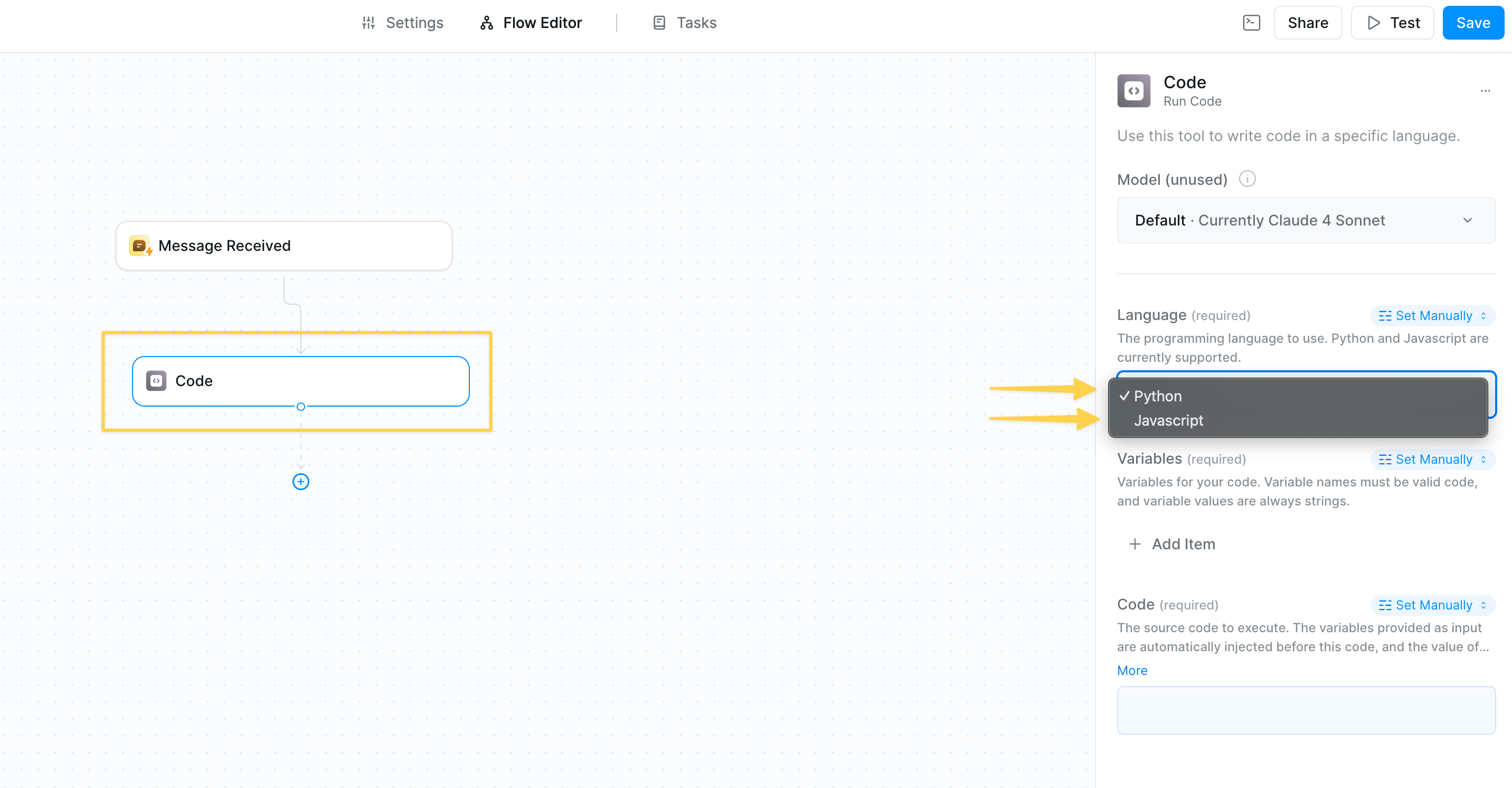
Choose between Python and JavaScript based on your needs:
* **Python** - Best for data analysis, scientific computing, and complex calculations
* **JavaScript** - Ideal for web APIs, JSON manipulation, and async operations
### Variables
### Language Selection
Choose between Python and JavaScript based on your needs:
* **Python** - Best for data analysis, scientific computing, and complex calculations
* **JavaScript** - Ideal for web APIs, JSON manipulation, and async operations
### Variables
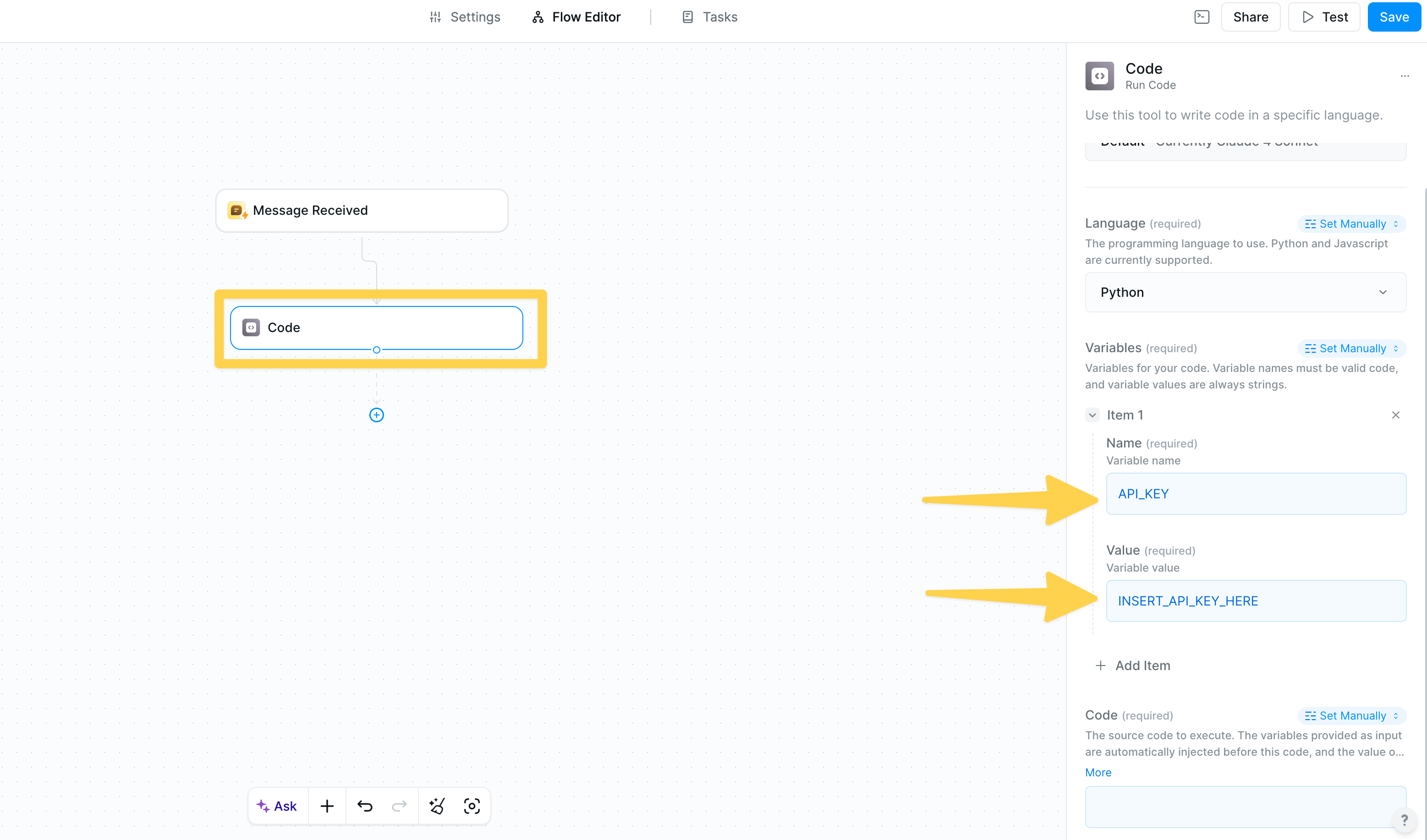 Set up variables to pass data from previous steps into your code:
* **Name** - The variable name you'll use in your code
* **Value** - Set to output references from previous steps
* **Type** - Variable values are always passed as strings
All variable values are passed as strings. Convert to appropriate types (int, float, etc.) within your code as needed.
### Code Editor
Set up variables to pass data from previous steps into your code:
* **Name** - The variable name you'll use in your code
* **Value** - Set to output references from previous steps
* **Type** - Variable values are always passed as strings
All variable values are passed as strings. Convert to appropriate types (int, float, etc.) within your code as needed.
### Code Editor
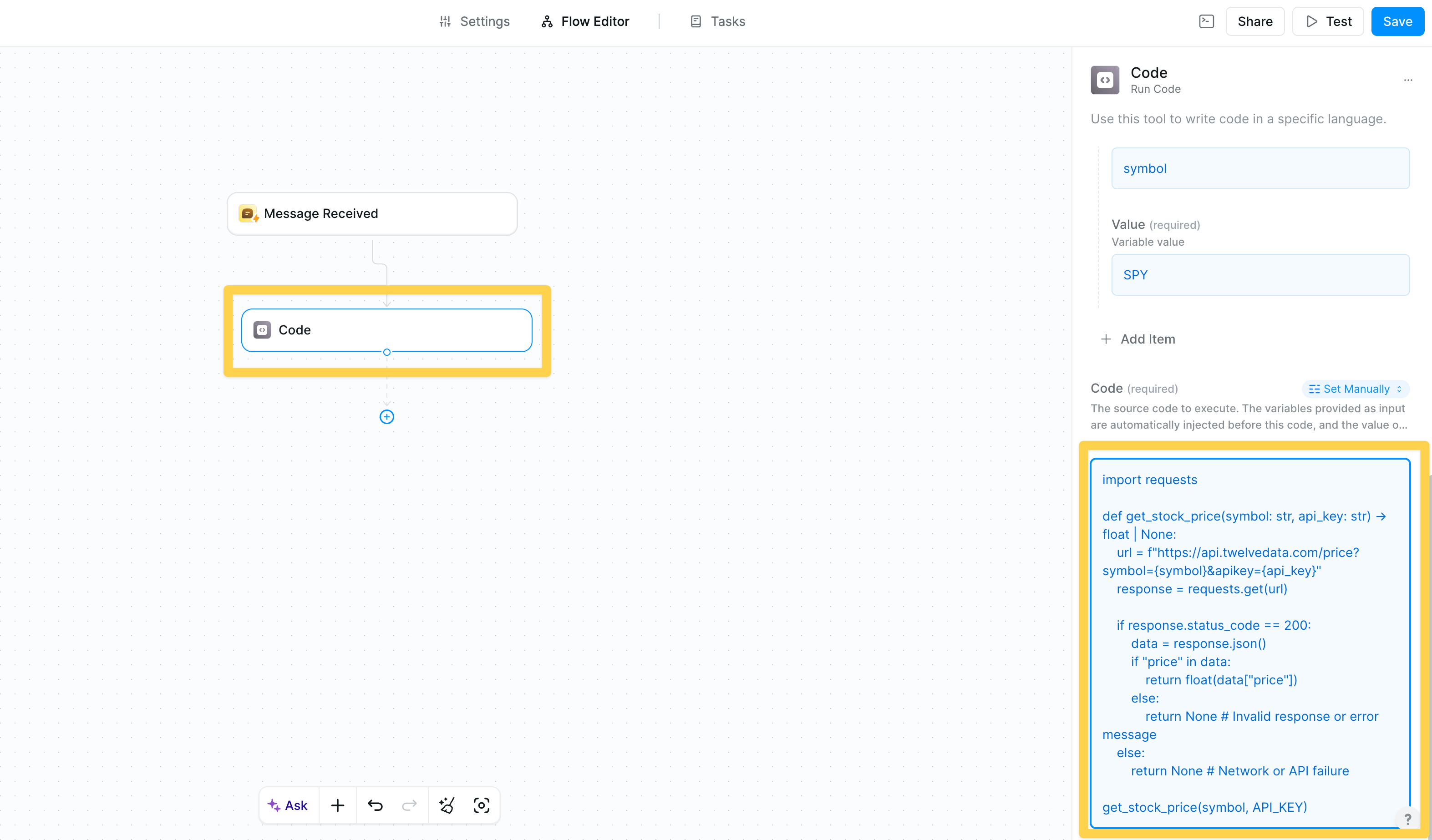 Write your code using the variables defined in the previous step. The code editor supports:
* Syntax highlighting
* Auto-completion
* Error detection
* Multi-line code blocks
## Reference Code Output
Write your code using the variables defined in the previous step. The code editor supports:
* Syntax highlighting
* Auto-completion
* Error detection
* Multi-line code blocks
## Reference Code Output
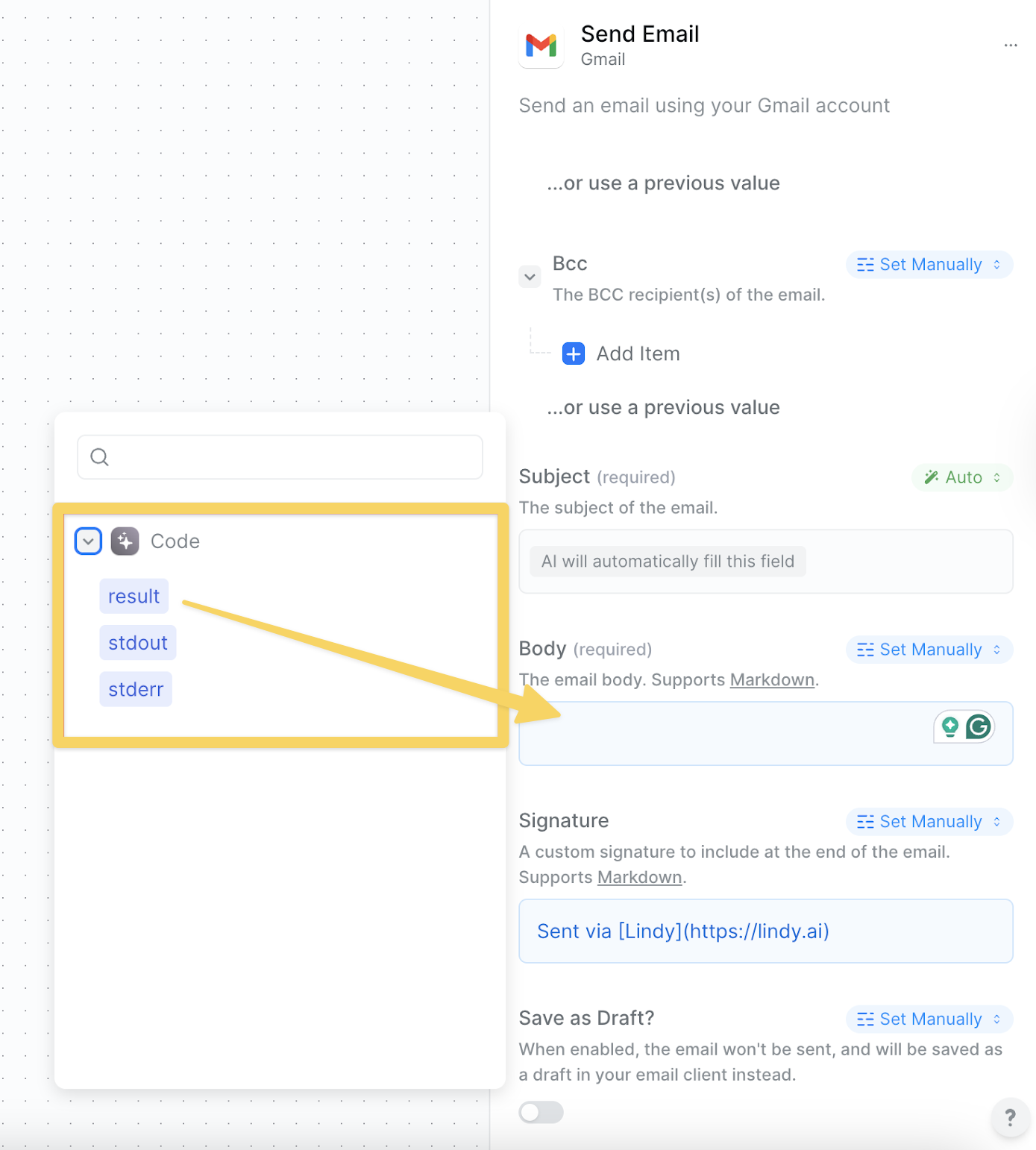 The results of your code action can be used in subsequent steps with three output references:
* **result** - What your code returns (using `return` statement)
* **text** - Any text printed during execution (stdout)
* **stderr** - Standard error buffer for debugging
If you want to see what the example code output looks like within the test panel or task view, you can click into the code action and see the JSON for all the outputs, so you can use them appropriately.
## Available Libraries
### Python Libraries
* **pandas** (v1.5.3) - Data manipulation and analysis
* **numpy** (v1.26.4) - Numerical computing
* **scipy** (v1.12.0) - Scientific computing
* **scikit-learn** (v1.4.1.post1) - Machine learning
* **matplotlib** (v3.8.3) - Plotting and visualization
* **seaborn** (v0.13.2) - Statistical visualization
* **plotly** (v5.19.0) - Interactive plotting
* **bokeh** (v3.3.4) - Web-based visualization
* **requests** (v2.26.0) - HTTP requests
* **aiohttp** (v3.9.3) - Async HTTP client/server
* **urllib3** (v1.26.7) - HTTP client library
* **beautifulsoup4** (v4.12.3) - Web scraping
* **nltk** (v3.8.1) - Natural language processing
* **textblob** (v0.18.0) - Text processing
* **spacy** (v3.7.4) - Advanced NLP
* **gensim** (v4.3.2) - Topic modeling
* **openpyxl** (v3.1.2) - Excel file handling
* **xlrd** (v2.0.1) - Excel file reading
* **python-docx** (v1.1.0) - Word document processing
* **xarray** (v2024.2.0) - N-dimensional arrays
* **opencv-python** (v4.9.0.80) - Computer vision
* **scikit-image** (v0.22.0) - Image processing
* **imageio** (v2.34.0) - Image I/O
* **librosa** (v0.10.1) - Audio analysis
* **soundfile** (v0.12.1) - Audio file I/O
* **pytz** (v2024.1) - Timezone handling
* **joblib** (v1.3.2) - Parallel computing
* **tornado** (v6.4) - Web framework
* **pytest** (v8.1.0) - Testing framework
* **sympy** (v1.12) - Symbolic mathematics
## Use Cases
Process CSV files, calculate statistics, generate reports from your data sources
Call external APIs, parse responses, and format data for your workflows
Perform mathematical operations, financial calculations, or scientific computations
Convert between data formats, clean datasets, or restructure information
Implement complex decision trees and branching logic beyond simple conditions
## Best Practices
Use try-catch blocks to handle potential failures and return meaningful error messages
Check variable types and values before processing to avoid runtime errors
Optimize for performance, especially with large datasets to avoid timeouts
Return structured data that's easy to use in subsequent workflow steps
Comment your code for future maintenance and debugging
Always handle errors gracefully in your code. Use try-catch blocks and return meaningful error messages.
Code execution has timeouts. Keep your code efficient and avoid infinite loops or very long-running operations.
## Next Steps
Combine code with AI for powerful data processing
Make API calls to external services
Store and retrieve processed data
Add logic to your code workflows
The results of your code action can be used in subsequent steps with three output references:
* **result** - What your code returns (using `return` statement)
* **text** - Any text printed during execution (stdout)
* **stderr** - Standard error buffer for debugging
If you want to see what the example code output looks like within the test panel or task view, you can click into the code action and see the JSON for all the outputs, so you can use them appropriately.
## Available Libraries
### Python Libraries
* **pandas** (v1.5.3) - Data manipulation and analysis
* **numpy** (v1.26.4) - Numerical computing
* **scipy** (v1.12.0) - Scientific computing
* **scikit-learn** (v1.4.1.post1) - Machine learning
* **matplotlib** (v3.8.3) - Plotting and visualization
* **seaborn** (v0.13.2) - Statistical visualization
* **plotly** (v5.19.0) - Interactive plotting
* **bokeh** (v3.3.4) - Web-based visualization
* **requests** (v2.26.0) - HTTP requests
* **aiohttp** (v3.9.3) - Async HTTP client/server
* **urllib3** (v1.26.7) - HTTP client library
* **beautifulsoup4** (v4.12.3) - Web scraping
* **nltk** (v3.8.1) - Natural language processing
* **textblob** (v0.18.0) - Text processing
* **spacy** (v3.7.4) - Advanced NLP
* **gensim** (v4.3.2) - Topic modeling
* **openpyxl** (v3.1.2) - Excel file handling
* **xlrd** (v2.0.1) - Excel file reading
* **python-docx** (v1.1.0) - Word document processing
* **xarray** (v2024.2.0) - N-dimensional arrays
* **opencv-python** (v4.9.0.80) - Computer vision
* **scikit-image** (v0.22.0) - Image processing
* **imageio** (v2.34.0) - Image I/O
* **librosa** (v0.10.1) - Audio analysis
* **soundfile** (v0.12.1) - Audio file I/O
* **pytz** (v2024.1) - Timezone handling
* **joblib** (v1.3.2) - Parallel computing
* **tornado** (v6.4) - Web framework
* **pytest** (v8.1.0) - Testing framework
* **sympy** (v1.12) - Symbolic mathematics
## Use Cases
Process CSV files, calculate statistics, generate reports from your data sources
Call external APIs, parse responses, and format data for your workflows
Perform mathematical operations, financial calculations, or scientific computations
Convert between data formats, clean datasets, or restructure information
Implement complex decision trees and branching logic beyond simple conditions
## Best Practices
Use try-catch blocks to handle potential failures and return meaningful error messages
Check variable types and values before processing to avoid runtime errors
Optimize for performance, especially with large datasets to avoid timeouts
Return structured data that's easy to use in subsequent workflow steps
Comment your code for future maintenance and debugging
Always handle errors gracefully in your code. Use try-catch blocks and return meaningful error messages.
Code execution has timeouts. Keep your code efficient and avoid infinite loops or very long-running operations.
## Next Steps
Combine code with AI for powerful data processing
Make API calls to external services
Store and retrieve processed data
Add logic to your code workflows