> ## Documentation Index
> Fetch the complete documentation index at: https://docs.lindy.ai/llms.txt
> Use this file to discover all available pages before exploring further.
# Webhooks
> Trigger agent workflows with custom API calls from any external system
## Overview
While Lindy supports over 5,000 integrations out of the box, webhooks provide the ultimate flexibility for custom integrations. Use webhooks to trigger agent workflows from any system that can make HTTP requests — your own applications, third-party services, or custom scripts.
Webhooks are ideal when you need real-time event processing or when working with systems that don't have native Lindy integrations.
## Adding a Webhook Trigger
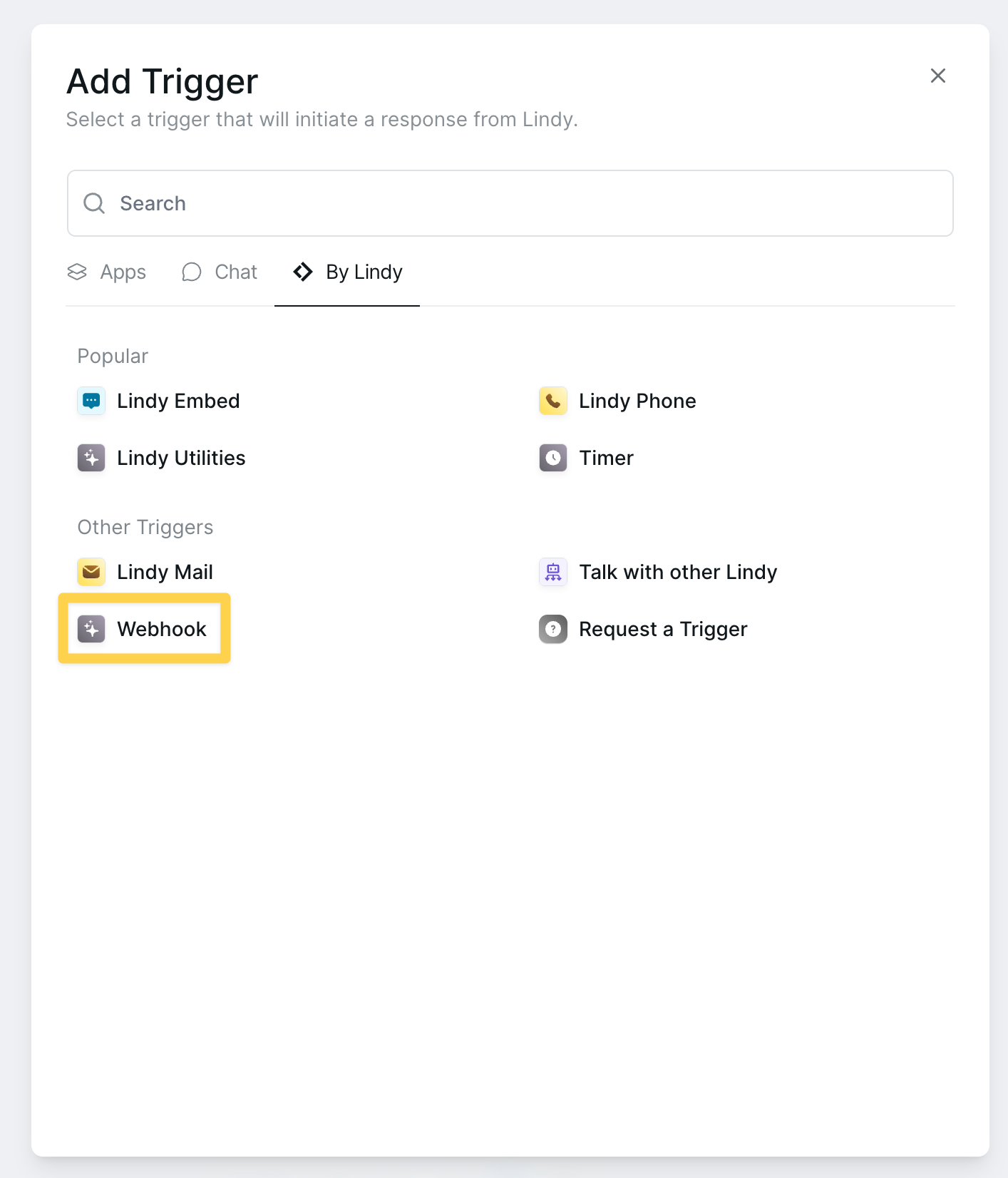 To get started:
1. Click **Add Trigger** in your workflow
2. Search for "Webhook"
3. Select **Webhook Received** trigger
The webhook trigger appears in both the "Popular" section and under "Other Triggers" for easy access.
## Configuration Options
To get started:
1. Click **Add Trigger** in your workflow
2. Search for "Webhook"
3. Select **Webhook Received** trigger
The webhook trigger appears in both the "Popular" section and under "Other Triggers" for easy access.
## Configuration Options
 ### Webhook Selection
Choose an existing webhook or create a new one. Each webhook has its own unique URL and security settings.
### Follow-up Behavior
### Webhook Selection
Choose an existing webhook or create a new one. Each webhook has its own unique URL and security settings.
### Follow-up Behavior
 Configure how your agent processes webhook requests:
| Option | Description |
| ----------------------- | ------------------------------------------------ |
| **Handle in same task** | Process follow-up requests in the same workflow |
| **Create new task** | Spawn a new task for each follow-up webhook call |
| **Ignore** | Ignore follow-up webhook requests |
## Creating a New Webhook
Configure how your agent processes webhook requests:
| Option | Description |
| ----------------------- | ------------------------------------------------ |
| **Handle in same task** | Process follow-up requests in the same workflow |
| **Create new task** | Spawn a new task for each follow-up webhook call |
| **Ignore** | Ignore follow-up webhook requests |
## Creating a New Webhook
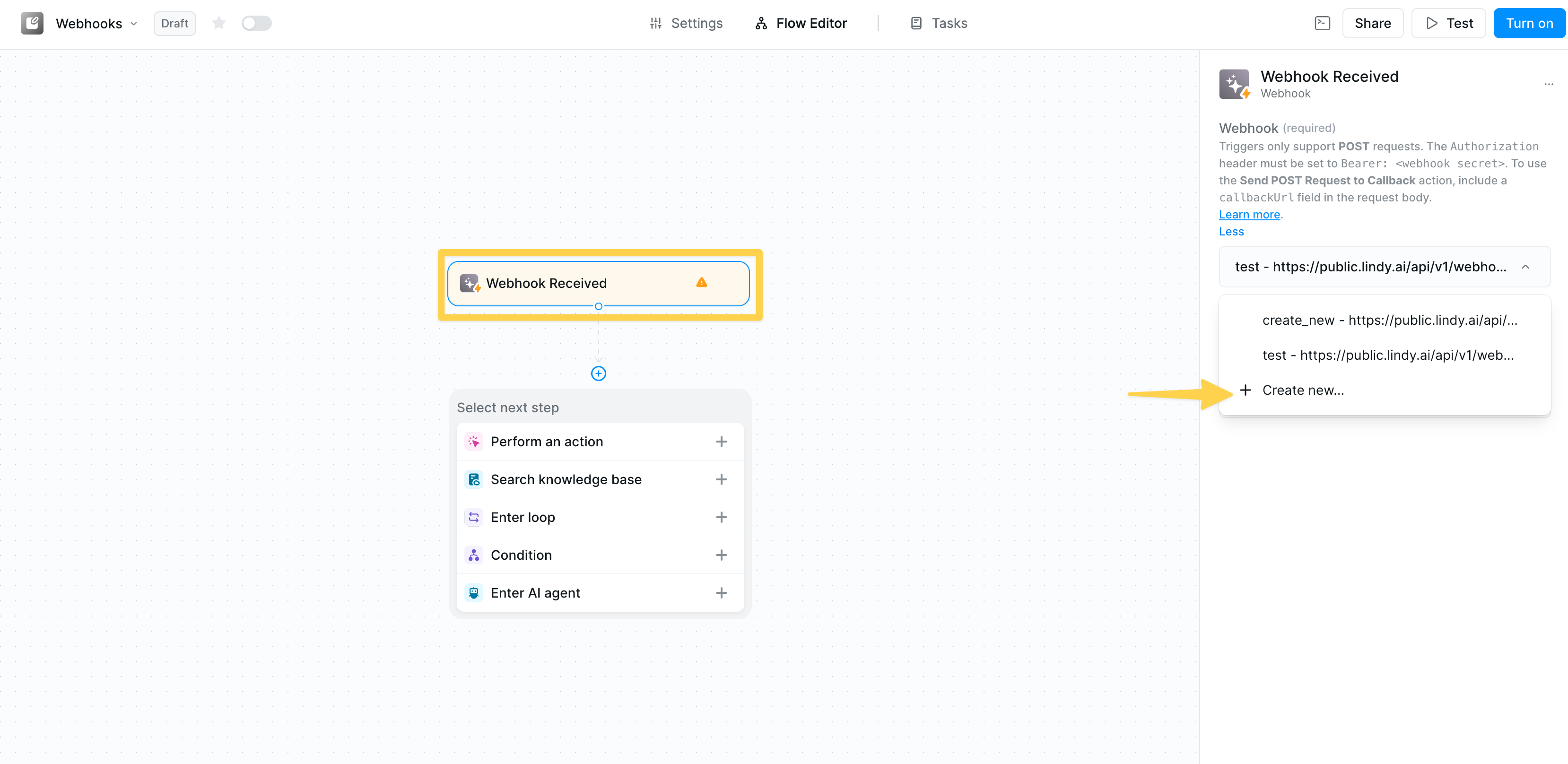 1. Click **"Select an option"** → **"Create new"**
2. Enter a descriptive name for your webhook
3. Press Enter to save and select the webhook
Each webhook gets a unique URL in the format:
```plaintext theme={null}
https://public.lindy.ai/api/v1/webhooks/[unique-id]
```
## Security with Secret Keys
1. Click **"Select an option"** → **"Create new"**
2. Enter a descriptive name for your webhook
3. Press Enter to save and select the webhook
Each webhook gets a unique URL in the format:
```plaintext theme={null}
https://public.lindy.ai/api/v1/webhooks/[unique-id]
```
## Security with Secret Keys
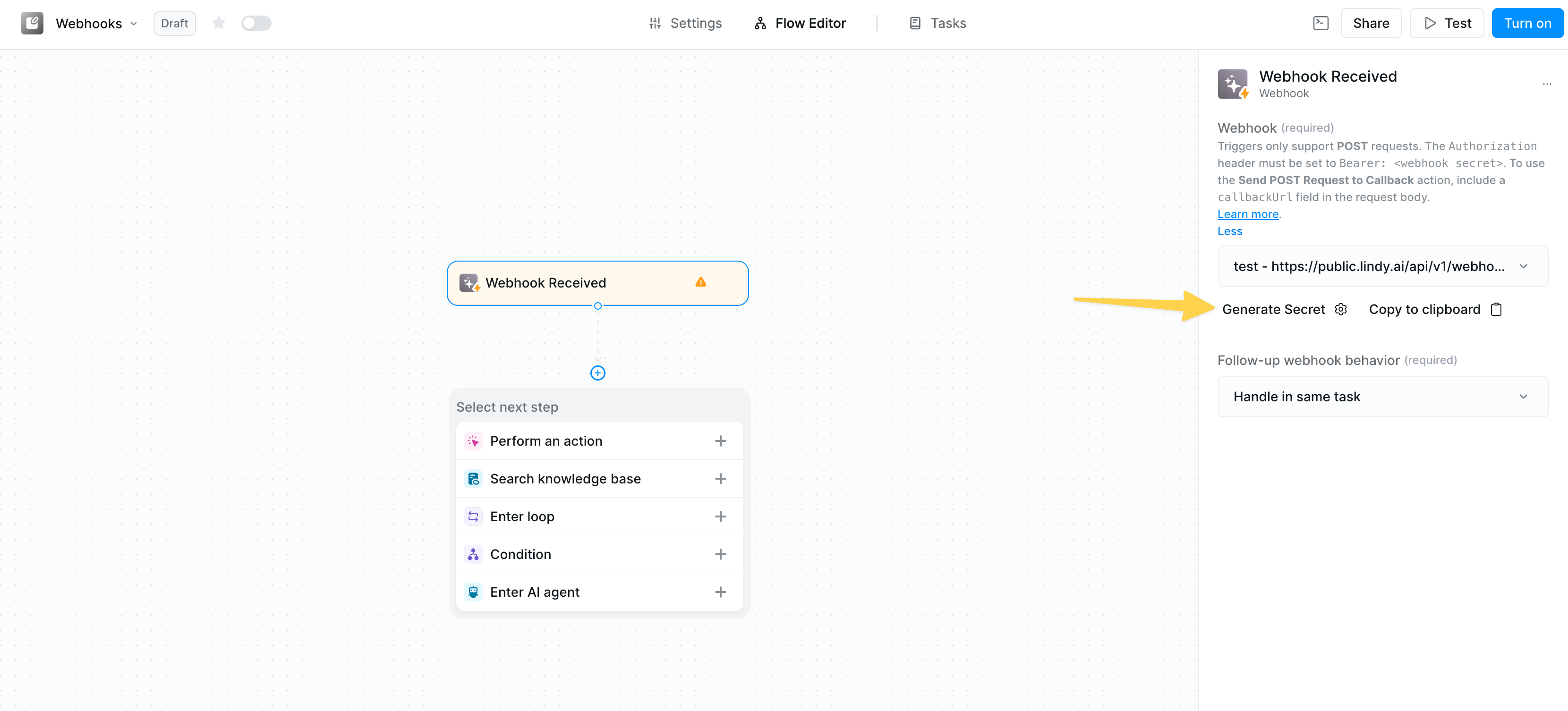 Protect your webhooks from unauthorized access:
1. Click **Generate Secret** to create a secure token
2. Copy the secret key immediately
Protect your webhooks from unauthorized access:
1. Click **Generate Secret** to create a secure token
2. Copy the secret key immediately
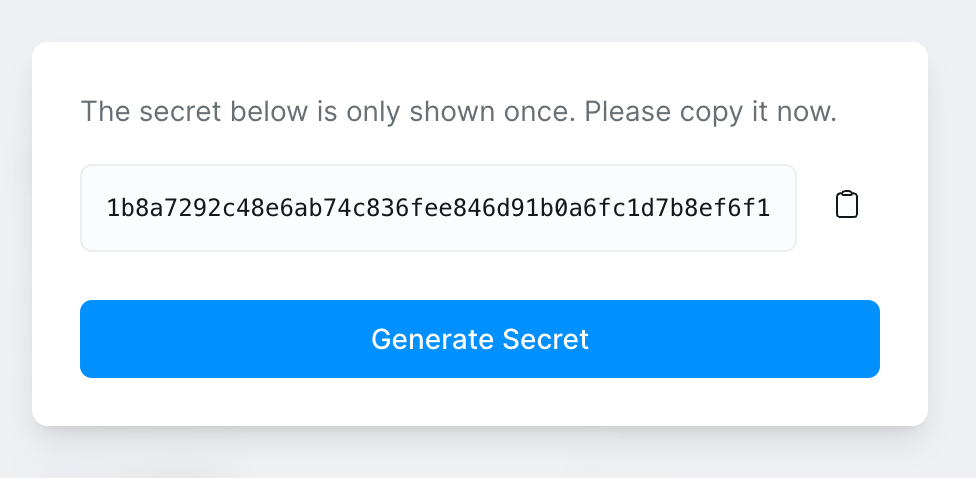 The secret key is only shown once! Copy it now and store it securely. You'll need to include this in the Authorization header of all webhook requests.
### Using the Secret Key
Include the secret in your webhook requests:
```http theme={null}
Authorization: Bearer [your-secret-key]
```
## Webhook + AI Agent Pattern
The secret key is only shown once! Copy it now and store it securely. You'll need to include this in the Authorization header of all webhook requests.
### Using the Secret Key
Include the secret in your webhook requests:
```http theme={null}
Authorization: Bearer [your-secret-key]
```
## Webhook + AI Agent Pattern
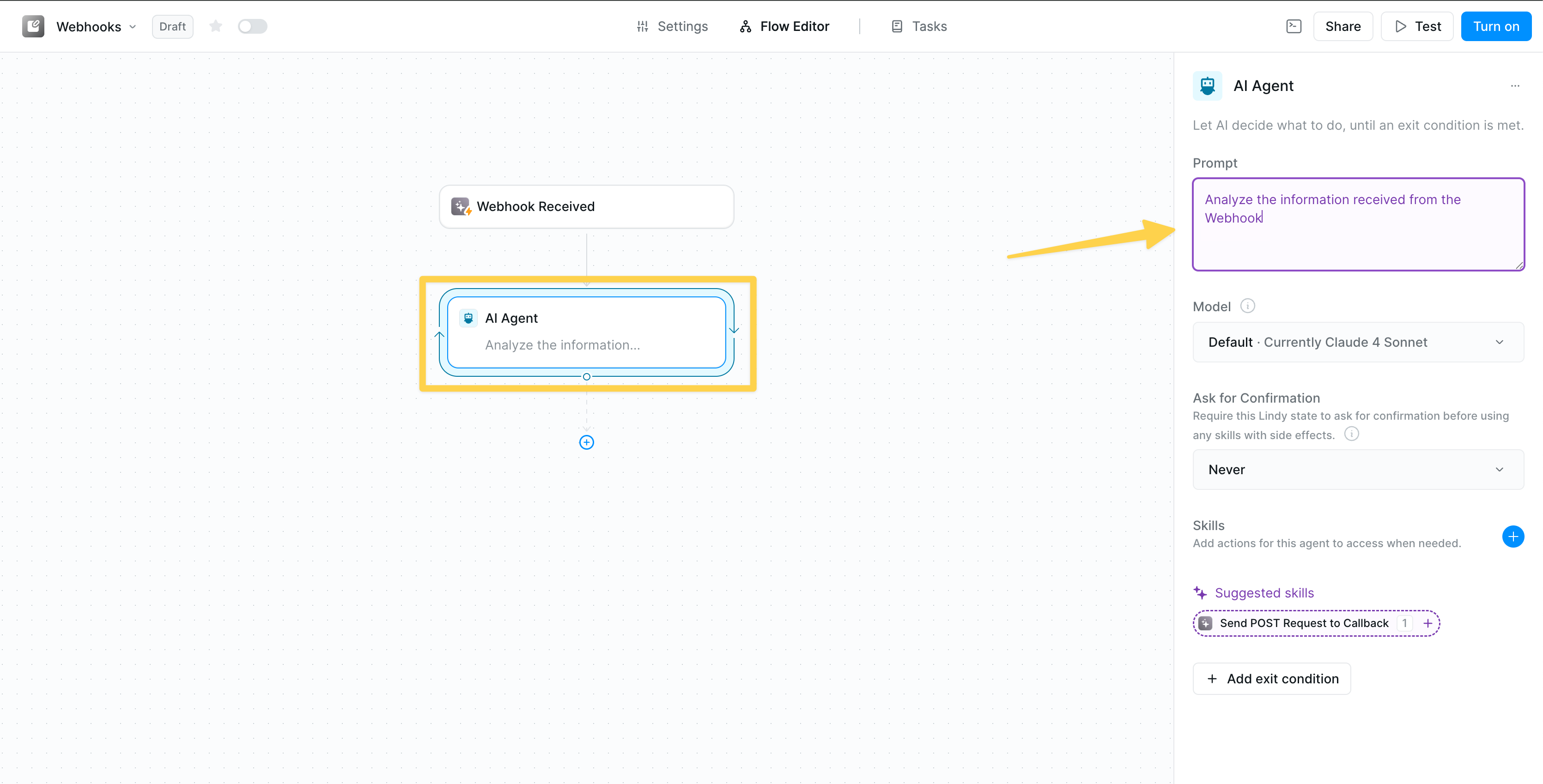 The most powerful webhook pattern combines the trigger with an AI Agent that can intelligently process incoming data:
### AI Agent Configuration
After your webhook trigger, add an AI Agent to:
* Analyze incoming webhook data
* Make decisions based on content
* Execute multiple actions conditionally
* Handle complex business logic
The most powerful webhook pattern combines the trigger with an AI Agent that can intelligently process incoming data:
### AI Agent Configuration
After your webhook trigger, add an AI Agent to:
* Analyze incoming webhook data
* Make decisions based on content
* Execute multiple actions conditionally
* Handle complex business logic
 ### Essential AI Agent Skills
**Suggested skill for webhooks:**
* **Send POST Request to Callback** - Respond back to the original request sender
**Additional powerful skills to add:**
* **HTTP Request** - Call other APIs based on webhook data
* **Update Spreadsheet** - Log webhook data
* **Send Email/Slack** - Notify teams
* **Search Knowledge Base** - Enrich with context
* **Create Calendar Event** - Schedule based on webhooks
* **Run Code** - Custom data transformations
## Working with Webhook Data
Access webhook data from the trigger in any subsequent step using the following variables:
| Data Source | Variable Reference | Description |
| ---------------- | -------------------------------------- | --------------------------------------- |
| **Request Body** | `{{webhook_received.request.body}}` | The full JSON payload from the request. |
| **Headers** | `{{webhook_received.request.headers}}` | All request headers. |
| **Query Params** | `{{webhook_received.request.query}}` | Any parameters from the webhook URL. |
Use AI Prompt mode in action fields to intelligently extract and use specific fields from your webhook payload.
## Callback Responses
When you need to respond to the webhook sender:
1. Include a `callbackUrl` field in your webhook request body
2. Add the "Send POST Request to Callback" action
3. Configure your response data
This enables two-way communication between your external system and Lindy.
Common callback scenarios:
* Acknowledge receipt with status
* Return processed results
* Send error messages
* Provide async job IDs
## Best Practices
Always use secret keys and validate incoming requests to protect your workflows from unauthorized access.
Add error handling conditions after webhook processing to manage unexpected issues and ensure reliability.
Use tools like Postman to test your webhook endpoints with different scenarios before deploying to production.
## Related Resources
Make outbound API calls from Lindy
Build intelligent webhook processors
Route webhook data conditionally
Enrich webhook data with context
### Essential AI Agent Skills
**Suggested skill for webhooks:**
* **Send POST Request to Callback** - Respond back to the original request sender
**Additional powerful skills to add:**
* **HTTP Request** - Call other APIs based on webhook data
* **Update Spreadsheet** - Log webhook data
* **Send Email/Slack** - Notify teams
* **Search Knowledge Base** - Enrich with context
* **Create Calendar Event** - Schedule based on webhooks
* **Run Code** - Custom data transformations
## Working with Webhook Data
Access webhook data from the trigger in any subsequent step using the following variables:
| Data Source | Variable Reference | Description |
| ---------------- | -------------------------------------- | --------------------------------------- |
| **Request Body** | `{{webhook_received.request.body}}` | The full JSON payload from the request. |
| **Headers** | `{{webhook_received.request.headers}}` | All request headers. |
| **Query Params** | `{{webhook_received.request.query}}` | Any parameters from the webhook URL. |
Use AI Prompt mode in action fields to intelligently extract and use specific fields from your webhook payload.
## Callback Responses
When you need to respond to the webhook sender:
1. Include a `callbackUrl` field in your webhook request body
2. Add the "Send POST Request to Callback" action
3. Configure your response data
This enables two-way communication between your external system and Lindy.
Common callback scenarios:
* Acknowledge receipt with status
* Return processed results
* Send error messages
* Provide async job IDs
## Best Practices
Always use secret keys and validate incoming requests to protect your workflows from unauthorized access.
Add error handling conditions after webhook processing to manage unexpected issues and ensure reliability.
Use tools like Postman to test your webhook endpoints with different scenarios before deploying to production.
## Related Resources
Make outbound API calls from Lindy
Build intelligent webhook processors
Route webhook data conditionally
Enrich webhook data with context