> ## Documentation Index
> Fetch the complete documentation index at: https://docs.lindy.ai/llms.txt
> Use this file to discover all available pages before exploring further.
# LLM Call
> Make lightweight AI requests with direct model access - cheaper than AI agents but without built-in context
## Overview
Make direct AI requests to any model provider with full control over prompts and parameters. LLM Call is perfect for:
* **Single AI requests** where you need a specific answer or analysis
* **Cost-effective processing** — cheaper than using full AI agents
* **Custom prompt control** — write exactly what you want the AI to do
* **Output references** — use the AI response in other parts of your workflow
Perfect when you need AI for a specific task without the overhead of a full agent.
## LLM Call Action
* **What it does**: Makes a direct request to your chosen model provider with complete control over the prompt, temperature, and output settings.
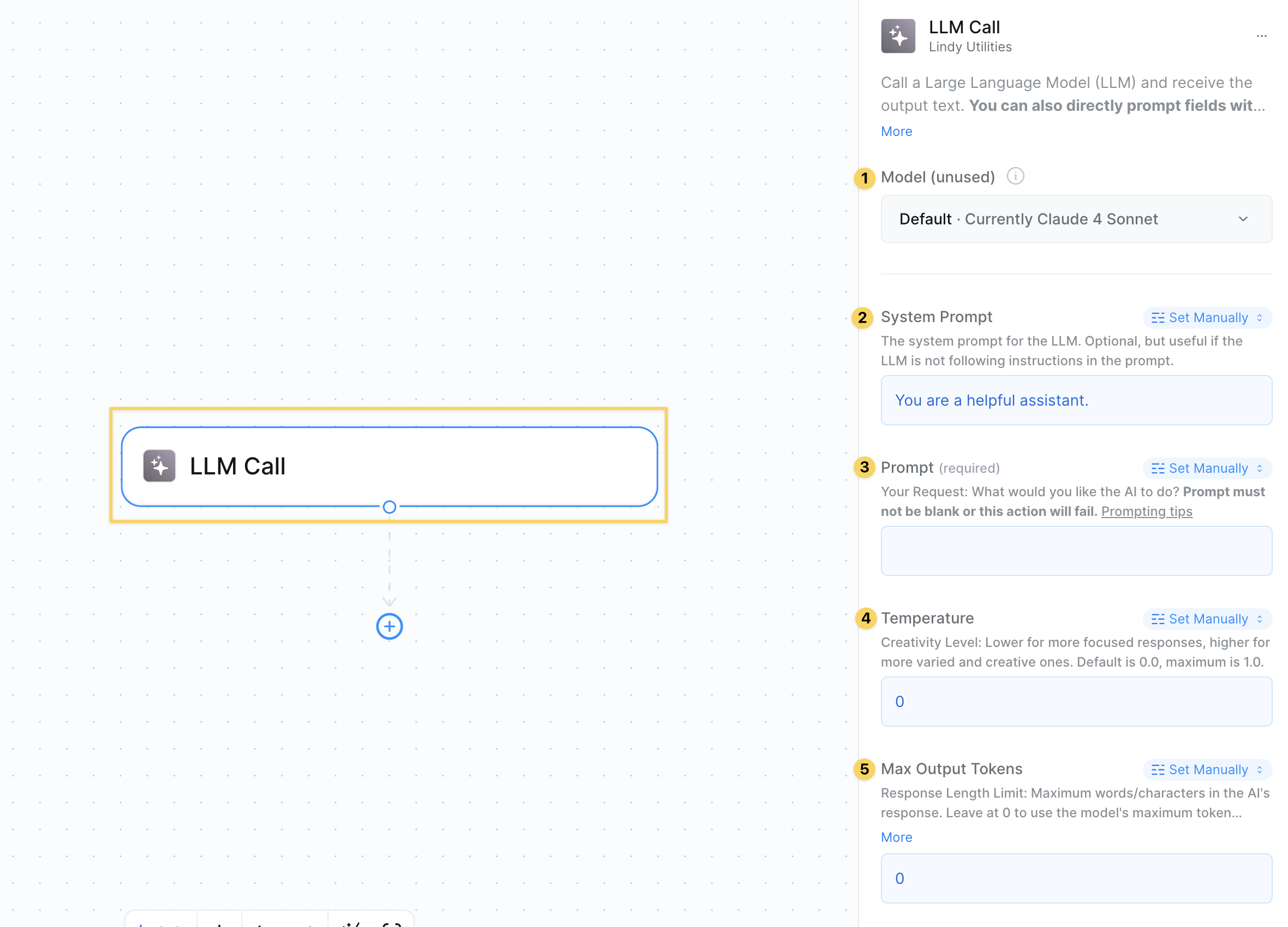 ### Inputs
* **Model Provider**: Choose your AI model (GPT-4, Claude, etc.)
* **System Prompt**: The instructions you give to the AI
* **User Prompt**: The actual content you want analyzed
* **Temperature**: Controls randomness (0 = focused, 1 = creative)
* **Max Output Tokens**: Limits how long the response can be
If you set these to manual, the AI won't have context about what's happening in your workflow. It only knows what you explicitly tell it in the prompts.
### Outputs
* **AI Response**: The model's complete response to your prompt
### When to Use vs AI Agents
**Use LLM Call when:**
* You need a single, specific AI analysis
* Cost is a concern (it's cheaper than AI agents)
* You want full control over the prompt
* You don't need workflow context or tool access
**Use AI Agents when:**
* You need access to tools and integrations
* The AI should understand your workflow context
* You want conversational, multi-step interactions
* You need the AI to make decisions about next actions
## Common Use Cases
### Data Analysis
```
System Prompt: "Analyze this data and provide 3 key insights"
User Message: [CSV data or metrics]
Result: Focused analysis without expensive agent overhead
```
### Content Processing
```
System Prompt: "Extract the main topic and sentiment from this text"
User Message: [Email, review, or document content]
Result: Quick classification or extraction
```
### Format Conversion
```
System Prompt: "Convert this to JSON format with these fields: name, email, company"
User Message: [Unstructured contact information]
Result: Structured data output you can use in other actions
```
## Advanced Features
| Feature | What it does |
| ------------------- | ----------------------------------------------------------- |
| Output References | Use AI response as input for other actions in your workflow |
| Model Selection | Choose different models based on task complexity and cost |
| Temperature Control | Fine-tune creativity vs consistency for different use cases |
| Token Management | Control costs by limiting response length |
| Batch Processing | Make multiple LLM calls for different data points |
## Best Practices
Be specific about what you want. Include format requirements, tone, and any constraints.
Remember that LLM Call doesn't know about your workflow. Include all necessary context in your prompts.
Use LLM Call for simple tasks and AI Agents for complex ones that need tools or context.
Lower temperatures (0.2-0.5) for factual tasks, higher (0.7-1.0) for creative work.
## Next Steps
Store LLM responses for later use
Pass AI analysis to other actions
Save insights for future reference
Monitor LLM call performance and usage
### Inputs
* **Model Provider**: Choose your AI model (GPT-4, Claude, etc.)
* **System Prompt**: The instructions you give to the AI
* **User Prompt**: The actual content you want analyzed
* **Temperature**: Controls randomness (0 = focused, 1 = creative)
* **Max Output Tokens**: Limits how long the response can be
If you set these to manual, the AI won't have context about what's happening in your workflow. It only knows what you explicitly tell it in the prompts.
### Outputs
* **AI Response**: The model's complete response to your prompt
### When to Use vs AI Agents
**Use LLM Call when:**
* You need a single, specific AI analysis
* Cost is a concern (it's cheaper than AI agents)
* You want full control over the prompt
* You don't need workflow context or tool access
**Use AI Agents when:**
* You need access to tools and integrations
* The AI should understand your workflow context
* You want conversational, multi-step interactions
* You need the AI to make decisions about next actions
## Common Use Cases
### Data Analysis
```
System Prompt: "Analyze this data and provide 3 key insights"
User Message: [CSV data or metrics]
Result: Focused analysis without expensive agent overhead
```
### Content Processing
```
System Prompt: "Extract the main topic and sentiment from this text"
User Message: [Email, review, or document content]
Result: Quick classification or extraction
```
### Format Conversion
```
System Prompt: "Convert this to JSON format with these fields: name, email, company"
User Message: [Unstructured contact information]
Result: Structured data output you can use in other actions
```
## Advanced Features
| Feature | What it does |
| ------------------- | ----------------------------------------------------------- |
| Output References | Use AI response as input for other actions in your workflow |
| Model Selection | Choose different models based on task complexity and cost |
| Temperature Control | Fine-tune creativity vs consistency for different use cases |
| Token Management | Control costs by limiting response length |
| Batch Processing | Make multiple LLM calls for different data points |
## Best Practices
Be specific about what you want. Include format requirements, tone, and any constraints.
Remember that LLM Call doesn't know about your workflow. Include all necessary context in your prompts.
Use LLM Call for simple tasks and AI Agents for complex ones that need tools or context.
Lower temperatures (0.2-0.5) for factual tasks, higher (0.7-1.0) for creative work.
## Next Steps
Store LLM responses for later use
Pass AI analysis to other actions
Save insights for future reference
Monitor LLM call performance and usage