> ## Documentation Index
> Fetch the complete documentation index at: https://docs.lindy.ai/llms.txt
> Use this file to discover all available pages before exploring further.
# Memories
> Help your agent learn and improve over time with persistent memories that last across all tasks
## Overview
Memories let your agent learn and remember things forever — across all future tasks. Perfect for:
* **Self-improvement** — learn from mistakes and successes over time
* **Persistent knowledge** — remember important facts that apply to all tasks
* **Performance optimization** — build up expertise through experience
* **Error prevention** — avoid repeating the same mistakes
Unlike context (which only lasts during one task), memories persist across all task executions.
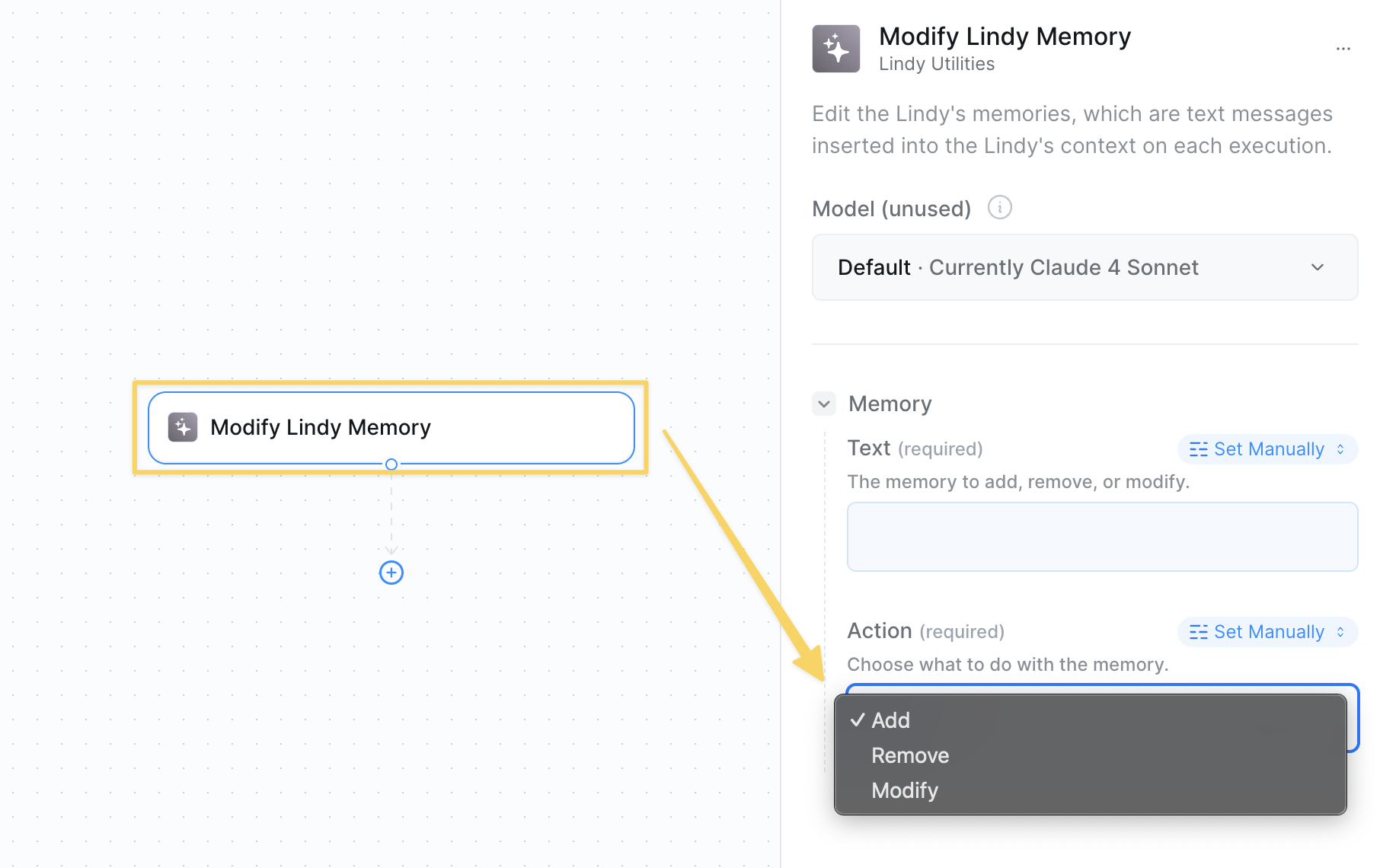
## Modify Lindy Memory Action
* **What it does**: Add, remove, or modify memories that your agent will remember across all future tasks.
 ### Inputs
* **Action**: Add, remove, or modify memory
* **Memory**: The text content of what to remember
### Outputs
* **Memory Status**: Confirmation of what was added, removed, or modified
* **Updated Memory**: The agent's memory bank is updated behind the scenes
Great at helping your agent learn from experience by adding snippets and rules over time that improve performance across all future tasks.
## Delete All Memories Action
* **What it does**: Completely wipes your agent's memory history — use when you need a fresh start.
## When to Use Memory Actions
### Add Memory
* Agent makes a mistake you want it to avoid next time
* Agent performs exceptionally well and you want to reinforce the behavior
* Important facts or preferences that apply to all tasks
* Process improvements discovered over time
### Clear Memories
* Starting fresh with a new agent configuration
* Memories have become outdated or conflicting
* Agent behavior has degraded due to accumulated memories
## Best Practices
* Be specific about what went wrong or right
* Include context about when the memory applies
* Use clear, actionable language
* Focus on learnable patterns, not one-off events
* Regularly review and clean up outdated memories
* Remove conflicting or contradictory memories
* Keep memories focused and specific
* Use memories for recurring patterns, not exceptions
* Add memories immediately after mistakes or successes
* Include positive reinforcement for good behaviors
* Document edge cases and special handling rules
* Build up domain expertise through accumulated memories
## Next Steps
Manage short-term memory within individual tasks
Store temporary data during task execution
Access advanced monitoring and observability features
Make direct AI requests with controlled context
### Inputs
* **Action**: Add, remove, or modify memory
* **Memory**: The text content of what to remember
### Outputs
* **Memory Status**: Confirmation of what was added, removed, or modified
* **Updated Memory**: The agent's memory bank is updated behind the scenes
Great at helping your agent learn from experience by adding snippets and rules over time that improve performance across all future tasks.
## Delete All Memories Action
* **What it does**: Completely wipes your agent's memory history — use when you need a fresh start.
## When to Use Memory Actions
### Add Memory
* Agent makes a mistake you want it to avoid next time
* Agent performs exceptionally well and you want to reinforce the behavior
* Important facts or preferences that apply to all tasks
* Process improvements discovered over time
### Clear Memories
* Starting fresh with a new agent configuration
* Memories have become outdated or conflicting
* Agent behavior has degraded due to accumulated memories
## Best Practices
* Be specific about what went wrong or right
* Include context about when the memory applies
* Use clear, actionable language
* Focus on learnable patterns, not one-off events
* Regularly review and clean up outdated memories
* Remove conflicting or contradictory memories
* Keep memories focused and specific
* Use memories for recurring patterns, not exceptions
* Add memories immediately after mistakes or successes
* Include positive reinforcement for good behaviors
* Document edge cases and special handling rules
* Build up domain expertise through accumulated memories
## Next Steps
Manage short-term memory within individual tasks
Store temporary data during task execution
Access advanced monitoring and observability features
Make direct AI requests with controlled context