> ## Documentation Index
> Fetch the complete documentation index at: https://docs.lindy.ai/llms.txt
> Use this file to discover all available pages before exploring further.
# Observability
> Monitor your agents and see exactly what happens when they run - perfect for debugging issues and tracking performance
## Overview
Monitor and analyze agent performance with detailed task execution data. There are two key options for full observability into your agents:
* `Agent Task Change` trigger wakes up when another Lindy agent performs specific actions (errors, starts, finishes, etc.)
* `Get Task Details` action reads and analyzes everything an agent did during task execution, showing you block-by-block inputs, outputs, and performance data.
## Agent Task Change Trigger
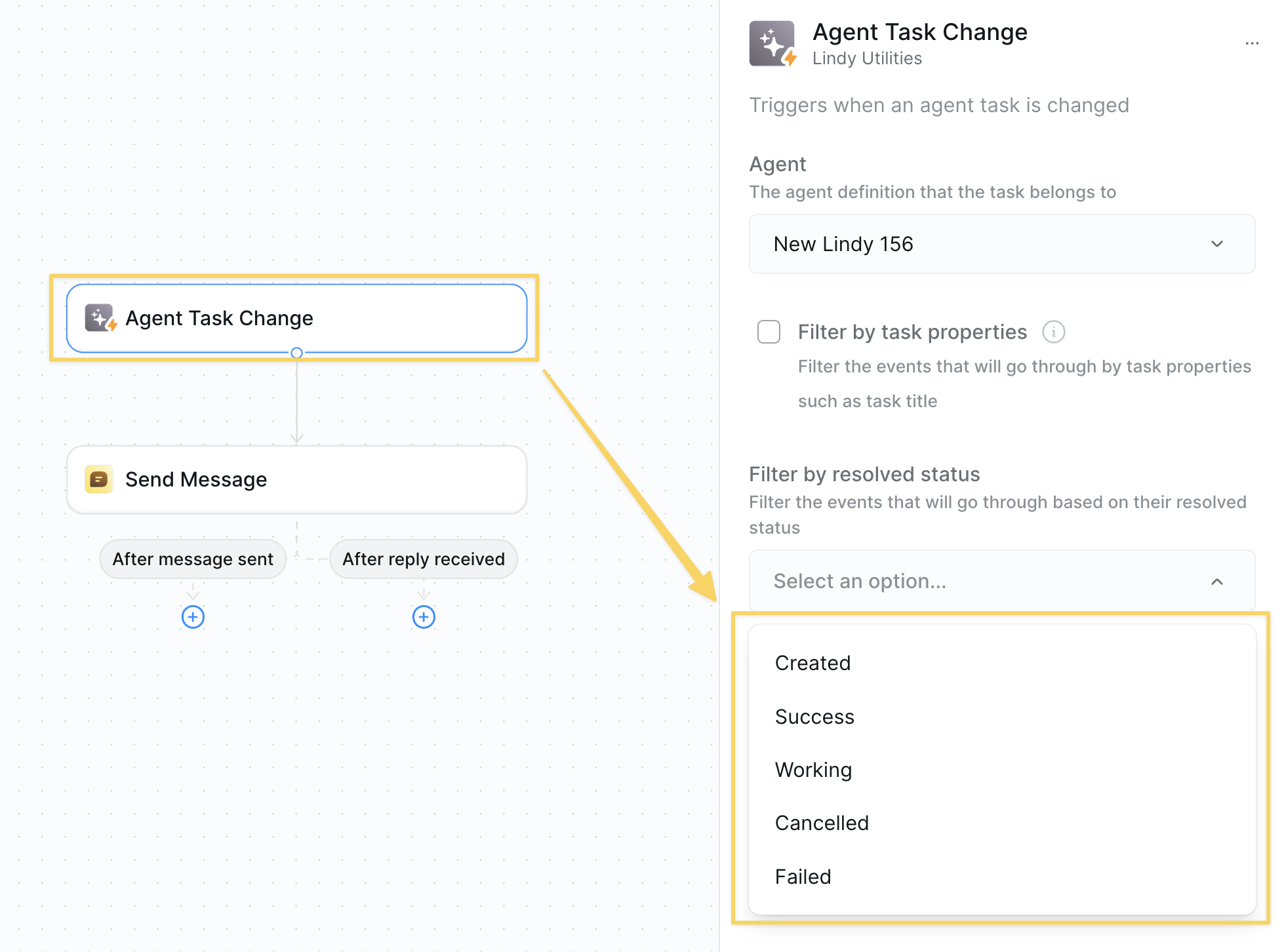
* **What it does**: Triggers when another Lindy agent performs specific actions — perfect for monitoring agent activity and building reactive workflows.
 ### Inputs
* **Agent**: Select which agent you want to monitor
* **Events**: Multi-select from task states:
* Task was created
* Task succeeded
* Task is working
* Task was canceled
* Task failed
* **Filter by subtask title**: Optional — monitor specific subtasks only
### Common Examples
* **Error Alerts**: Trigger on "Task failed" → Send email with failure details
* **Performance Tracking**: Trigger on "Task succeeded" → Log completion metrics
* **Real-time Monitoring**: Trigger on "Task is working" → Send status updates
***
## Get Task Details
* **What it does**: Reads and analyzes everything an agent did during task execution. Shows you block-by-block inputs, outputs, and performance data for complete observability.
### Inputs
* **Agent**: Select which agent you want to monitor
* **Events**: Multi-select from task states:
* Task was created
* Task succeeded
* Task is working
* Task was canceled
* Task failed
* **Filter by subtask title**: Optional — monitor specific subtasks only
### Common Examples
* **Error Alerts**: Trigger on "Task failed" → Send email with failure details
* **Performance Tracking**: Trigger on "Task succeeded" → Log completion metrics
* **Real-time Monitoring**: Trigger on "Task is working" → Send status updates
***
## Get Task Details
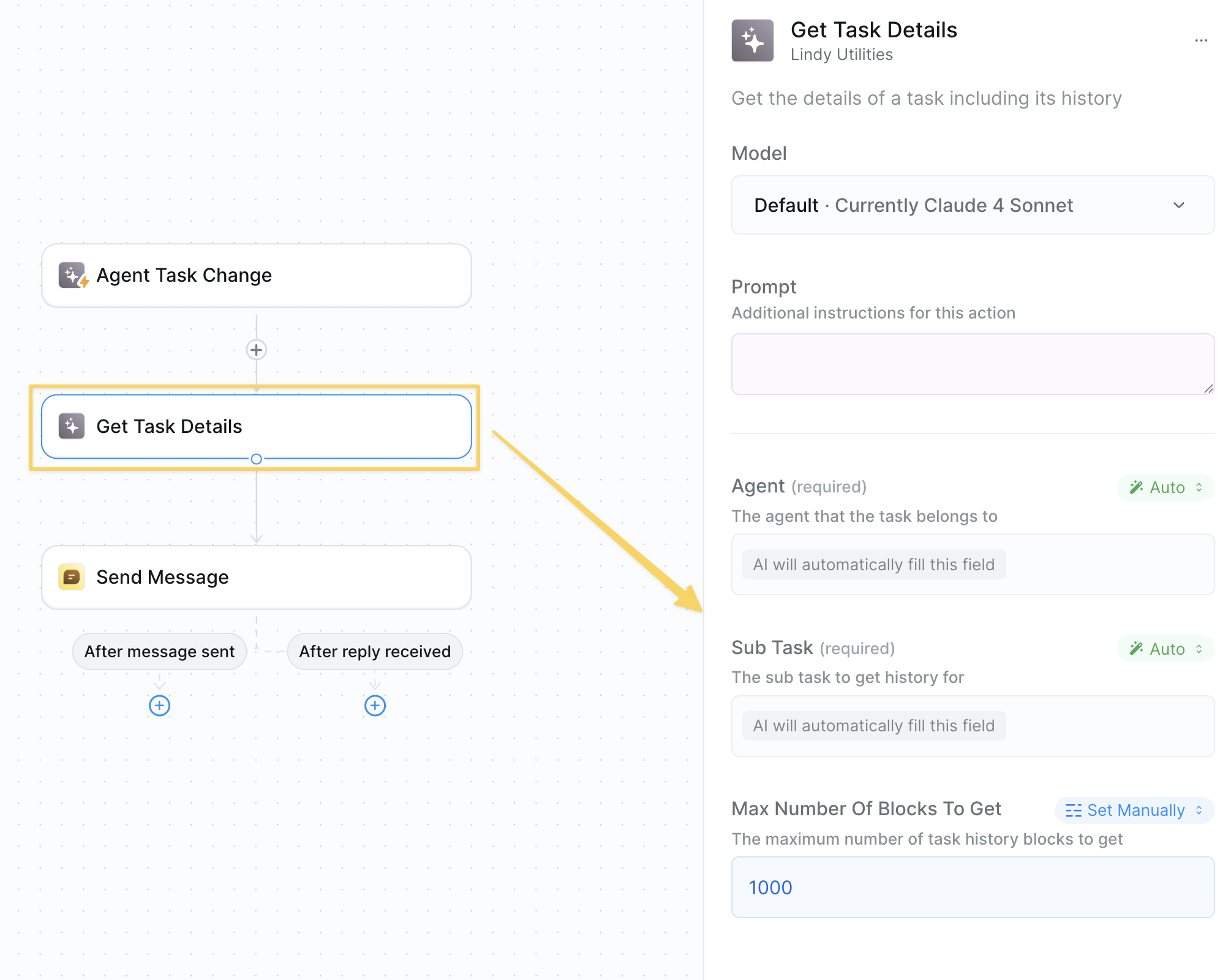
* **What it does**: Reads and analyzes everything an agent did during task execution. Shows you block-by-block inputs, outputs, and performance data for complete observability.
 ### Inputs
* **Agent**: Select the agent to analyze
* **Sub Task** (required): ID of the specific task/subtask to examine
* **Max Number of Blocks**: Recommended to set high — controls how much execution history to retrieve
Usually you want to use this action after an "Agent Task Change" trigger and you can leave the fields on "Auto" to pull in the correct agent & task ID.
### Outputs
* **Block-by-block execution**: Every action the agent performed
* **Inputs and outputs**: Exact data flowing through each step
* **Performance metrics**: Timing, success rates, error details
* **Task metadata**: Status, timestamps, execution context
### Common Examples
* **Error Analysis**: Get task details on failure → Analyze what went wrong → Send diagnostic report
* **Quality Evaluation**: Get task details after completion → Score performance → Log to spreadsheet
* **Performance Optimization**: Analyze slow tasks → Identify bottlenecks → Optimize workflows
### Use Cases
* Build evaluation tools for agent quality
* Create automated debugging systems
* Track agent performance over time
* Generate detailed audit logs
* Feed execution data to AI for analysis and insights
***
## Working Together
These actions are designed to work together for complete agent observability:
### Inputs
* **Agent**: Select the agent to analyze
* **Sub Task** (required): ID of the specific task/subtask to examine
* **Max Number of Blocks**: Recommended to set high — controls how much execution history to retrieve
Usually you want to use this action after an "Agent Task Change" trigger and you can leave the fields on "Auto" to pull in the correct agent & task ID.
### Outputs
* **Block-by-block execution**: Every action the agent performed
* **Inputs and outputs**: Exact data flowing through each step
* **Performance metrics**: Timing, success rates, error details
* **Task metadata**: Status, timestamps, execution context
### Common Examples
* **Error Analysis**: Get task details on failure → Analyze what went wrong → Send diagnostic report
* **Quality Evaluation**: Get task details after completion → Score performance → Log to spreadsheet
* **Performance Optimization**: Analyze slow tasks → Identify bottlenecks → Optimize workflows
### Use Cases
* Build evaluation tools for agent quality
* Create automated debugging systems
* Track agent performance over time
* Generate detailed audit logs
* Feed execution data to AI for analysis and insights
***
## Working Together
These actions are designed to work together for complete agent observability:
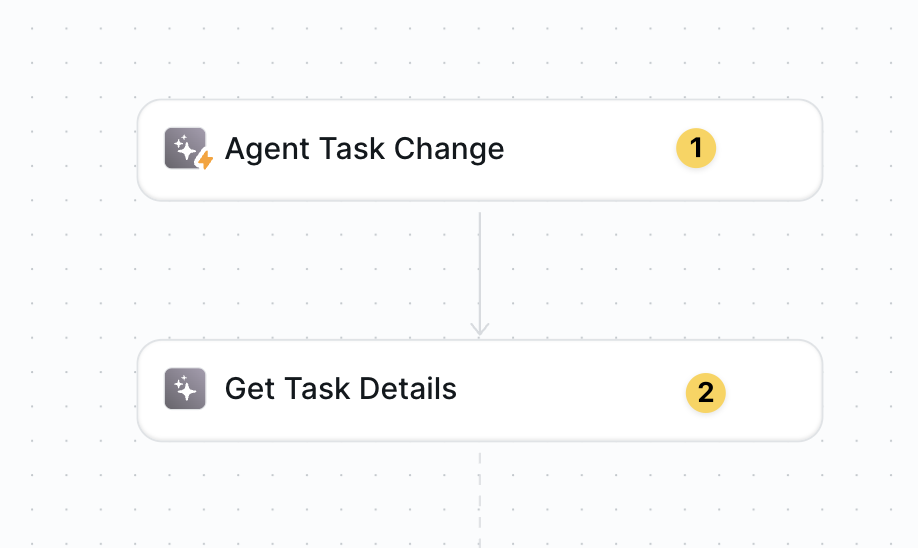 `Agent Task Change` triggers when something happens → `Get Task Details` analyzes exactly what occurred
This gives you full visibility into your agents — you'll know when they run, how they perform, and exactly what they do at every step.
## Advanced Features
| Feature | What it does |
| ------------------------ | ------------------------------------------------------------------- |
| Multi-Agent Monitoring | Track multiple agents from one observability workflow |
| Performance Benchmarking | Compare agent execution times and success rates over time |
| Error Pattern Analysis | Identify common failure points across different agents |
| Custom Alert Routing | Send different types of failures to different teams or channels |
| Quality Score Tracking | Build evaluation systems that score agent performance automatically |
## Best Practices
Focus on the most actionable events — usually "Task Failed" for debugging and "Task Succeeded" for performance tracking.
For Get Task Details, set max blocks to a high number to capture complete execution history.
Use LLM Call to analyze task details — AI can spot patterns humans miss in execution data.
Create systematic quality scoring by analyzing successful vs failed task patterns.
## Next Steps
Store performance metrics for analysis
Analyze task execution with AI
Build long-term performance intelligence
Pass task data to other workflows
`Agent Task Change` triggers when something happens → `Get Task Details` analyzes exactly what occurred
This gives you full visibility into your agents — you'll know when they run, how they perform, and exactly what they do at every step.
## Advanced Features
| Feature | What it does |
| ------------------------ | ------------------------------------------------------------------- |
| Multi-Agent Monitoring | Track multiple agents from one observability workflow |
| Performance Benchmarking | Compare agent execution times and success rates over time |
| Error Pattern Analysis | Identify common failure points across different agents |
| Custom Alert Routing | Send different types of failures to different teams or channels |
| Quality Score Tracking | Build evaluation systems that score agent performance automatically |
## Best Practices
Focus on the most actionable events — usually "Task Failed" for debugging and "Task Succeeded" for performance tracking.
For Get Task Details, set max blocks to a high number to capture complete execution history.
Use LLM Call to analyze task details — AI can spot patterns humans miss in execution data.
Create systematic quality scoring by analyzing successful vs failed task patterns.
## Next Steps
Store performance metrics for analysis
Analyze task execution with AI
Build long-term performance intelligence
Pass task data to other workflows