> ## Documentation Index
> Fetch the complete documentation index at: https://docs.lindy.ai/llms.txt
> Use this file to discover all available pages before exploring further.
# Notion
## Quick Overview
Lindy's Notion integration enables you to automate, synchronize, and supercharge your Notion workspace. You can create, update, search, and monitor Notion pages and databases, making Lindy a powerful assistant for knowledge management, project tracking, CRM, and more.
This comprehensive integration transforms Lindy into a powerful knowledge management platform, capable of handling everything from simple page creation to complex database automation and content workflows.
Key benefits of Notion integration:
* **Comprehensive content management** – 16 actions for complete Notion workspace control
* **Real-time monitoring** – 7 triggers for instant workflow activation
* **Database automation** – Powerful CRM, project management, and ticketing capabilities
* **Advanced content workflows** – AI-powered content generation and management
## How to set up Notion
Click on the plus sign at the bottom or right-click anywhere on the canvas and select "Add Trigger" or "Add Action" from the pop-up menu and choose "Notion"
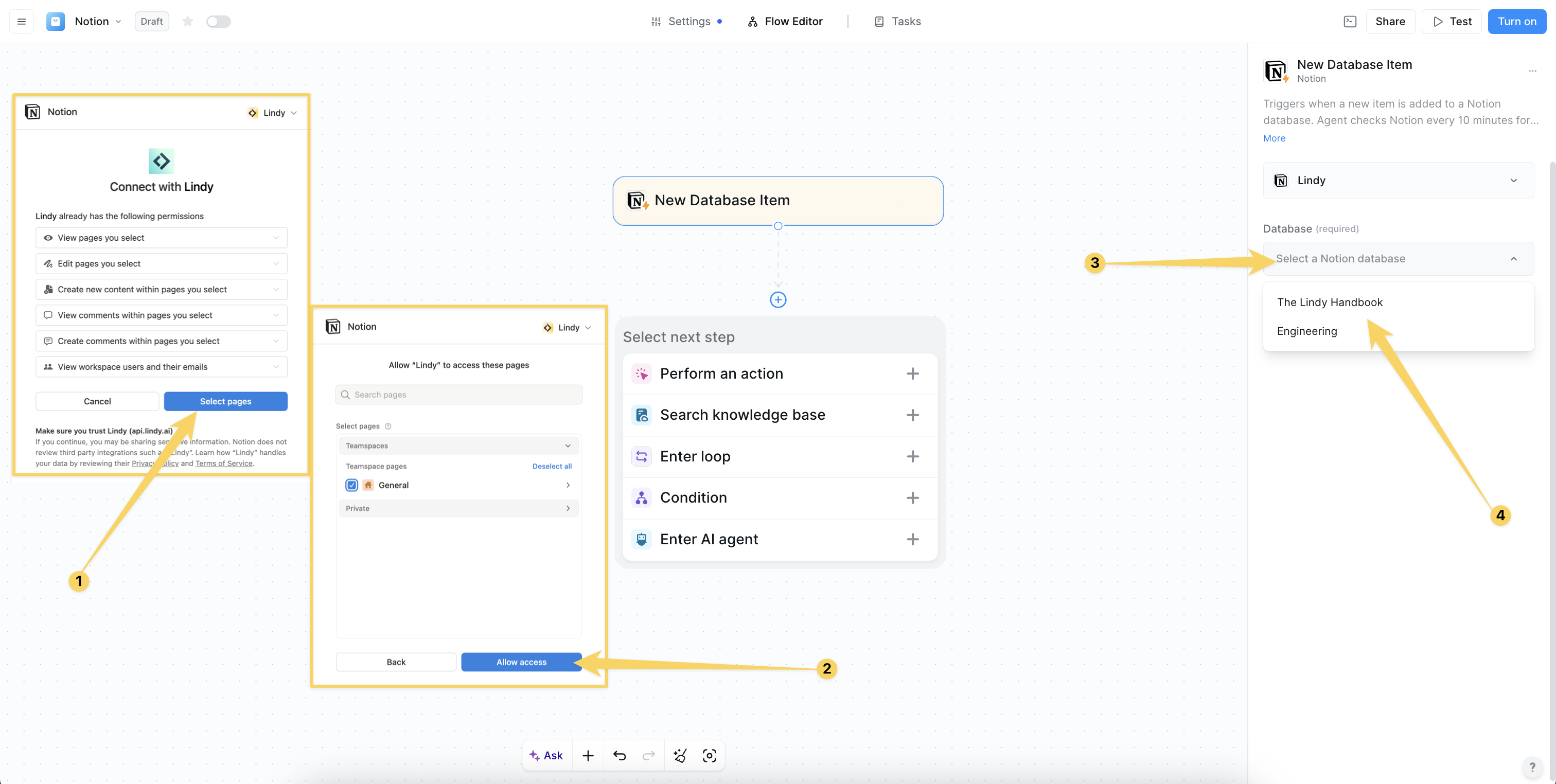
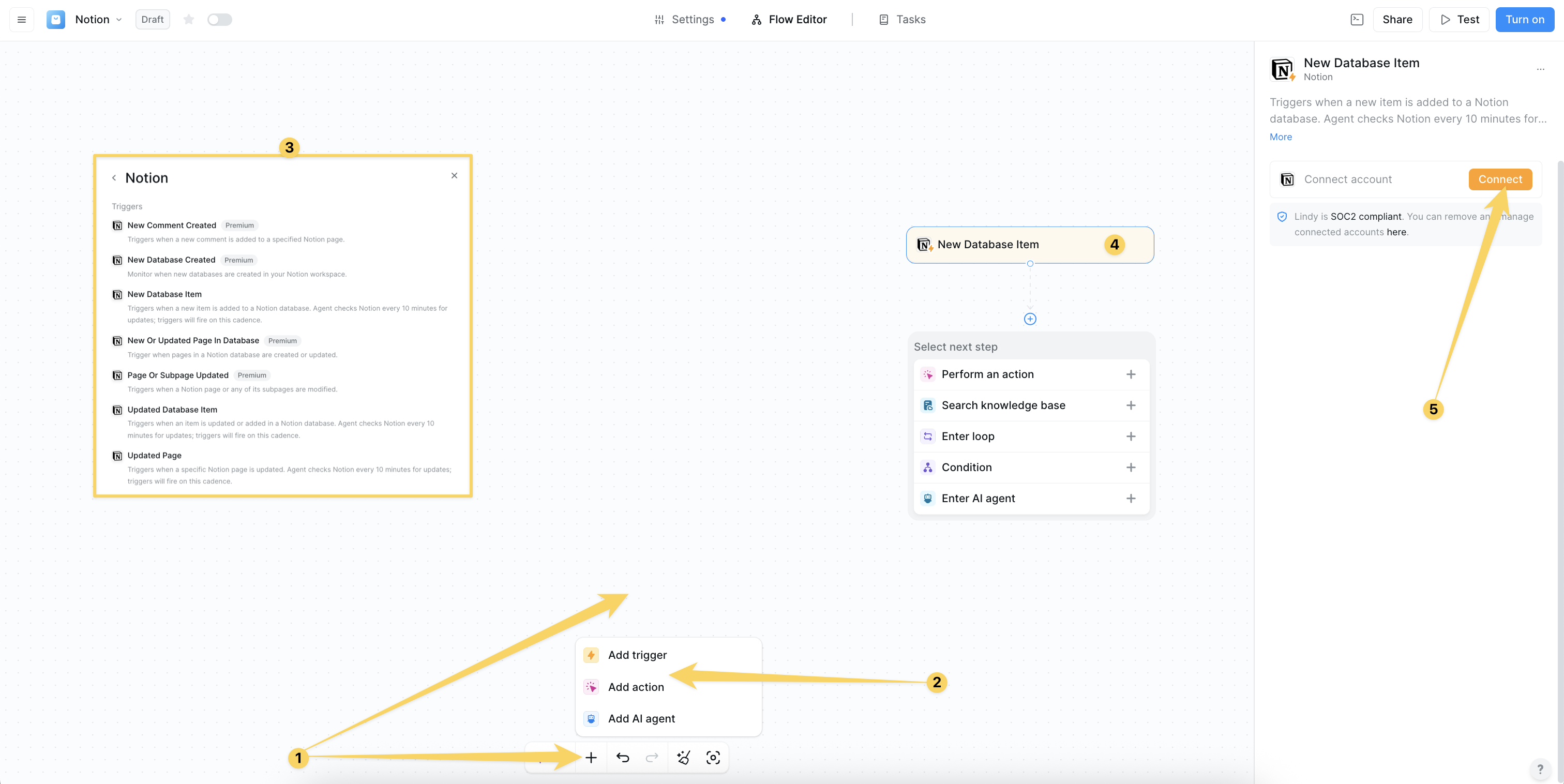 Click on "Add Account" and authorize your Notion for Lindy's integrations by granting permissions for workspace access and management. Choose which pages and databases you want this Lindy to access.
 ## Notion Triggers
#### New Database Item
Triggers when a new item is added to a Notion database:
* **Real-time monitoring** - Checks every 10 minutes for new database entries
* **Structured data processing** - Handles CRM, project management, or ticketing data
* **Workflow activation** - Processes new tasks, leads, or tickets automatically
* Perfect for task management, lead processing, ticket routing
#### Updated Database Item
Triggers when an item is updated or added in a Notion database:
* **Change detection** - Monitors database modifications every 10 minutes
* **Status tracking** - Tracks workflow progression and status changes
* **Automation activation** - Triggers follow-ups, syncs, and notifications
* Ideal for workflow automation, system synchronization, change monitoring
#### Updated Page
Triggers when a specific Notion page is updated:
* **Content monitoring** - Tracks page modifications every 10 minutes
* **Change tracking** - Monitors content updates and property changes
* **Workflow activation** - Triggers content-based automation
* Perfect for content change monitoring, compliance tracking, workflow automation
#### Page Or Subpage Updated
Triggers when a Notion page or any of its subpages are modified:
* **Hierarchical monitoring** - Tracks changes across page hierarchies
* **Document management** - Monitors key documents and their subpages
* **Review workflows** - Triggers review processes and dashboard updates
* Great for document monitoring, review workflows, dashboard synchronization
#### New Comment Created
Triggers when a new comment is added to a specified Notion page:
* **Collaboration monitoring** - Tracks team feedback and discussions
* **Review workflows** - Activates feedback processing and review requests
* **Team notifications** - Escalates feedback and starts collaborative workflows
* Essential for team collaboration, feedback processing, review automation
#### New Database Created
Monitor when new databases are created in your Notion workspace:
* **Workspace monitoring** - Track new database creation across workspace
* **Template initialization** - Auto-initialize templates for new databases
* **Permission setup** - Set up permissions and access controls
* Perfect for project onboarding, template automation, workspace organization
#### New Or Updated Page In Database
Trigger when pages in a Notion database are created or updated:
* **Database page monitoring** - Track all page changes within databases
* **Real-time synchronization** - Keep database pages in sync with other systems
* **Content tracking** - Monitor content updates and modifications
* Ideal for CRM sync, project updates, content monitoring
Use "New Database Item" triggers combined with "Update Database Item" actions for the most powerful database automation workflows.
## Notion Actions
#### Create Page
Creates a new Notion page with full customization:
* **Flexible creation** - Standalone pages or child pages within databases
* **Content generation** - AI-powered page creation with structured content
* **Template support** - Create pages from templates or existing structures
* Perfect for project documentation, meeting notes, knowledge base articles
#### Add Content To Page
Appends new content to the end of a Notion page:
* **Content addition** - Text, blocks, and structured content
* **Meeting integration** - Add meeting notes and AI-generated summaries
* **Action tracking** - Append action items and follow-up tasks
* Ideal for meeting notes, project updates, content enhancement
#### Update Page
Updates existing Notion page metadata and properties:
* **Metadata updates** - Title changes, property modifications
* **Content management** - For content updates, use Add Content To Page
* **Property management** - Update page properties and metadata
* Perfect for metadata updates, title changes, property modifications
#### Create Database Item
Adds a new item (row) to a specified Notion database:
* **Structured data entry** - Log tasks, leads, tickets, or any structured data
* **Property mapping** - Dynamic field mapping based on database schema
* **Data validation** - Ensures data integrity and proper formatting
* Essential for task logging, lead management, ticket creation
#### Find Database Item
Finds a single item in a database matching given filters:
* **Upsert capability** - Can create new item if none is found
* **Deduplication** - Prevents duplicate entries in databases
* **Idempotent operations** - Safe for repeated automation runs
* Perfect for upsert patterns, deduplication, idempotent automations
#### Update Database Item
Updates an existing item in a Notion database:
* **Status management** - Update workflow status and progression
* **Data enrichment** - Enhance records with additional information
* **Property updates** - Modify any database item properties
* Great for status changes, data enrichment, workflow progression
#### Search By Title
Searches for pages and databases by their title:
* **Quick lookups** - Fast title-based search across workspace
* **Dynamic linking** - Find and link to existing content
* **Navigation support** - Locate pages for further processing
* Perfect for quick lookups, dynamic linking, content navigation
#### Get Page
Retrieves a Notion page by its ID with full content:
* **Complete content access** - Metadata and full page content
* **Content analysis** - AI summarization and processing capabilities
* **Further processing** - Extract data for downstream workflows
* Essential for content analysis, AI summarization, data extraction
#### Duplicate Page
Makes a copy of an existing Notion page:
* **Template workflows** - Create pages from existing templates
* **Recurring structures** - Duplicate project templates and structures
* **Content replication** - Copy pages with optional title changes
* Perfect for template-based workflows, recurring project structures
#### Create Comment
Add comments to Notion pages or existing discussion threads:
* **Collaborative feedback** - Add automated feedback and review requests
* **Discussion threads** - Participate in existing comment discussions
* **Team communication** - Automated team notifications and updates
* Perfect for automated feedback, review requests, collaborative discussions
#### Find Database Items
Finds items that match the given filters in a Notion database:
* **Batch retrieval** - Get multiple items matching criteria
* **Property-based results** - Returns properties, not full page text
* **Filtered data** - Use Get Page or Find Database Item for full content
* Great for reporting, batch processing, data extraction
#### Retrieve Block
Retrieve a block and optionally its children from your Notion workspace:
* **Deep content analysis** - Access specific content blocks
* **Block-level automation** - Process individual content blocks
* **Hierarchical content** - Retrieve blocks with their child elements
* Perfect for deep content analysis, block-level automations
#### Retrieve Database Content
Retrieve and view content stored within a specified Notion database:
* **Full database export** - Get complete database content
* **Backup capabilities** - Create database backups and exports
* **Data migration** - Extract data for migration or analysis
* Essential for full database exports, backups, data migration
#### Retrieve Database Schema
Get the structure and properties of a specific Notion database:
* **Schema discovery** - Understand database structure dynamically
* **Form generation** - Create dynamic forms based on schema
* **Integration setup** - Validate schema for integration workflows
* Perfect for dynamic form generation, schema validation, integration setup
#### Retrieve Page Property Item
Retrieve a specific property value from a Notion page:
* **Property extraction** - Get specific property values
* **Status checks** - Check page status and properties
* **Field extraction** - Extract specific fields for processing
* Great for status checks, field extraction, conditional logic
#### Query Database
Advanced search and filter for database records:
* **Complex filtering** - Multi-condition database queries
* **Custom dashboards** - Create filtered views and reports
* **Data extraction** - Extract specific datasets for processing
* Great for custom dashboards, filtered views, complex reporting
## Example knowledge management workflow
## Practical Implementation Scenarios
## Notion Triggers
#### New Database Item
Triggers when a new item is added to a Notion database:
* **Real-time monitoring** - Checks every 10 minutes for new database entries
* **Structured data processing** - Handles CRM, project management, or ticketing data
* **Workflow activation** - Processes new tasks, leads, or tickets automatically
* Perfect for task management, lead processing, ticket routing
#### Updated Database Item
Triggers when an item is updated or added in a Notion database:
* **Change detection** - Monitors database modifications every 10 minutes
* **Status tracking** - Tracks workflow progression and status changes
* **Automation activation** - Triggers follow-ups, syncs, and notifications
* Ideal for workflow automation, system synchronization, change monitoring
#### Updated Page
Triggers when a specific Notion page is updated:
* **Content monitoring** - Tracks page modifications every 10 minutes
* **Change tracking** - Monitors content updates and property changes
* **Workflow activation** - Triggers content-based automation
* Perfect for content change monitoring, compliance tracking, workflow automation
#### Page Or Subpage Updated
Triggers when a Notion page or any of its subpages are modified:
* **Hierarchical monitoring** - Tracks changes across page hierarchies
* **Document management** - Monitors key documents and their subpages
* **Review workflows** - Triggers review processes and dashboard updates
* Great for document monitoring, review workflows, dashboard synchronization
#### New Comment Created
Triggers when a new comment is added to a specified Notion page:
* **Collaboration monitoring** - Tracks team feedback and discussions
* **Review workflows** - Activates feedback processing and review requests
* **Team notifications** - Escalates feedback and starts collaborative workflows
* Essential for team collaboration, feedback processing, review automation
#### New Database Created
Monitor when new databases are created in your Notion workspace:
* **Workspace monitoring** - Track new database creation across workspace
* **Template initialization** - Auto-initialize templates for new databases
* **Permission setup** - Set up permissions and access controls
* Perfect for project onboarding, template automation, workspace organization
#### New Or Updated Page In Database
Trigger when pages in a Notion database are created or updated:
* **Database page monitoring** - Track all page changes within databases
* **Real-time synchronization** - Keep database pages in sync with other systems
* **Content tracking** - Monitor content updates and modifications
* Ideal for CRM sync, project updates, content monitoring
Use "New Database Item" triggers combined with "Update Database Item" actions for the most powerful database automation workflows.
## Notion Actions
#### Create Page
Creates a new Notion page with full customization:
* **Flexible creation** - Standalone pages or child pages within databases
* **Content generation** - AI-powered page creation with structured content
* **Template support** - Create pages from templates or existing structures
* Perfect for project documentation, meeting notes, knowledge base articles
#### Add Content To Page
Appends new content to the end of a Notion page:
* **Content addition** - Text, blocks, and structured content
* **Meeting integration** - Add meeting notes and AI-generated summaries
* **Action tracking** - Append action items and follow-up tasks
* Ideal for meeting notes, project updates, content enhancement
#### Update Page
Updates existing Notion page metadata and properties:
* **Metadata updates** - Title changes, property modifications
* **Content management** - For content updates, use Add Content To Page
* **Property management** - Update page properties and metadata
* Perfect for metadata updates, title changes, property modifications
#### Create Database Item
Adds a new item (row) to a specified Notion database:
* **Structured data entry** - Log tasks, leads, tickets, or any structured data
* **Property mapping** - Dynamic field mapping based on database schema
* **Data validation** - Ensures data integrity and proper formatting
* Essential for task logging, lead management, ticket creation
#### Find Database Item
Finds a single item in a database matching given filters:
* **Upsert capability** - Can create new item if none is found
* **Deduplication** - Prevents duplicate entries in databases
* **Idempotent operations** - Safe for repeated automation runs
* Perfect for upsert patterns, deduplication, idempotent automations
#### Update Database Item
Updates an existing item in a Notion database:
* **Status management** - Update workflow status and progression
* **Data enrichment** - Enhance records with additional information
* **Property updates** - Modify any database item properties
* Great for status changes, data enrichment, workflow progression
#### Search By Title
Searches for pages and databases by their title:
* **Quick lookups** - Fast title-based search across workspace
* **Dynamic linking** - Find and link to existing content
* **Navigation support** - Locate pages for further processing
* Perfect for quick lookups, dynamic linking, content navigation
#### Get Page
Retrieves a Notion page by its ID with full content:
* **Complete content access** - Metadata and full page content
* **Content analysis** - AI summarization and processing capabilities
* **Further processing** - Extract data for downstream workflows
* Essential for content analysis, AI summarization, data extraction
#### Duplicate Page
Makes a copy of an existing Notion page:
* **Template workflows** - Create pages from existing templates
* **Recurring structures** - Duplicate project templates and structures
* **Content replication** - Copy pages with optional title changes
* Perfect for template-based workflows, recurring project structures
#### Create Comment
Add comments to Notion pages or existing discussion threads:
* **Collaborative feedback** - Add automated feedback and review requests
* **Discussion threads** - Participate in existing comment discussions
* **Team communication** - Automated team notifications and updates
* Perfect for automated feedback, review requests, collaborative discussions
#### Find Database Items
Finds items that match the given filters in a Notion database:
* **Batch retrieval** - Get multiple items matching criteria
* **Property-based results** - Returns properties, not full page text
* **Filtered data** - Use Get Page or Find Database Item for full content
* Great for reporting, batch processing, data extraction
#### Retrieve Block
Retrieve a block and optionally its children from your Notion workspace:
* **Deep content analysis** - Access specific content blocks
* **Block-level automation** - Process individual content blocks
* **Hierarchical content** - Retrieve blocks with their child elements
* Perfect for deep content analysis, block-level automations
#### Retrieve Database Content
Retrieve and view content stored within a specified Notion database:
* **Full database export** - Get complete database content
* **Backup capabilities** - Create database backups and exports
* **Data migration** - Extract data for migration or analysis
* Essential for full database exports, backups, data migration
#### Retrieve Database Schema
Get the structure and properties of a specific Notion database:
* **Schema discovery** - Understand database structure dynamically
* **Form generation** - Create dynamic forms based on schema
* **Integration setup** - Validate schema for integration workflows
* Perfect for dynamic form generation, schema validation, integration setup
#### Retrieve Page Property Item
Retrieve a specific property value from a Notion page:
* **Property extraction** - Get specific property values
* **Status checks** - Check page status and properties
* **Field extraction** - Extract specific fields for processing
* Great for status checks, field extraction, conditional logic
#### Query Database
Advanced search and filter for database records:
* **Complex filtering** - Multi-condition database queries
* **Custom dashboards** - Create filtered views and reports
* **Data extraction** - Extract specific datasets for processing
* Great for custom dashboards, filtered views, complex reporting
## Example knowledge management workflow
## Practical Implementation Scenarios
 Transform Lindy into a project management assistant:
* New Database Created trigger detects new project databases
* Duplicate Page action creates project templates with tasks and milestones
* Update Database Item action assigns team members and sets properties
* Add Content To Page action adds kickoff meeting notes and resources
Automate your entire task lifecycle:
* New Database Item trigger processes new tasks automatically
* Update Database Item action sets due dates and priorities
* Create Comment action adds instructions and context
* Conditional escalation for high-priority tasks
Transform Lindy into a project management assistant:
* New Database Created trigger detects new project databases
* Duplicate Page action creates project templates with tasks and milestones
* Update Database Item action assigns team members and sets properties
* Add Content To Page action adds kickoff meeting notes and resources
Automate your entire task lifecycle:
* New Database Item trigger processes new tasks automatically
* Update Database Item action sets due dates and priorities
* Create Comment action adds instructions and context
* Conditional escalation for high-priority tasks
 Streamline content creation and publishing:
* Page Or Subpage Updated trigger monitors content pipeline
* Conditional workflows based on status property changes
* Add Content To Page action appends publication logs
* Archive or duplicate pages for future reference
## Advanced Features & Capabilities
Streamline content creation and publishing:
* Page Or Subpage Updated trigger monitors content pipeline
* Conditional workflows based on status property changes
* Add Content To Page action appends publication logs
* Archive or duplicate pages for future reference
## Advanced Features & Capabilities
 Powerful database management capabilities:
* **CRM functionality** - Contact and deal management in Notion
* **Project tracking** - Task and milestone management
* **Ticketing systems** - Support ticket and issue tracking
* **Data synchronization** - Keep databases in sync across systems
Intelligent content management and processing:
* **AI-powered content** - Generate summaries and enhance content
* **Template systems** - Create and manage content templates
* **Review workflows** - Automated content review and approval
* **Knowledge base management** - Organize and maintain documentation
Sophisticated content discovery and retrieval:
* **Title-based search** - Quick content location
* **Database queries** - Complex filtering and data extraction
* **Property-based filtering** - Filter by any Notion property
* **Content analysis** - AI-powered content processing
## Configuration Best Practices
Optimize your database workflows:
* Use clear, consistent property names (Status, Owner, Due Date)
* Leverage select/multi-select for workflow states
* Use relations and rollups for cross-database linking
* Start with clear triggers and chain actions for multi-step processes
Powerful database management capabilities:
* **CRM functionality** - Contact and deal management in Notion
* **Project tracking** - Task and milestone management
* **Ticketing systems** - Support ticket and issue tracking
* **Data synchronization** - Keep databases in sync across systems
Intelligent content management and processing:
* **AI-powered content** - Generate summaries and enhance content
* **Template systems** - Create and manage content templates
* **Review workflows** - Automated content review and approval
* **Knowledge base management** - Organize and maintain documentation
Sophisticated content discovery and retrieval:
* **Title-based search** - Quick content location
* **Database queries** - Complex filtering and data extraction
* **Property-based filtering** - Filter by any Notion property
* **Content analysis** - AI-powered content processing
## Configuration Best Practices
Optimize your database workflows:
* Use clear, consistent property names (Status, Owner, Due Date)
* Leverage select/multi-select for workflow states
* Use relations and rollups for cross-database linking
* Start with clear triggers and chain actions for multi-step processes
 Set up robust content workflows:
* Use "Add Content To Page" for logs, notes, and AI summaries
* Implement template-based content creation
* Set up review and approval workflows
* Use "Find Database Item" before updates to avoid duplicates
Create efficient high-volume workflows:
* Batch updates where possible to stay within API limits
* Avoid excessive polling on large databases
* Use filters in triggers/actions to minimize unnecessary runs
* Set up error handling and monitoring for failed automations
## Limitations & Considerations
* **Rate Limits**: Notion API has rate limits for high-volume operations
* **Polling Intervals**: Triggers check every 10 minutes by default
* **Content Size**: Large pages may have processing limitations
* **Permission Requirements**: Lindy needs explicit access to pages/databases
* **Access Control**: Lindy can only access explicitly shared content
* **Dedicated Integration**: Create a dedicated "Lindy" integration in Notion
* **Permission Auditing**: Regularly review access permissions
* **Data Privacy**: Ensure compliance with data privacy requirements
* Many advanced triggers require Premium subscription
* Advanced database queries are Premium-only
* Duplicate page functionality requires Premium
* Complex filtering options may be Premium features
## Next steps
Combine Notion with document automation
Connect Notion workflows to team communication
Build powerful knowledge management systems
Create intelligent content and task management agents
Set up robust content workflows:
* Use "Add Content To Page" for logs, notes, and AI summaries
* Implement template-based content creation
* Set up review and approval workflows
* Use "Find Database Item" before updates to avoid duplicates
Create efficient high-volume workflows:
* Batch updates where possible to stay within API limits
* Avoid excessive polling on large databases
* Use filters in triggers/actions to minimize unnecessary runs
* Set up error handling and monitoring for failed automations
## Limitations & Considerations
* **Rate Limits**: Notion API has rate limits for high-volume operations
* **Polling Intervals**: Triggers check every 10 minutes by default
* **Content Size**: Large pages may have processing limitations
* **Permission Requirements**: Lindy needs explicit access to pages/databases
* **Access Control**: Lindy can only access explicitly shared content
* **Dedicated Integration**: Create a dedicated "Lindy" integration in Notion
* **Permission Auditing**: Regularly review access permissions
* **Data Privacy**: Ensure compliance with data privacy requirements
* Many advanced triggers require Premium subscription
* Advanced database queries are Premium-only
* Duplicate page functionality requires Premium
* Complex filtering options may be Premium features
## Next steps
Combine Notion with document automation
Connect Notion workflows to team communication
Build powerful knowledge management systems
Create intelligent content and task management agents