> ## Documentation Index
> Fetch the complete documentation index at: https://docs.lindy.ai/llms.txt
> Use this file to discover all available pages before exploring further.
# YouTube
## Quick Overview
YouTube integration is one of Lindy's most powerful content management capabilities, enabling your AI agents to act as sophisticated YouTube assistants for content creators, marketers, and businesses. The integration provides both Triggers (what can start a Lindy workflow) and Actions (what Lindy can do).
This comprehensive integration transforms Lindy into a powerful YouTube automation platform, capable of handling everything from community management and content monitoring to video publishing and channel optimization.
Key benefits of YouTube integration:
* **Comprehensive monitoring** – Track comments, subscribers, and new videos in real-time
* **Content management** – Upload, organize, and optimize videos automatically
* **Community engagement** – Automate responses and build stronger communities
* **Analytics and insights** – Monitor performance and competitor activity
## How to set up YouTube
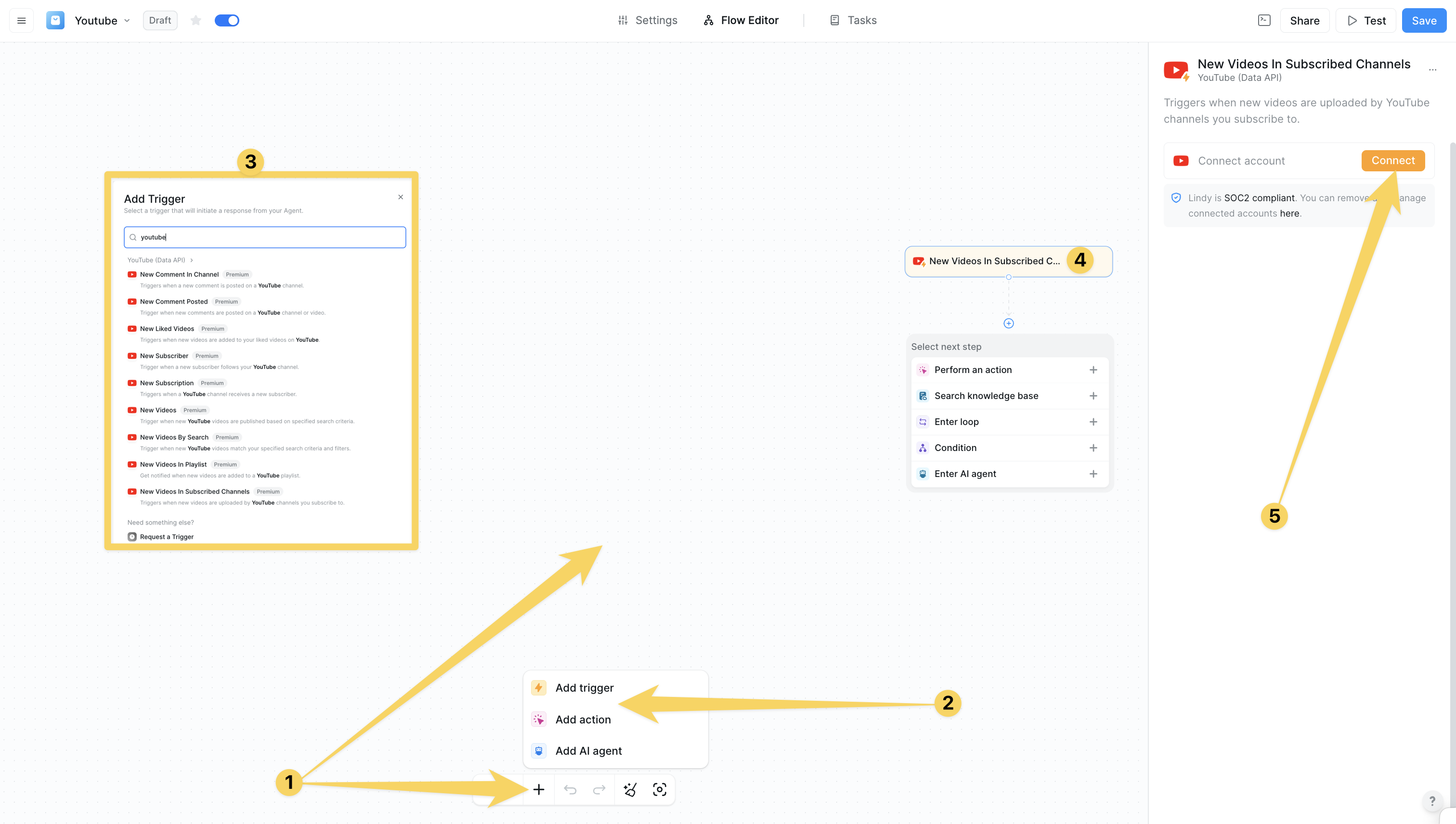
Click on the plus sign at the bottom or right-click anywhere on the canvas and select "Add Trigger" or "Add Action" from the pop-up menu and choose "YouTube"
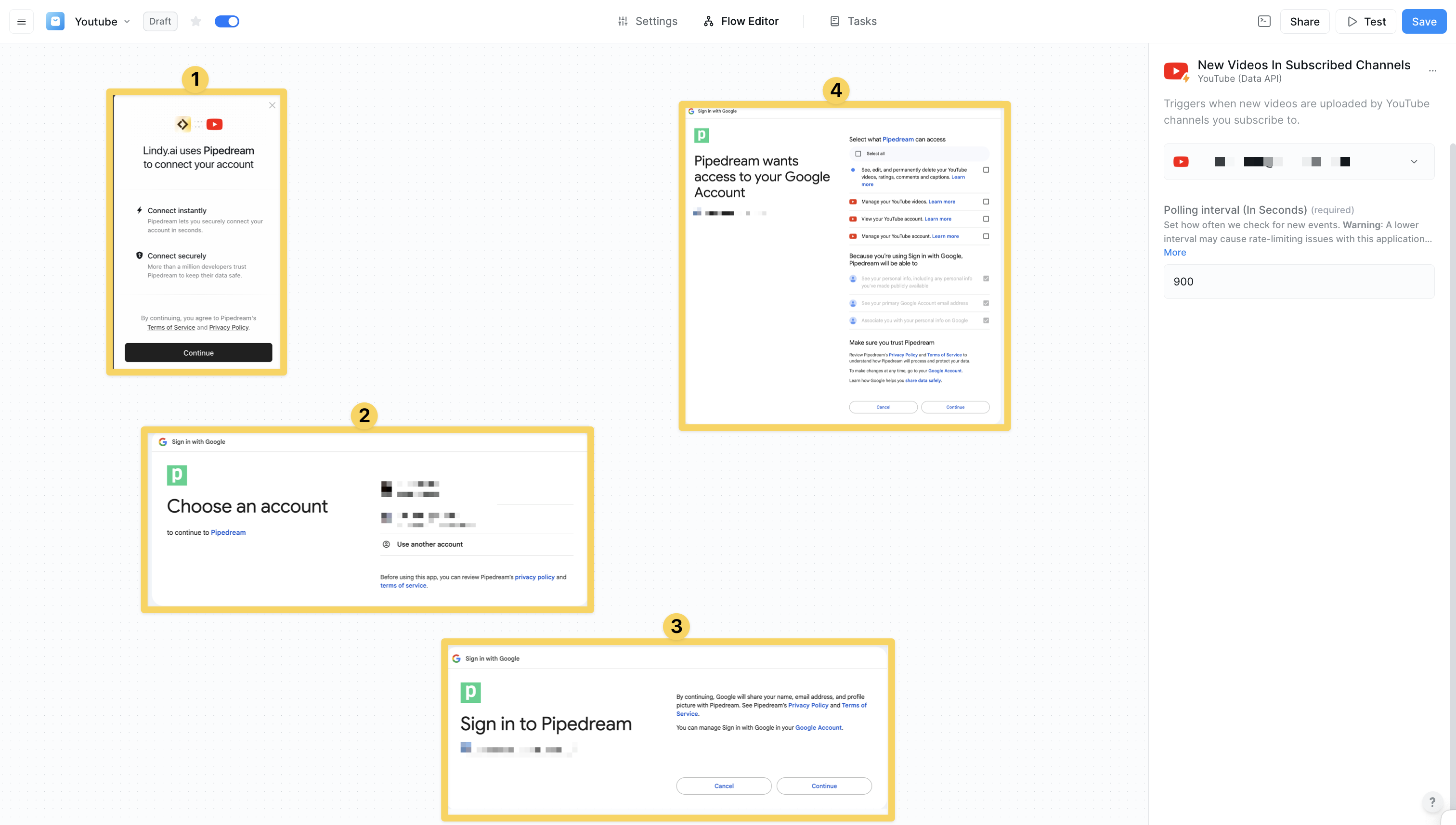
 Click on "Add Account" and authorize your YouTube for Lindy's integrations through Google OAuth. Grant the necessary permissions for read, write, and manage access to your YouTube account.
 ## YouTube Triggers
#### New Comment In Channel
Triggers when a new comment is posted on a YouTube channel:
* **Community management** - Stay on top of community interactions automatically
* **Automated responses** - Respond to frequently asked questions instantly
* **Content moderation** - Monitor and moderate channel comments
* Perfect for community engagement, customer service, content moderation
#### New Comment Posted
Triggers when new comments are posted on YouTube videos or channels:
* **Broader monitoring** - Track comments across multiple videos
* **Sentiment analysis** - Analyze viewer feedback and sentiment
* **Customer service** - Automate responses to product-related inquiries
* Essential for engagement tracking, customer service, feedback analysis
#### New Liked Videos
Triggers when new videos are added to your liked videos:
* **Content curation** - Build personal content curation workflows
* **Research compilation** - Track competitive analysis and inspiration
* **Recommendation systems** - Build systems based on preferences
* Perfect for content research, competitive analysis, personal curation
#### New Subscriber
Triggers when a new subscriber follows your YouTube channel:
* **Welcome campaigns** - Send welcome emails to new subscribers
* **Milestone celebrations** - Celebrate subscriber milestones automatically
* **CRM integration** - Convert subscribers into leads
* Essential for growth tracking, welcome sequences, community building
#### New Subscription
Triggers when a YouTube channel receives a new subscriber:
* **Growth tracking** - Monitor channel growth and analytics
* **Thank you messages** - Send automated appreciation messages
* **Marketing funnels** - Integrate with marketing automation
* Perfect for analytics tracking, subscriber engagement, growth monitoring
#### New Videos
Triggers when new YouTube videos are published based on search criteria:
* **Competitor monitoring** - Track competitor video uploads
* **Industry trends** - Monitor industry-specific content
* **Content research** - Gather inspiration and market intelligence
* Essential for competitive analysis, market research, trend monitoring
#### New Videos By Search
Triggers when new videos match specified search criteria and filters:
* **Targeted monitoring** - Highly specific content tracking
* **Brand mentions** - Track brand mentions across YouTube
* **Niche research** - Monitor specific topics and keywords
* Perfect for brand monitoring, niche research, targeted content curation
#### New Videos In Playlist
Triggers when new videos are added to a YouTube playlist:
* **Playlist management** - Automate playlist organization
* **Educational tracking** - Monitor course and series updates
* **Collaborative management** - Track team playlist changes
* Essential for playlist automation, educational content, team collaboration
#### New Videos In Subscribed Channels
Triggers when subscribed channels upload new videos:
* **Content consumption** - Automate personal content workflows
* **Research automation** - Track learning and research sources
* **Competitive analysis** - Monitor competitor uploads
* Perfect for personal automation, research workflows, competitive intelligence
Use "New Videos By Search" triggers combined with "Create Comment Thread" actions for the most powerful YouTube engagement workflows.
## YouTube Actions
#### Transcribe Video
Get captions and title for a YouTube video as plain text:
* **Content analysis** - Analyze video content and generate summaries
* **SEO research** - Extract content for optimization research
* **Accessibility** - Improve content accessibility with transcriptions
* Perfect for content analysis, SEO optimization, accessibility improvements
#### YouTube Channels by URL
Collect YouTube channels by channel URL:
* **Channel analysis** - Research and analyze channel performance
* **Competitor profiling** - Build comprehensive competitor profiles
* **Influencer identification** - Discover partnership opportunities
* Essential for channel research, competitor analysis, influencer marketing
#### YouTube Comments by URL
Collect YouTube comments by video URL:
* **Sentiment analysis** - Analyze viewer sentiment and feedback
* **Community insights** - Understand audience preferences
* **Market research** - Gather market intelligence from comments
* Perfect for sentiment analysis, market research, community insights
#### YouTube Scraper
YouTube crawler and video scraper with no limits or quotas:
* **Large-scale extraction** - Extract data at scale without API limits
* **Comprehensive research** - Conduct extensive market research
* **Content analysis** - Analyze content across multiple channels
* Essential for large-scale data extraction, comprehensive research, competitive intelligence
#### YouTube Videos by URL
Collect YouTube videos by video URL:
* **Video metadata** - Extract comprehensive video information
* **Content cataloging** - Organize and catalog video content
* **Performance tracking** - Track video performance metrics
* Perfect for video analysis, content cataloging, performance tracking
#### Add Playlist Items
Add videos to a YouTube playlist:
* **Automated curation** - Automatically organize content into playlists
* **Content organization** - Structure educational and marketing content
* **Campaign management** - Organize campaign-specific content
* Essential for content organization, automated curation, campaign management
#### Create Comment Thread
Create a new comment thread on a YouTube video or channel:
* **Automated engagement** - Engage with community automatically
* **Community building** - Build stronger community connections
* **Marketing campaigns** - Execute marketing engagement strategies
* Perfect for community engagement, marketing campaigns, customer service
#### Create Playlist
Create a new playlist with customizable privacy settings:
* **Content organization** - Organize content into structured playlists
* **Campaign playlists** - Create campaign-specific content collections
* **Educational series** - Structure educational content systematically
* Essential for content organization, educational series, campaign management
#### Delete Playlist
Delete a YouTube playlist from your account:
* **Content cleanup** - Remove outdated or unnecessary playlists
* **Campaign conclusion** - Clean up after campaign completion
* **Account maintenance** - Maintain organized channel structure
* Perfect for content cleanup, campaign management, account maintenance
#### Delete Playlist Items
Remove selected videos from a YouTube playlist:
* **Playlist maintenance** - Keep playlists current and relevant
* **Content quality control** - Remove low-performing content
* **Automated curation** - Maintain high-quality content collections
* Essential for playlist maintenance, quality control, automated curation
#### List Playlist Videos
Get a list of videos from a specified YouTube playlist:
* **Playlist analysis** - Analyze playlist performance and content
* **Content auditing** - Audit and review playlist content
* **Performance tracking** - Track playlist engagement metrics
* Perfect for playlist analysis, content auditing, performance tracking
#### Reply To Comment
Reply to YouTube comments with custom text messages:
* **Community engagement** - Respond to community interactions
* **Customer service** - Provide automated customer support
* **Marketing interactions** - Engage with marketing campaigns
* Essential for community engagement, customer service, marketing automation
#### Search Videos
Search YouTube videos with filters for duration, location, and criteria:
* **Content research** - Find relevant content for research
* **Competitive analysis** - Analyze competitor content strategies
* **Market intelligence** - Gather market insights and trends
* Perfect for content research, competitive analysis, market intelligence
#### Update Channel
Update YouTube channel details including description and keywords:
* **Channel optimization** - Optimize channel for better discoverability
* **SEO automation** - Automate SEO optimization workflows
* **Brand consistency** - Maintain consistent branding across channels
* Essential for channel optimization, SEO automation, brand management
#### Update Video Details
Modify title, description, tags, and metadata for YouTube videos:
* **SEO optimization** - Optimize video metadata for better ranking
* **Content updates** - Update video information and descriptions
* **Performance optimization** - Optimize based on performance data
* Perfect for SEO optimization, content updates, performance improvement
#### Upload Channel Banner
Upload a banner image to your YouTube channel:
* **Brand consistency** - Maintain consistent visual branding
* **Campaign branding** - Update branding for specific campaigns
* **Seasonal updates** - Automate seasonal branding changes
* Essential for brand consistency, campaign management, seasonal updates
#### Upload Thumbnail
Upload a custom thumbnail image for a YouTube video:
* **Visual optimization** - Optimize thumbnails for better click-through
* **A/B testing** - Test different thumbnail variations
* **Brand consistency** - Maintain consistent thumbnail styling
* Perfect for visual optimization, A/B testing, brand consistency
#### Upload Video
Upload and publish videos to YouTube with customizable settings:
* **Content publishing** - Automate video publishing workflows
* **Scheduled releases** - Schedule content releases automatically
* **Multi-platform distribution** - Coordinate across multiple platforms
* Essential for content publishing, scheduled releases, campaign launches
## Practical Implementation Scenarios
Transform Lindy into a comprehensive content management assistant:
* New video upload → Optimize metadata → Upload custom thumbnail → Create playlist → Engage with comments → Track performance → Generate reports
Build sophisticated community engagement workflows:
* New comment posted → Analyze sentiment → Generate appropriate response → Reply to comment → Escalate if needed → Update engagement metrics
Create advanced competitor monitoring systems:
* New competitor video → Analyze content → Extract insights → Update competitive analysis → Generate reports → Adjust strategy
## Advanced Features & Capabilities
Full-featured YouTube content management capabilities:
* **Video Publishing** - Upload, optimize, and schedule video content
* **Playlist Management** - Organize and maintain content collections
* **Channel Optimization** - Optimize channel settings and branding
* **Metadata Management** - Optimize titles, descriptions, and tags
Advanced community management and engagement features:
* **Comment Monitoring** - Track and respond to community interactions
* **Automated Responses** - Provide instant responses to common questions
* **Sentiment Analysis** - Analyze community sentiment and feedback
* **Engagement Tracking** - Monitor and optimize community engagement
Powerful analytics and competitive intelligence capabilities:
* **Performance Tracking** - Monitor video and channel performance
* **Competitor Analysis** - Track competitor strategies and content
* **Market Research** - Gather insights from YouTube ecosystem
* **Trend Monitoring** - Stay ahead of industry trends and topics
## Configuration Best Practices
Optimize your content creation workflows:
* Use "Upload Video" with automated metadata optimization
* Set up "New Comment Posted" triggers for community engagement
* Implement "Create Playlist" for content organization
* Use "Update Video Details" for SEO optimization
* Set up automated thumbnail and banner updates
Set up powerful marketing automation workflows:
* Use "New Videos By Search" for brand monitoring
* Implement "Create Comment Thread" for engagement campaigns
* Set up "Search Videos" for competitive analysis
* Use "YouTube Scraper" for large-scale market research
* Create automated reporting and analytics workflows
Create comprehensive business automation workflows:
* Use "New Subscriber" triggers for lead generation
* Implement "Reply To Comment" for customer service
* Set up "Transcribe Video" for content analysis
* Use "YouTube Comments by URL" for sentiment analysis
* Create automated compliance and moderation workflows
## Limitations & Considerations
* **Rate Limits**: YouTube Data API has daily quota limits
* **Authentication**: Requires Google OAuth 2.0 authentication
* **Permissions**: Different actions require different permission scopes
* **Content Policies**: All actions must comply with YouTube's content policies
* **Video Processing**: Large video uploads may take time to process
* **Thumbnail Requirements**: Custom thumbnails require channel verification
* **Comment Moderation**: Automated responses should be carefully designed
* **Data Retention**: Consider data retention policies for scraped content
* **Quality Control**: Implement quality checks for automated content
* **Community Guidelines**: Ensure all automation complies with YouTube guidelines
* **Performance Monitoring**: Monitor automation performance and adjust as needed
* **Human Oversight**: Maintain human oversight for sensitive interactions
## Next steps
Combine YouTube with file management automation
Connect YouTube workflows with email automation
Build intelligent content and community management agents
Store and analyze video performance data
## YouTube Triggers
#### New Comment In Channel
Triggers when a new comment is posted on a YouTube channel:
* **Community management** - Stay on top of community interactions automatically
* **Automated responses** - Respond to frequently asked questions instantly
* **Content moderation** - Monitor and moderate channel comments
* Perfect for community engagement, customer service, content moderation
#### New Comment Posted
Triggers when new comments are posted on YouTube videos or channels:
* **Broader monitoring** - Track comments across multiple videos
* **Sentiment analysis** - Analyze viewer feedback and sentiment
* **Customer service** - Automate responses to product-related inquiries
* Essential for engagement tracking, customer service, feedback analysis
#### New Liked Videos
Triggers when new videos are added to your liked videos:
* **Content curation** - Build personal content curation workflows
* **Research compilation** - Track competitive analysis and inspiration
* **Recommendation systems** - Build systems based on preferences
* Perfect for content research, competitive analysis, personal curation
#### New Subscriber
Triggers when a new subscriber follows your YouTube channel:
* **Welcome campaigns** - Send welcome emails to new subscribers
* **Milestone celebrations** - Celebrate subscriber milestones automatically
* **CRM integration** - Convert subscribers into leads
* Essential for growth tracking, welcome sequences, community building
#### New Subscription
Triggers when a YouTube channel receives a new subscriber:
* **Growth tracking** - Monitor channel growth and analytics
* **Thank you messages** - Send automated appreciation messages
* **Marketing funnels** - Integrate with marketing automation
* Perfect for analytics tracking, subscriber engagement, growth monitoring
#### New Videos
Triggers when new YouTube videos are published based on search criteria:
* **Competitor monitoring** - Track competitor video uploads
* **Industry trends** - Monitor industry-specific content
* **Content research** - Gather inspiration and market intelligence
* Essential for competitive analysis, market research, trend monitoring
#### New Videos By Search
Triggers when new videos match specified search criteria and filters:
* **Targeted monitoring** - Highly specific content tracking
* **Brand mentions** - Track brand mentions across YouTube
* **Niche research** - Monitor specific topics and keywords
* Perfect for brand monitoring, niche research, targeted content curation
#### New Videos In Playlist
Triggers when new videos are added to a YouTube playlist:
* **Playlist management** - Automate playlist organization
* **Educational tracking** - Monitor course and series updates
* **Collaborative management** - Track team playlist changes
* Essential for playlist automation, educational content, team collaboration
#### New Videos In Subscribed Channels
Triggers when subscribed channels upload new videos:
* **Content consumption** - Automate personal content workflows
* **Research automation** - Track learning and research sources
* **Competitive analysis** - Monitor competitor uploads
* Perfect for personal automation, research workflows, competitive intelligence
Use "New Videos By Search" triggers combined with "Create Comment Thread" actions for the most powerful YouTube engagement workflows.
## YouTube Actions
#### Transcribe Video
Get captions and title for a YouTube video as plain text:
* **Content analysis** - Analyze video content and generate summaries
* **SEO research** - Extract content for optimization research
* **Accessibility** - Improve content accessibility with transcriptions
* Perfect for content analysis, SEO optimization, accessibility improvements
#### YouTube Channels by URL
Collect YouTube channels by channel URL:
* **Channel analysis** - Research and analyze channel performance
* **Competitor profiling** - Build comprehensive competitor profiles
* **Influencer identification** - Discover partnership opportunities
* Essential for channel research, competitor analysis, influencer marketing
#### YouTube Comments by URL
Collect YouTube comments by video URL:
* **Sentiment analysis** - Analyze viewer sentiment and feedback
* **Community insights** - Understand audience preferences
* **Market research** - Gather market intelligence from comments
* Perfect for sentiment analysis, market research, community insights
#### YouTube Scraper
YouTube crawler and video scraper with no limits or quotas:
* **Large-scale extraction** - Extract data at scale without API limits
* **Comprehensive research** - Conduct extensive market research
* **Content analysis** - Analyze content across multiple channels
* Essential for large-scale data extraction, comprehensive research, competitive intelligence
#### YouTube Videos by URL
Collect YouTube videos by video URL:
* **Video metadata** - Extract comprehensive video information
* **Content cataloging** - Organize and catalog video content
* **Performance tracking** - Track video performance metrics
* Perfect for video analysis, content cataloging, performance tracking
#### Add Playlist Items
Add videos to a YouTube playlist:
* **Automated curation** - Automatically organize content into playlists
* **Content organization** - Structure educational and marketing content
* **Campaign management** - Organize campaign-specific content
* Essential for content organization, automated curation, campaign management
#### Create Comment Thread
Create a new comment thread on a YouTube video or channel:
* **Automated engagement** - Engage with community automatically
* **Community building** - Build stronger community connections
* **Marketing campaigns** - Execute marketing engagement strategies
* Perfect for community engagement, marketing campaigns, customer service
#### Create Playlist
Create a new playlist with customizable privacy settings:
* **Content organization** - Organize content into structured playlists
* **Campaign playlists** - Create campaign-specific content collections
* **Educational series** - Structure educational content systematically
* Essential for content organization, educational series, campaign management
#### Delete Playlist
Delete a YouTube playlist from your account:
* **Content cleanup** - Remove outdated or unnecessary playlists
* **Campaign conclusion** - Clean up after campaign completion
* **Account maintenance** - Maintain organized channel structure
* Perfect for content cleanup, campaign management, account maintenance
#### Delete Playlist Items
Remove selected videos from a YouTube playlist:
* **Playlist maintenance** - Keep playlists current and relevant
* **Content quality control** - Remove low-performing content
* **Automated curation** - Maintain high-quality content collections
* Essential for playlist maintenance, quality control, automated curation
#### List Playlist Videos
Get a list of videos from a specified YouTube playlist:
* **Playlist analysis** - Analyze playlist performance and content
* **Content auditing** - Audit and review playlist content
* **Performance tracking** - Track playlist engagement metrics
* Perfect for playlist analysis, content auditing, performance tracking
#### Reply To Comment
Reply to YouTube comments with custom text messages:
* **Community engagement** - Respond to community interactions
* **Customer service** - Provide automated customer support
* **Marketing interactions** - Engage with marketing campaigns
* Essential for community engagement, customer service, marketing automation
#### Search Videos
Search YouTube videos with filters for duration, location, and criteria:
* **Content research** - Find relevant content for research
* **Competitive analysis** - Analyze competitor content strategies
* **Market intelligence** - Gather market insights and trends
* Perfect for content research, competitive analysis, market intelligence
#### Update Channel
Update YouTube channel details including description and keywords:
* **Channel optimization** - Optimize channel for better discoverability
* **SEO automation** - Automate SEO optimization workflows
* **Brand consistency** - Maintain consistent branding across channels
* Essential for channel optimization, SEO automation, brand management
#### Update Video Details
Modify title, description, tags, and metadata for YouTube videos:
* **SEO optimization** - Optimize video metadata for better ranking
* **Content updates** - Update video information and descriptions
* **Performance optimization** - Optimize based on performance data
* Perfect for SEO optimization, content updates, performance improvement
#### Upload Channel Banner
Upload a banner image to your YouTube channel:
* **Brand consistency** - Maintain consistent visual branding
* **Campaign branding** - Update branding for specific campaigns
* **Seasonal updates** - Automate seasonal branding changes
* Essential for brand consistency, campaign management, seasonal updates
#### Upload Thumbnail
Upload a custom thumbnail image for a YouTube video:
* **Visual optimization** - Optimize thumbnails for better click-through
* **A/B testing** - Test different thumbnail variations
* **Brand consistency** - Maintain consistent thumbnail styling
* Perfect for visual optimization, A/B testing, brand consistency
#### Upload Video
Upload and publish videos to YouTube with customizable settings:
* **Content publishing** - Automate video publishing workflows
* **Scheduled releases** - Schedule content releases automatically
* **Multi-platform distribution** - Coordinate across multiple platforms
* Essential for content publishing, scheduled releases, campaign launches
## Practical Implementation Scenarios
Transform Lindy into a comprehensive content management assistant:
* New video upload → Optimize metadata → Upload custom thumbnail → Create playlist → Engage with comments → Track performance → Generate reports
Build sophisticated community engagement workflows:
* New comment posted → Analyze sentiment → Generate appropriate response → Reply to comment → Escalate if needed → Update engagement metrics
Create advanced competitor monitoring systems:
* New competitor video → Analyze content → Extract insights → Update competitive analysis → Generate reports → Adjust strategy
## Advanced Features & Capabilities
Full-featured YouTube content management capabilities:
* **Video Publishing** - Upload, optimize, and schedule video content
* **Playlist Management** - Organize and maintain content collections
* **Channel Optimization** - Optimize channel settings and branding
* **Metadata Management** - Optimize titles, descriptions, and tags
Advanced community management and engagement features:
* **Comment Monitoring** - Track and respond to community interactions
* **Automated Responses** - Provide instant responses to common questions
* **Sentiment Analysis** - Analyze community sentiment and feedback
* **Engagement Tracking** - Monitor and optimize community engagement
Powerful analytics and competitive intelligence capabilities:
* **Performance Tracking** - Monitor video and channel performance
* **Competitor Analysis** - Track competitor strategies and content
* **Market Research** - Gather insights from YouTube ecosystem
* **Trend Monitoring** - Stay ahead of industry trends and topics
## Configuration Best Practices
Optimize your content creation workflows:
* Use "Upload Video" with automated metadata optimization
* Set up "New Comment Posted" triggers for community engagement
* Implement "Create Playlist" for content organization
* Use "Update Video Details" for SEO optimization
* Set up automated thumbnail and banner updates
Set up powerful marketing automation workflows:
* Use "New Videos By Search" for brand monitoring
* Implement "Create Comment Thread" for engagement campaigns
* Set up "Search Videos" for competitive analysis
* Use "YouTube Scraper" for large-scale market research
* Create automated reporting and analytics workflows
Create comprehensive business automation workflows:
* Use "New Subscriber" triggers for lead generation
* Implement "Reply To Comment" for customer service
* Set up "Transcribe Video" for content analysis
* Use "YouTube Comments by URL" for sentiment analysis
* Create automated compliance and moderation workflows
## Limitations & Considerations
* **Rate Limits**: YouTube Data API has daily quota limits
* **Authentication**: Requires Google OAuth 2.0 authentication
* **Permissions**: Different actions require different permission scopes
* **Content Policies**: All actions must comply with YouTube's content policies
* **Video Processing**: Large video uploads may take time to process
* **Thumbnail Requirements**: Custom thumbnails require channel verification
* **Comment Moderation**: Automated responses should be carefully designed
* **Data Retention**: Consider data retention policies for scraped content
* **Quality Control**: Implement quality checks for automated content
* **Community Guidelines**: Ensure all automation complies with YouTube guidelines
* **Performance Monitoring**: Monitor automation performance and adjust as needed
* **Human Oversight**: Maintain human oversight for sensitive interactions
## Next steps
Combine YouTube with file management automation
Connect YouTube workflows with email automation
Build intelligent content and community management agents
Store and analyze video performance data