> ## Documentation Index
> Fetch the complete documentation index at: https://docs.lindy.ai/llms.txt
> Use this file to discover all available pages before exploring further.
# Perplexity
> Search the web with AI-powered research using Perplexity models for real-time information.
## Overview
The Search Perplexity action gives your agent access to real-time web search with AI-powered research capabilities. Perfect for:
* **Real-time information** — access current news, trends, and up-to-date data
* **Research tasks** — get detailed answers with sources and citations
* **Fact checking** — verify claims and get authoritative information
## Search Perplexity Action
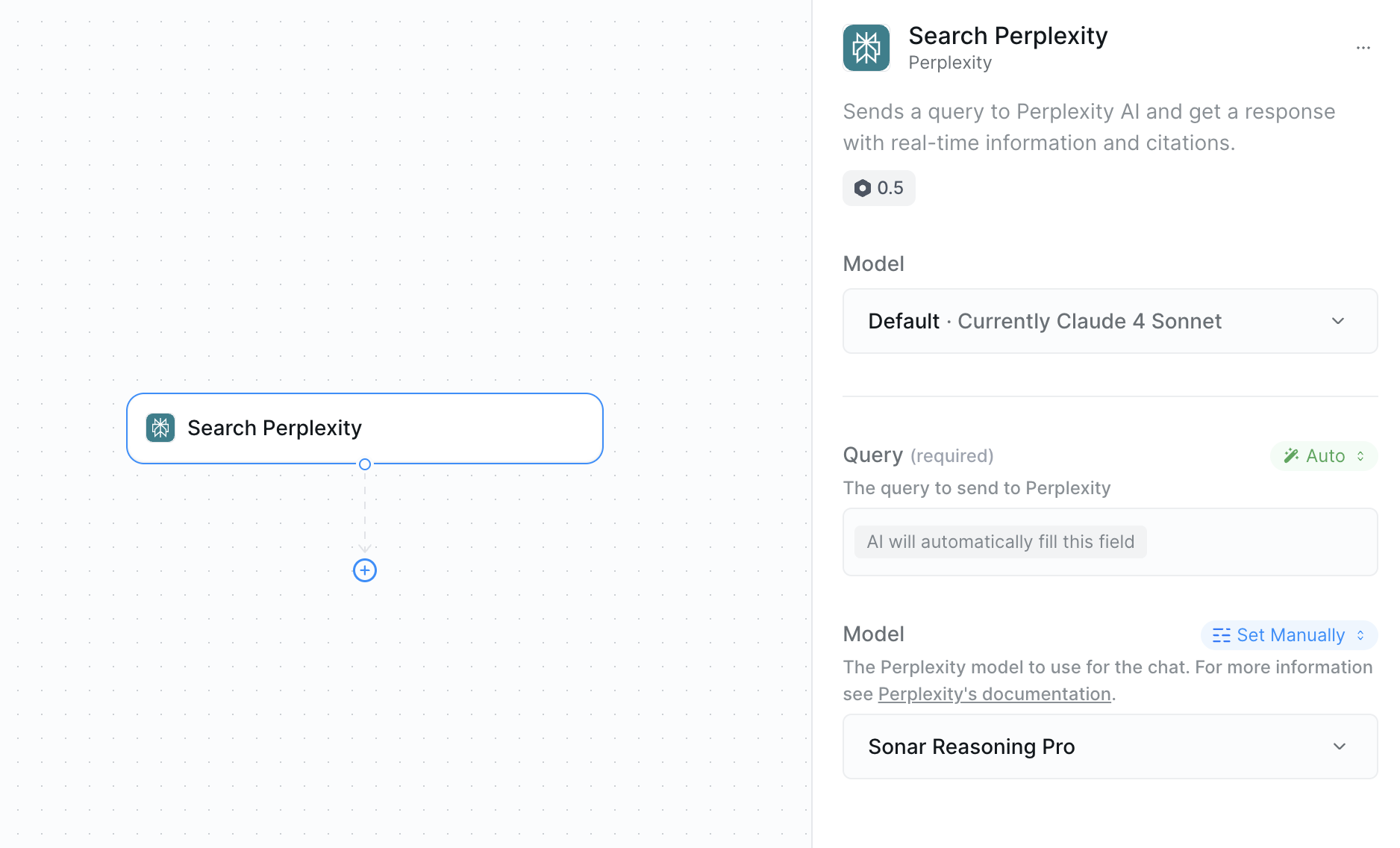
* **What it does**: Searches the web using Perplexity's AI models to provide sourced answers to your queries with real-time information.
 ### Inputs
* **Query**: The search query or question you want answered
* **Model**: Choose from Perplexity's model lineup based on your needs
### Outputs
* **Response**: The answer to your query
* **Citations**: Sources and references used in the response
### Query Options
You have two ways to set the query:
* **Manual Query**: Write your search query directly
* **AI-Generated Query**: Let your agent craft the optimal query based on workflow context
### Model Selection
| Model | Description | Strength |
| ----------------------- | --------------------------------------------- | -------- |
| **Sonar** | Quick research and basic searches | ⭐ |
| **Sonar Pro** | Better searches with more detailed results | ⭐⭐ |
| **Sonar Reasoning** | Adds reasoning capabilities to search results | ⭐⭐⭐ |
| **Sonar Reasoning Pro** | Advanced reasoning with better analysis | ⭐⭐⭐⭐ |
| **Sonar Deep Research** | Uses Perplexity's deep research function | ⭐⭐⭐⭐⭐ |
Sonar Reasoning Pro is recommended for most use cases as it provides the best balance of reasoning capability, search quality, and performance.
## Best Practices
* Be specific about what information you need
* Include timeframes when relevant ("latest", "2024", "recent")
* Use AI query generation when context is important
* Test different phrasings for complex topics
* Include industry or domain context for better results
* Start with lower-tier models for simple queries
* Use Deep Research for comprehensive analysis
* Consider cost vs. thoroughness trade-offs
* Use Reasoning models when you need logical connections
* Scale model choice to query complexity
## Next Steps
Extract specific data from websites found in your research
Store important research findings for your agent's memory
Save search results for use in other workflow steps
Analyze Perplexity results with custom AI prompts
### Inputs
* **Query**: The search query or question you want answered
* **Model**: Choose from Perplexity's model lineup based on your needs
### Outputs
* **Response**: The answer to your query
* **Citations**: Sources and references used in the response
### Query Options
You have two ways to set the query:
* **Manual Query**: Write your search query directly
* **AI-Generated Query**: Let your agent craft the optimal query based on workflow context
### Model Selection
| Model | Description | Strength |
| ----------------------- | --------------------------------------------- | -------- |
| **Sonar** | Quick research and basic searches | ⭐ |
| **Sonar Pro** | Better searches with more detailed results | ⭐⭐ |
| **Sonar Reasoning** | Adds reasoning capabilities to search results | ⭐⭐⭐ |
| **Sonar Reasoning Pro** | Advanced reasoning with better analysis | ⭐⭐⭐⭐ |
| **Sonar Deep Research** | Uses Perplexity's deep research function | ⭐⭐⭐⭐⭐ |
Sonar Reasoning Pro is recommended for most use cases as it provides the best balance of reasoning capability, search quality, and performance.
## Best Practices
* Be specific about what information you need
* Include timeframes when relevant ("latest", "2024", "recent")
* Use AI query generation when context is important
* Test different phrasings for complex topics
* Include industry or domain context for better results
* Start with lower-tier models for simple queries
* Use Deep Research for comprehensive analysis
* Consider cost vs. thoroughness trade-offs
* Use Reasoning models when you need logical connections
* Scale model choice to query complexity
## Next Steps
Extract specific data from websites found in your research
Store important research findings for your agent's memory
Save search results for use in other workflow steps
Analyze Perplexity results with custom AI prompts