> ## Documentation Index
> Fetch the complete documentation index at: https://docs.lindy.ai/llms.txt
> Use this file to discover all available pages before exploring further.
# Test Panel
> Test workflow runs step-by-step using the built-in test panel with free credits and real-time monitoring.
## Overview
The Test Panel lets you test a workflow run in real time before turning it on. Perfect for:
* **Testing workflows**: Run a workflow step-by-step to see exactly what happens
* **Debugging issues**: Identify problems in your logic or configuration
* **Validating triggers**: Test different trigger scenarios and inputs
## How to Use the Test Panel
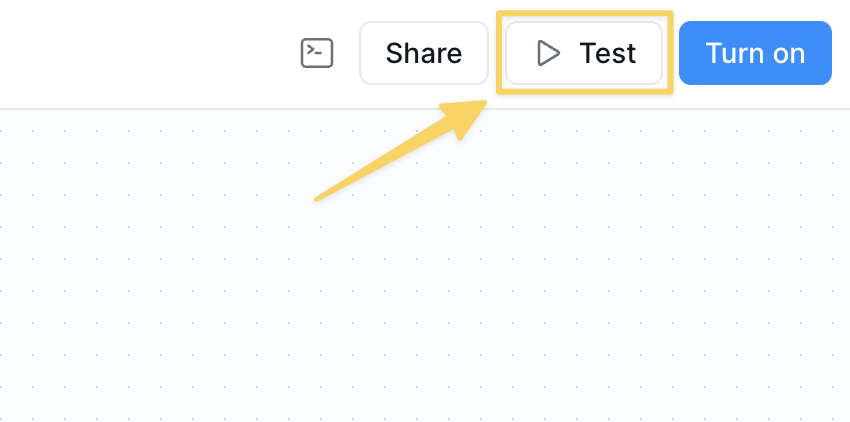
1. **Open the Test Panel**: Click the test button in the top right corner of your workflow editor
 2. **Select Your Trigger**
* A right panel will appear where you can choose from available triggers
* If you have multiple triggers, you'll see multiple trigger options to start from
* Click the trigger you want to test
3. **Run and Monitor**
* Your workflow will execute step-by-step
* Watch each action happen in real-time
* See outputs, errors, and decision points
* Follow the complete workflow from start to finish
The first 500 credits per test run are free! This gives you plenty of credits to thoroughly test your workflows before going live.
## What to Expect
* **Step-by-step execution** - See each action as it happens
* **Real-time feedback** - Get immediate results and error messages
* **Multiple trigger testing** - Test different entry points for a workflow
* **Free testing credits** - No cost for your first 500 credits per run
## Important Notes
The test panel shows actual execution - not a simulation. Actions will really run, APIs will be called, and data will be processed. Use test data when possible.
When testing Google Sheets, it can sometimes take a minute for new rows to populate in the test panel. Be patient - this is because of the Google API.
## Next Steps
Learn how to troubleshoot common issues
Set up monitoring for live workflow runs
Add manual review steps to your workflows
Start with pre-built agent templates
2. **Select Your Trigger**
* A right panel will appear where you can choose from available triggers
* If you have multiple triggers, you'll see multiple trigger options to start from
* Click the trigger you want to test
3. **Run and Monitor**
* Your workflow will execute step-by-step
* Watch each action happen in real-time
* See outputs, errors, and decision points
* Follow the complete workflow from start to finish
The first 500 credits per test run are free! This gives you plenty of credits to thoroughly test your workflows before going live.
## What to Expect
* **Step-by-step execution** - See each action as it happens
* **Real-time feedback** - Get immediate results and error messages
* **Multiple trigger testing** - Test different entry points for a workflow
* **Free testing credits** - No cost for your first 500 credits per run
## Important Notes
The test panel shows actual execution - not a simulation. Actions will really run, APIs will be called, and data will be processed. Use test data when possible.
When testing Google Sheets, it can sometimes take a minute for new rows to populate in the test panel. Be patient - this is because of the Google API.
## Next Steps
Learn how to troubleshoot common issues
Set up monitoring for live workflow runs
Add manual review steps to your workflows
Start with pre-built agent templates