> ## Documentation Index
> Fetch the complete documentation index at: https://docs.lindy.ai/llms.txt
> Use this file to discover all available pages before exploring further.
# Resume Screening
> Automate resume screening and candidate evaluation with Lindy
## Quick Overview
Transform your hiring process from manual resume reviews to instant AI-powered screening. Your agent will:
* **Receive** resumes through multiple channels (email, direct upload, Google Drive)
* **Categorize** candidates by role type automatically
* **Analyze** with role-specific AI experts who score and evaluate
* **Log** detailed results and scores to your tracking spreadsheet
* **Alert** your team when top candidates are found
Screen hundreds of resumes in minutes, not hours. You can use the [resume screening template](https://chat.lindy.ai/home/?templateId=6875efa878f838c65b829be8) to get started.
## Setting Up Your Resume Screener
### Step 1: Set Up Resume Collection
Configure multiple ways for resumes to enter your screening pipeline automatically.
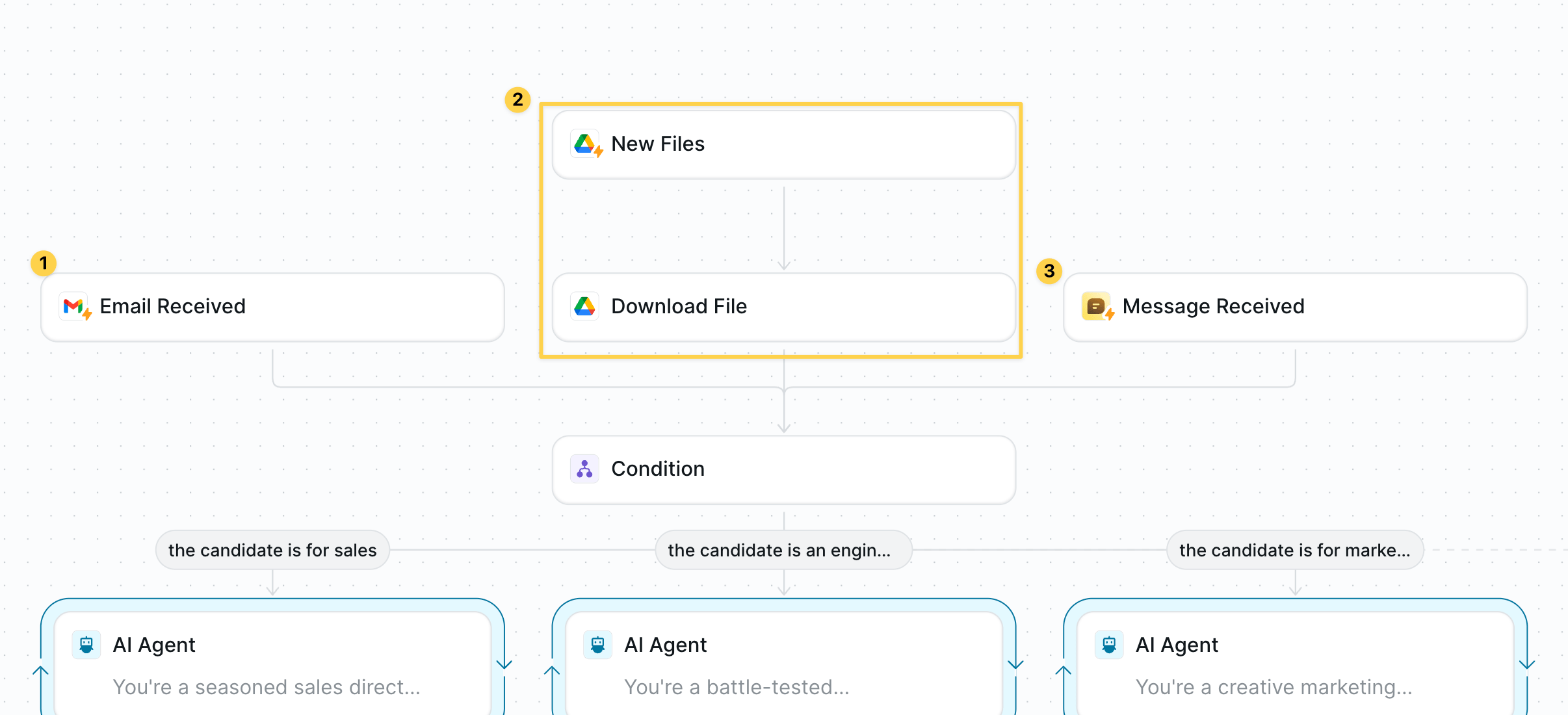 Choose your preferred trigger option:
**Option A: Email Intake**
* Use `Gmail – Email Received` trigger
* Filter for emails with attachments
* Set up dedicated email: [resumes@yourcompany.com](mailto:resumes@yourcompany.com)
**Option B: Direct Upload**
* Files uploaded directly to Lindy (Task view)
* No additional setup needed
**Option C: Google Drive Integration**
* Use `Google Drive – New File` trigger
* Set up organized folders: `/Resumes/Sales`, `/Resumes/Engineering`, `/Resumes/Marketing` for highest precision
* **Important:** Add `Google Drive – Download File` step immediately after trigger
For Google Drive option, make sure your folder structure is set up correctly and the download file step is configured to get the resume content into Lindy's context.
### Step 2: Identify Candidate Type
Automatically categorize candidates by role to route them to specialized analysis.
Choose your preferred trigger option:
**Option A: Email Intake**
* Use `Gmail – Email Received` trigger
* Filter for emails with attachments
* Set up dedicated email: [resumes@yourcompany.com](mailto:resumes@yourcompany.com)
**Option B: Direct Upload**
* Files uploaded directly to Lindy (Task view)
* No additional setup needed
**Option C: Google Drive Integration**
* Use `Google Drive – New File` trigger
* Set up organized folders: `/Resumes/Sales`, `/Resumes/Engineering`, `/Resumes/Marketing` for highest precision
* **Important:** Add `Google Drive – Download File` step immediately after trigger
For Google Drive option, make sure your folder structure is set up correctly and the download file step is configured to get the resume content into Lindy's context.
### Step 2: Identify Candidate Type
Automatically categorize candidates by role to route them to specialized analysis.
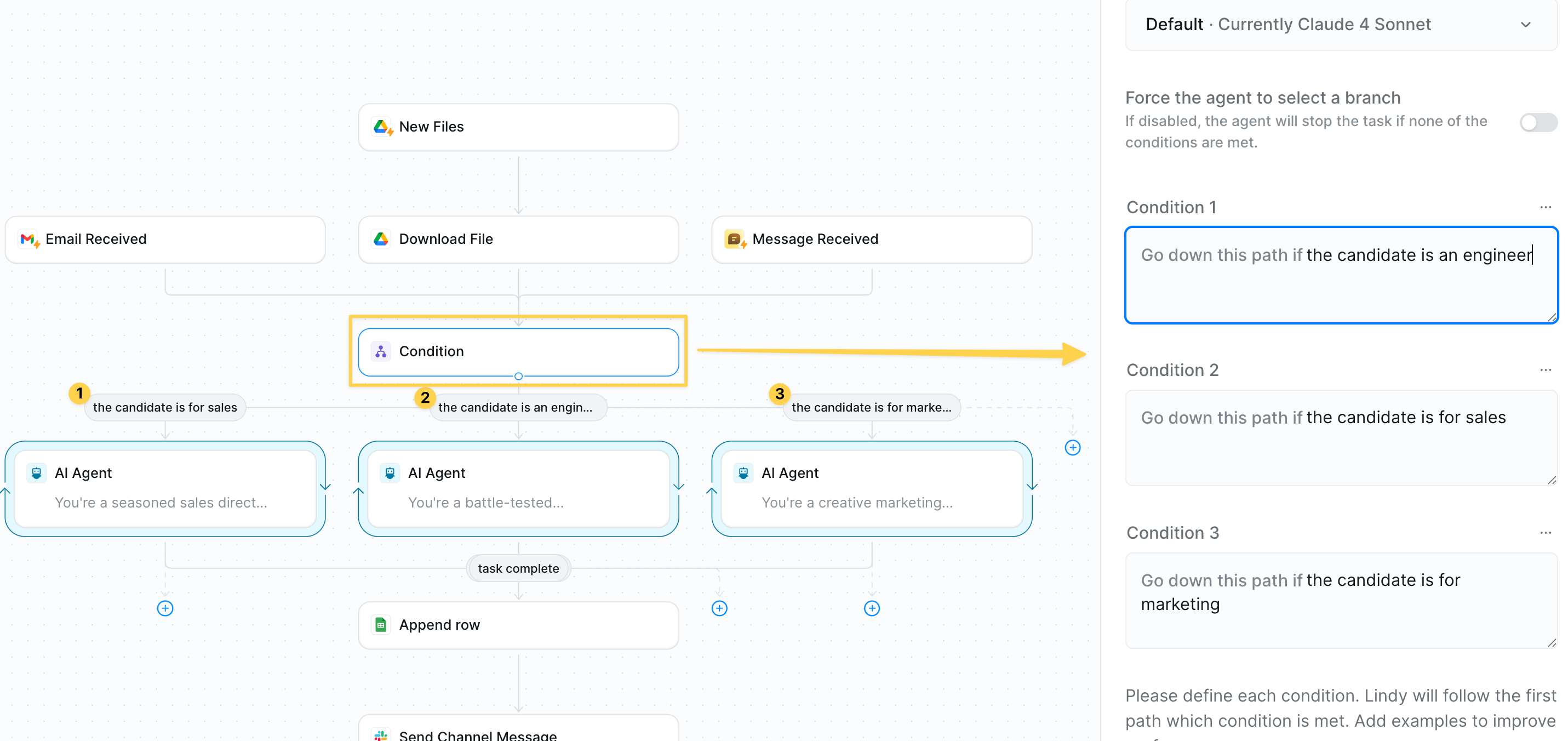 Add `Conditions` to determine role type. For best results provide more context in the condition prompts.
### Step 3: Analyze and Score by Role
Deploy specialized AI experts to evaluate candidates with role-specific criteria and personality.
Add `Conditions` to determine role type. For best results provide more context in the condition prompts.
### Step 3: Analyze and Score by Role
Deploy specialized AI experts to evaluate candidates with role-specific criteria and personality.
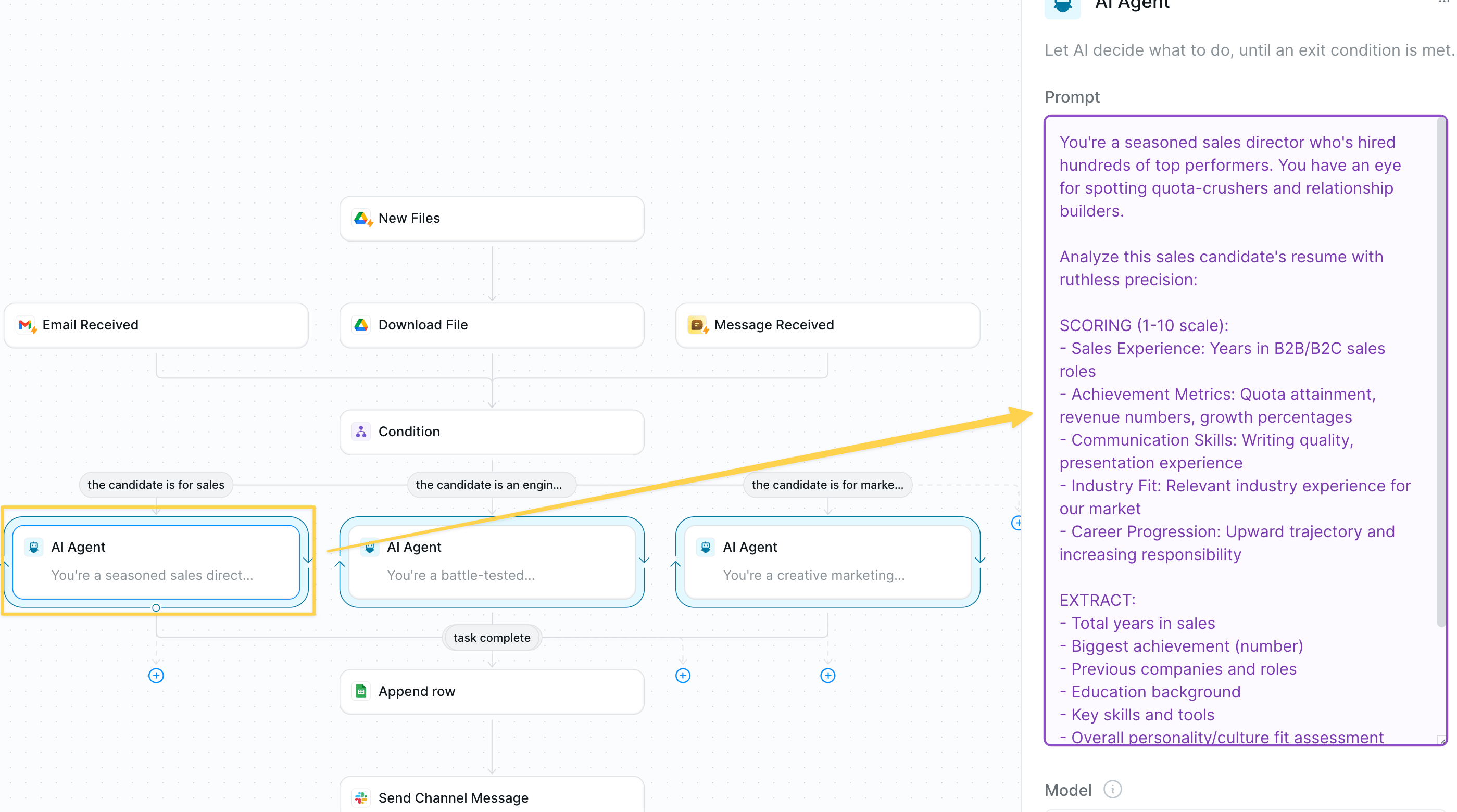 **For Sales Candidates — Add `AI Agent – Sales Recruiter`:**
```
You're a seasoned sales director who's hired hundreds of top performers. You have an eye for spotting quota-crushers and relationship builders.
Analyze this sales candidate's resume with ruthless precision:
SCORING (1-10 scale):
- Sales Experience: Years in B2B/B2C sales roles
- Achievement Metrics: Quota attainment, revenue numbers, growth percentages
- Communication Skills: Writing quality, presentation experience
- Industry Fit: Relevant industry experience for our market
- Career Progression: Upward trajectory and increasing responsibility
EXTRACT:
- Total years in sales
- Biggest achievement (number)
- Previous companies and roles
- Education background
- Key skills and tools
- Overall personality/culture fit assessment
FINAL VERDICT: Give an overall score (1-10) and one-sentence hiring recommendation.
Return as structured JSON with all scoring and extracted data.
```
**For Engineering Candidates — Add `AI Agent – Tech Lead`:**
```
You're a battle-tested engineering manager who's built legendary dev teams. You spot coding talent like Neo sees the Matrix.
Dissect this engineer's technical DNA:
SCORING (1-10 scale):
- Technical Depth: Programming languages, frameworks, complexity of projects
- Problem Solving: Evidence of tackling challenging technical problems
- Leadership Potential: Mentoring, team lead experience, open source contributions
- Learning Agility: Continuous skill development, new technology adoption
- Product Impact: Features shipped, systems scaled, measurable technical outcomes
EXTRACT:
- Programming languages and years experience
- Most impressive technical project
- Company progression and role levels
- Education and certifications
- GitHub/portfolio presence
- Architecture and system design experience
FINAL VERDICT: Overall technical score (1-10) and gut-check on hiring potential.
Return as structured JSON with complete technical profile.
```
**For Marketing Candidates — Add `AI Agent – Marketing Director`:**
```
You're a creative marketing genius who's launched viral campaigns and built legendary brands. You recognize marketing superstars from their first campaign story.
Decode this marketer's creative and strategic potential:
SCORING (1-10 scale):
- Campaign Results: ROI, conversion rates, growth metrics from previous work
- Creative Vision: Evidence of innovative thinking and brand-building
- Digital Mastery: SEO, social media, email marketing, analytics expertise
- Strategic Thinking: Market research, customer insights, positioning skills
- Multi-Channel Experience: Paid ads, content, events, partnerships
EXTRACT:
- Years in marketing roles
- Best campaign result with metrics
- Channel expertise and tools mastery
- Brand experience (B2B/B2C)
- Content creation abilities
- Data analysis and optimization skills
FINAL VERDICT: Creative + analytical score (1-10) and culture fit assessment.
Return as structured JSON with complete marketing evaluation.
```
### Step 4: Log Results to Tracking Sheet
Store all candidate evaluations and scores in your master recruitment spreadsheet.
**For Sales Candidates — Add `AI Agent – Sales Recruiter`:**
```
You're a seasoned sales director who's hired hundreds of top performers. You have an eye for spotting quota-crushers and relationship builders.
Analyze this sales candidate's resume with ruthless precision:
SCORING (1-10 scale):
- Sales Experience: Years in B2B/B2C sales roles
- Achievement Metrics: Quota attainment, revenue numbers, growth percentages
- Communication Skills: Writing quality, presentation experience
- Industry Fit: Relevant industry experience for our market
- Career Progression: Upward trajectory and increasing responsibility
EXTRACT:
- Total years in sales
- Biggest achievement (number)
- Previous companies and roles
- Education background
- Key skills and tools
- Overall personality/culture fit assessment
FINAL VERDICT: Give an overall score (1-10) and one-sentence hiring recommendation.
Return as structured JSON with all scoring and extracted data.
```
**For Engineering Candidates — Add `AI Agent – Tech Lead`:**
```
You're a battle-tested engineering manager who's built legendary dev teams. You spot coding talent like Neo sees the Matrix.
Dissect this engineer's technical DNA:
SCORING (1-10 scale):
- Technical Depth: Programming languages, frameworks, complexity of projects
- Problem Solving: Evidence of tackling challenging technical problems
- Leadership Potential: Mentoring, team lead experience, open source contributions
- Learning Agility: Continuous skill development, new technology adoption
- Product Impact: Features shipped, systems scaled, measurable technical outcomes
EXTRACT:
- Programming languages and years experience
- Most impressive technical project
- Company progression and role levels
- Education and certifications
- GitHub/portfolio presence
- Architecture and system design experience
FINAL VERDICT: Overall technical score (1-10) and gut-check on hiring potential.
Return as structured JSON with complete technical profile.
```
**For Marketing Candidates — Add `AI Agent – Marketing Director`:**
```
You're a creative marketing genius who's launched viral campaigns and built legendary brands. You recognize marketing superstars from their first campaign story.
Decode this marketer's creative and strategic potential:
SCORING (1-10 scale):
- Campaign Results: ROI, conversion rates, growth metrics from previous work
- Creative Vision: Evidence of innovative thinking and brand-building
- Digital Mastery: SEO, social media, email marketing, analytics expertise
- Strategic Thinking: Market research, customer insights, positioning skills
- Multi-Channel Experience: Paid ads, content, events, partnerships
EXTRACT:
- Years in marketing roles
- Best campaign result with metrics
- Channel expertise and tools mastery
- Brand experience (B2B/B2C)
- Content creation abilities
- Data analysis and optimization skills
FINAL VERDICT: Creative + analytical score (1-10) and culture fit assessment.
Return as structured JSON with complete marketing evaluation.
```
### Step 4: Log Results to Tracking Sheet
Store all candidate evaluations and scores in your master recruitment spreadsheet.
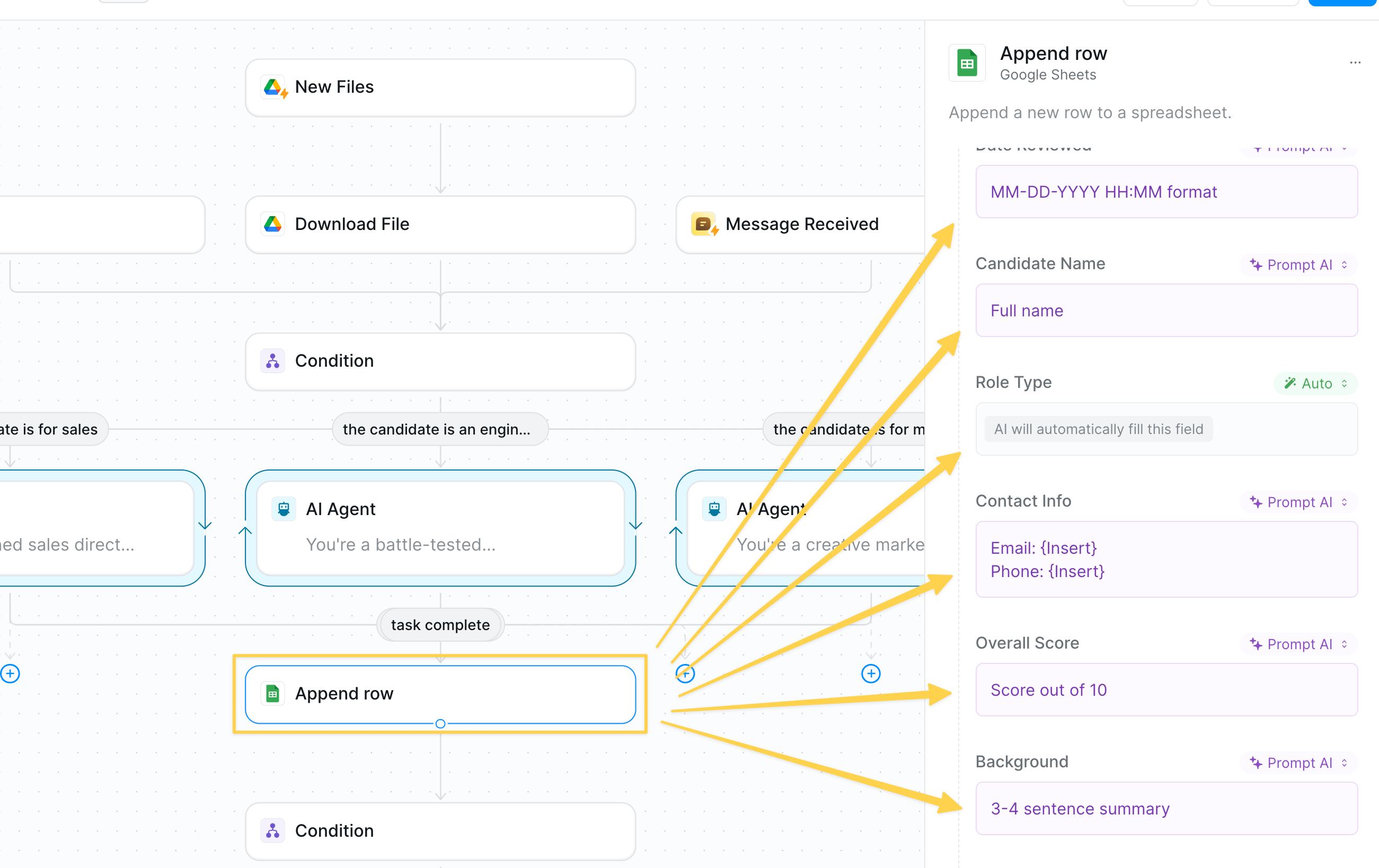 Create a Google Sheet with columns:
* Date Reviewed
* Candidate Name
* Role Type
* Contact Information
* Overall Score
* Background Summary
* Rating Justification
Use `Google Sheets – Append Row` to log each candidate's complete evaluation.
### Step 5: Check for High Scores
Filter for candidates that exceed your quality threshold to trigger immediate team alerts.
Create a Google Sheet with columns:
* Date Reviewed
* Candidate Name
* Role Type
* Contact Information
* Overall Score
* Background Summary
* Rating Justification
Use `Google Sheets – Append Row` to log each candidate's complete evaluation.
### Step 5: Check for High Scores
Filter for candidates that exceed your quality threshold to trigger immediate team alerts.
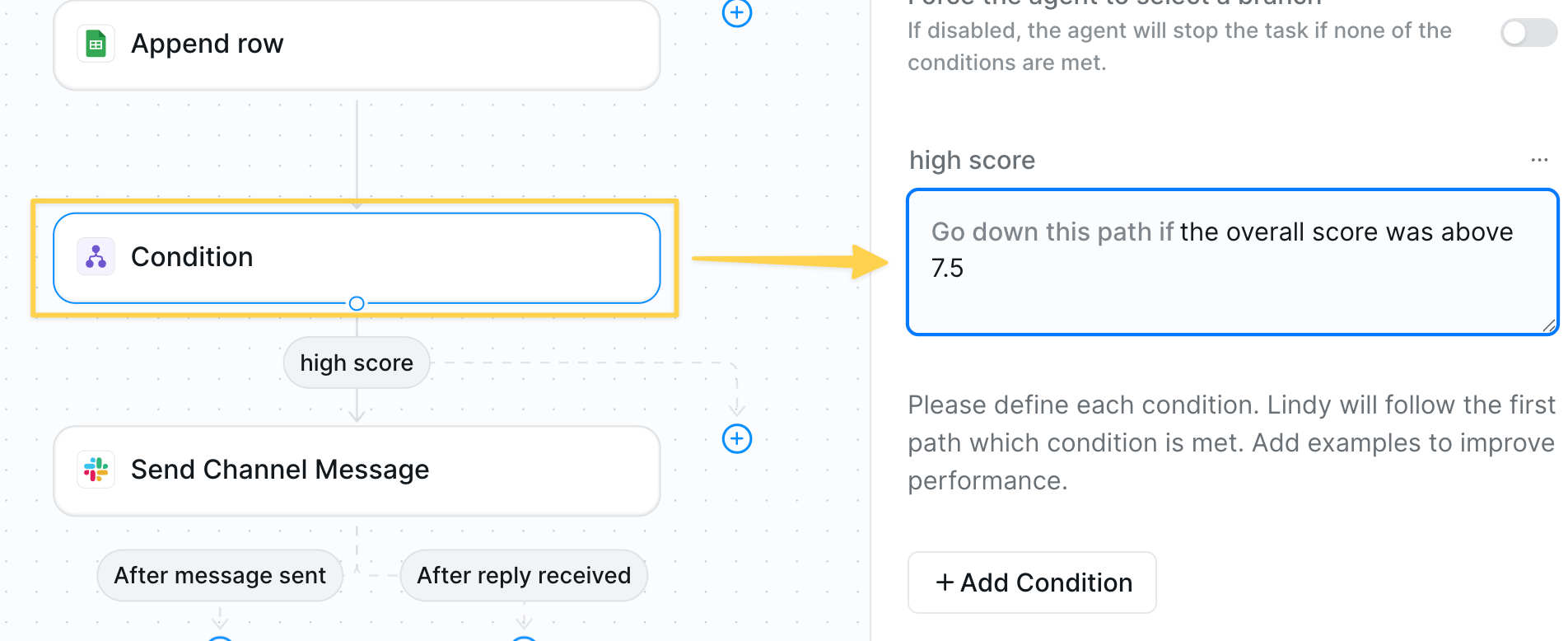 Add `Conditions` with prompt: "Go down this path if the overall score was above 7.5"
### Step 6: Alert Team About Top Talent
Send immediate notifications for candidates that are deemed high scoring.
For high-scoring candidates, use `Slack – Send Message` to alert team:
* **Channel**: #recruiting or #top-candidates
* Example prompt:
```
🎯 **TOP CANDIDATE ALERT**
**Candidate**: [Name]
**Role**: [Sales/Engineering/Marketing]
**Score**: [X]/10 ⭐
**Key Highlights**:
• [Biggest achievement]
• [Years experience] at [Previous companies]
• [Key skills/education]
**Recommendation**: [AI verdict in 2 concise sentences]
```
Lindy must be added to the Slack channel in order to send messages.
• You can notify your team however you'd like - this is just one example format.
## Advanced Features
| Feature | What it does |
| ---------------------- | --------------------------------------------------- |
| Duplicate Detection | Identify candidates who've applied multiple times |
| Custom Scoring Weights | Adjust importance of different criteria by role |
| Interview Scheduling | Auto-schedule interviews for top candidates |
| ATS Integration | Sync results with Workday, Greenhouse, or other ATS |
## Best Practices
Define clear 1-10 scoring rubrics for each role and stick to them consistently.
Update AI prompts based on successful hires to improve accuracy over time.
Regularly audit results to ensure fair evaluation across all candidate backgrounds.
Track which AI-scored candidates become successful hires to refine scoring.
## Next Steps
Collect feedback from new hires
Support candidates with questions
Process resumes and application documents
Build intelligent screening workflows
Add `Conditions` with prompt: "Go down this path if the overall score was above 7.5"
### Step 6: Alert Team About Top Talent
Send immediate notifications for candidates that are deemed high scoring.
For high-scoring candidates, use `Slack – Send Message` to alert team:
* **Channel**: #recruiting or #top-candidates
* Example prompt:
```
🎯 **TOP CANDIDATE ALERT**
**Candidate**: [Name]
**Role**: [Sales/Engineering/Marketing]
**Score**: [X]/10 ⭐
**Key Highlights**:
• [Biggest achievement]
• [Years experience] at [Previous companies]
• [Key skills/education]
**Recommendation**: [AI verdict in 2 concise sentences]
```
Lindy must be added to the Slack channel in order to send messages.
• You can notify your team however you'd like - this is just one example format.
## Advanced Features
| Feature | What it does |
| ---------------------- | --------------------------------------------------- |
| Duplicate Detection | Identify candidates who've applied multiple times |
| Custom Scoring Weights | Adjust importance of different criteria by role |
| Interview Scheduling | Auto-schedule interviews for top candidates |
| ATS Integration | Sync results with Workday, Greenhouse, or other ATS |
## Best Practices
Define clear 1-10 scoring rubrics for each role and stick to them consistently.
Update AI prompts based on successful hires to improve accuracy over time.
Regularly audit results to ensure fair evaluation across all candidate backgrounds.
Track which AI-scored candidates become successful hires to refine scoring.
## Next Steps
Collect feedback from new hires
Support candidates with questions
Process resumes and application documents
Build intelligent screening workflows