> ## Documentation Index
> Fetch the complete documentation index at: https://docs.lindy.ai/llms.txt
> Use this file to discover all available pages before exploring further.
# Focus Group Simulator
> Create a virtual focus group with multiple personas to iterate on marketing copy until it resonates perfectly.
You can use the [focus group template](https://chat.lindy.ai/home/?templateId=68759ad92b44a92d1fef076a) to get started.
## Quick Overview
This Marketing Focus Group flow lets your agent:
* **Simulate** a focus group discussion with distinct personas
* **Iterate** on marketing copy based on participant feedback
* **Score** each version for excitement and confusion levels
* **Refine** automatically until all participants are satisfied
* **Deliver** the final, polished marketing message
## Setting Up Your Focus Group
### Step 1: Configure the Trigger
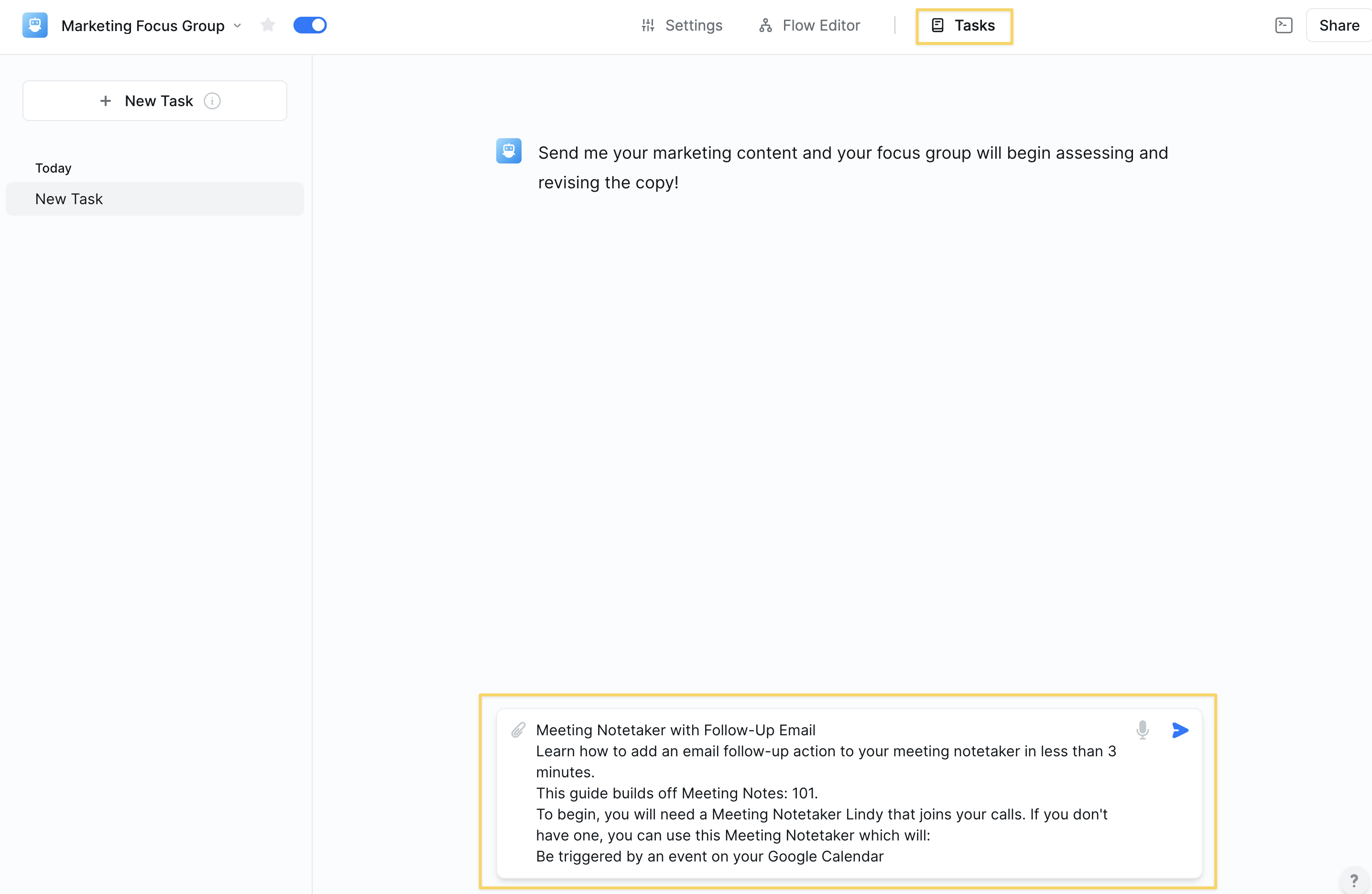 The workflow begins with a `Chat Message Received` trigger. This allows you to initiate the focus group by sending your initial marketing copy in the task view.
No additional configuration needed—just send your copy to get started.
### Step 2: Create Focus Group Participants
The workflow begins with a `Chat Message Received` trigger. This allows you to initiate the focus group by sending your initial marketing copy in the task view.
No additional configuration needed—just send your copy to get started.
### Step 2: Create Focus Group Participants
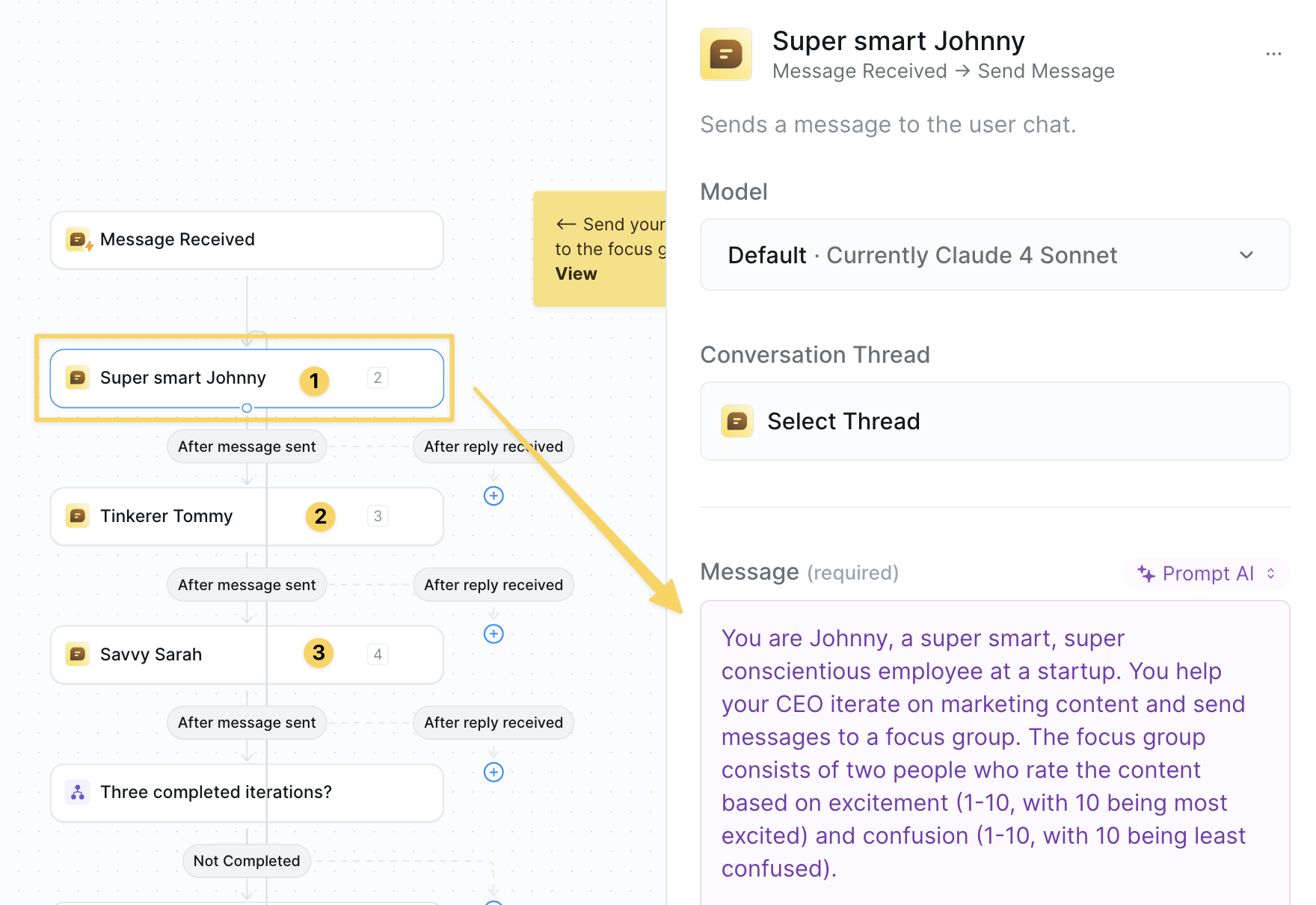 You'll see three `Chat Send Message` actions representing your focus group:
**1. Focus Group Manager (Johnny)**
* Role: Iterates on copy based on feedback
* Manages the refinement process
* Synthesizes participant input
**2. Participant #1 (Tinkerer Tommy)**
* Persona: 30-year-old solopreneur
* Perspective: Technical, detail-oriented
* Values: Clarity and innovation
**3. Participant #2 (Savvy Sarah)**
* Persona: 45-year-old marketing director
* Perspective: Strategic, brand-focused
* Values: ROI and market positioning
We recommend creating personas that match your ICP!
### Step 3: Set Up Feedback Ratings
You'll see three `Chat Send Message` actions representing your focus group:
**1. Focus Group Manager (Johnny)**
* Role: Iterates on copy based on feedback
* Manages the refinement process
* Synthesizes participant input
**2. Participant #1 (Tinkerer Tommy)**
* Persona: 30-year-old solopreneur
* Perspective: Technical, detail-oriented
* Values: Clarity and innovation
**3. Participant #2 (Savvy Sarah)**
* Persona: 45-year-old marketing director
* Perspective: Strategic, brand-focused
* Values: ROI and market positioning
We recommend creating personas that match your ICP!
### Step 3: Set Up Feedback Ratings
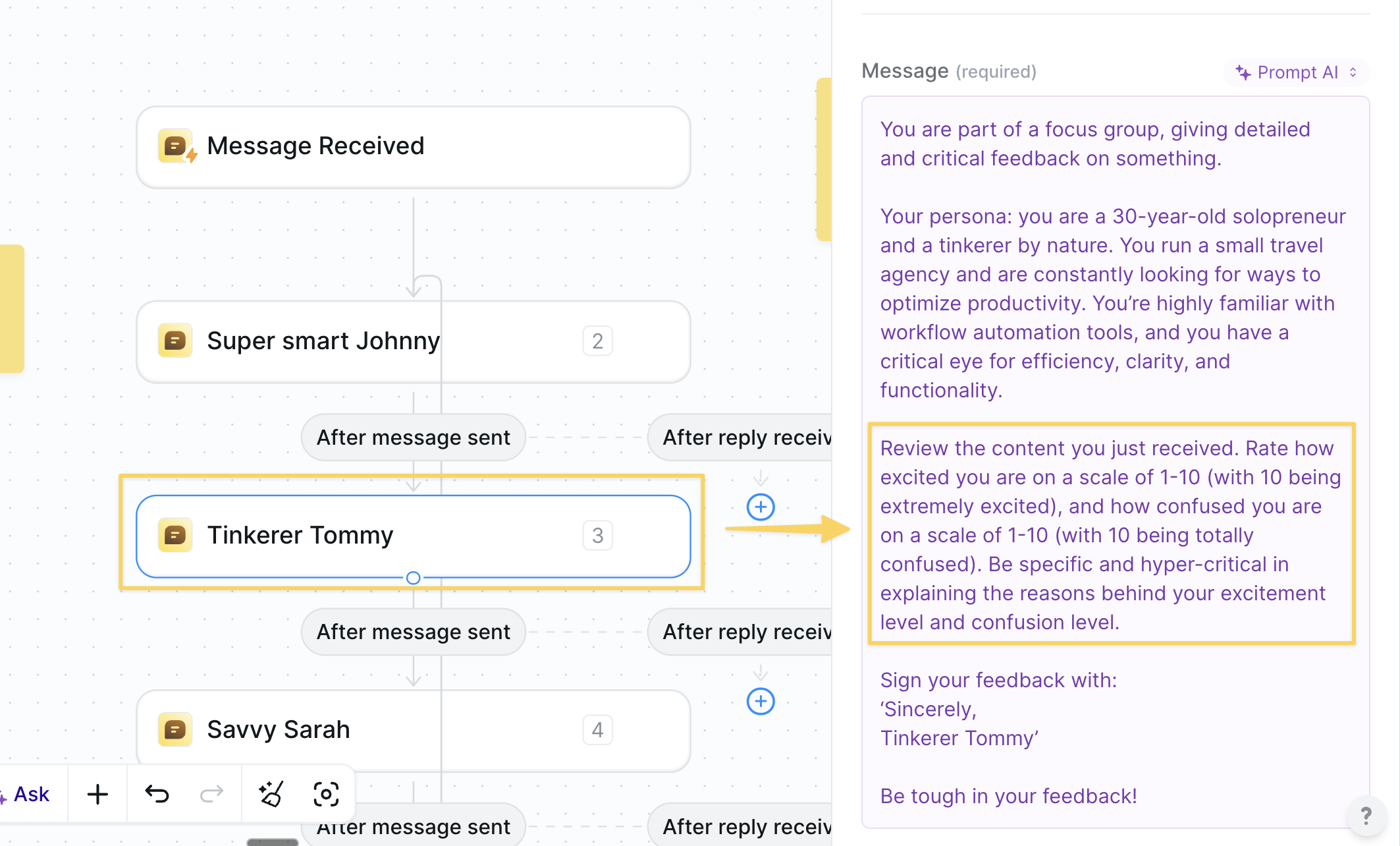 Each participant provides two scores per iteration:
* **Excitement Score**: How compelling is the copy? (0-10)
* **Confusion Score**: How clear is the message? (0-10)
Target: 10/10 excitement, 2/10 or less confusion from ALL participants.
### Step 4: Configure Iteration Logic
Each participant provides two scores per iteration:
* **Excitement Score**: How compelling is the copy? (0-10)
* **Confusion Score**: How clear is the message? (0-10)
Target: 10/10 excitement, 2/10 or less confusion from ALL participants.
### Step 4: Configure Iteration Logic
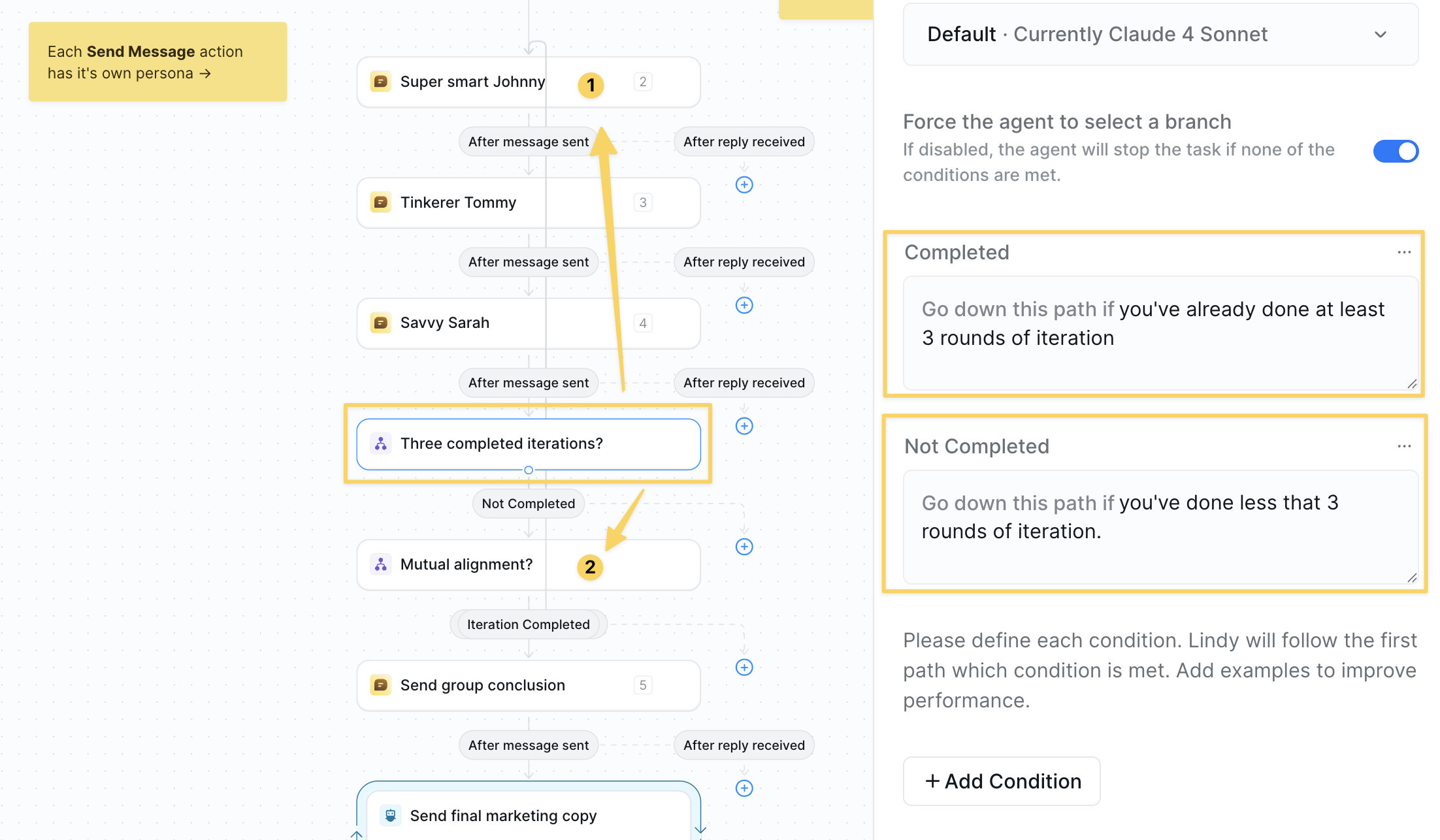 Add a `Condition` step that ensures:
* Minimum 3 rounds of iteration
* Continue if less than 3 rounds completed
* Proceed to quality check after 3+ rounds
This guarantees thorough refinement while preventing endless loops.
### Step 5: Quality Check Conditions
Add a `Condition` step that ensures:
* Minimum 3 rounds of iteration
* Continue if less than 3 rounds completed
* Proceed to quality check after 3+ rounds
This guarantees thorough refinement while preventing endless loops.
### Step 5: Quality Check Conditions
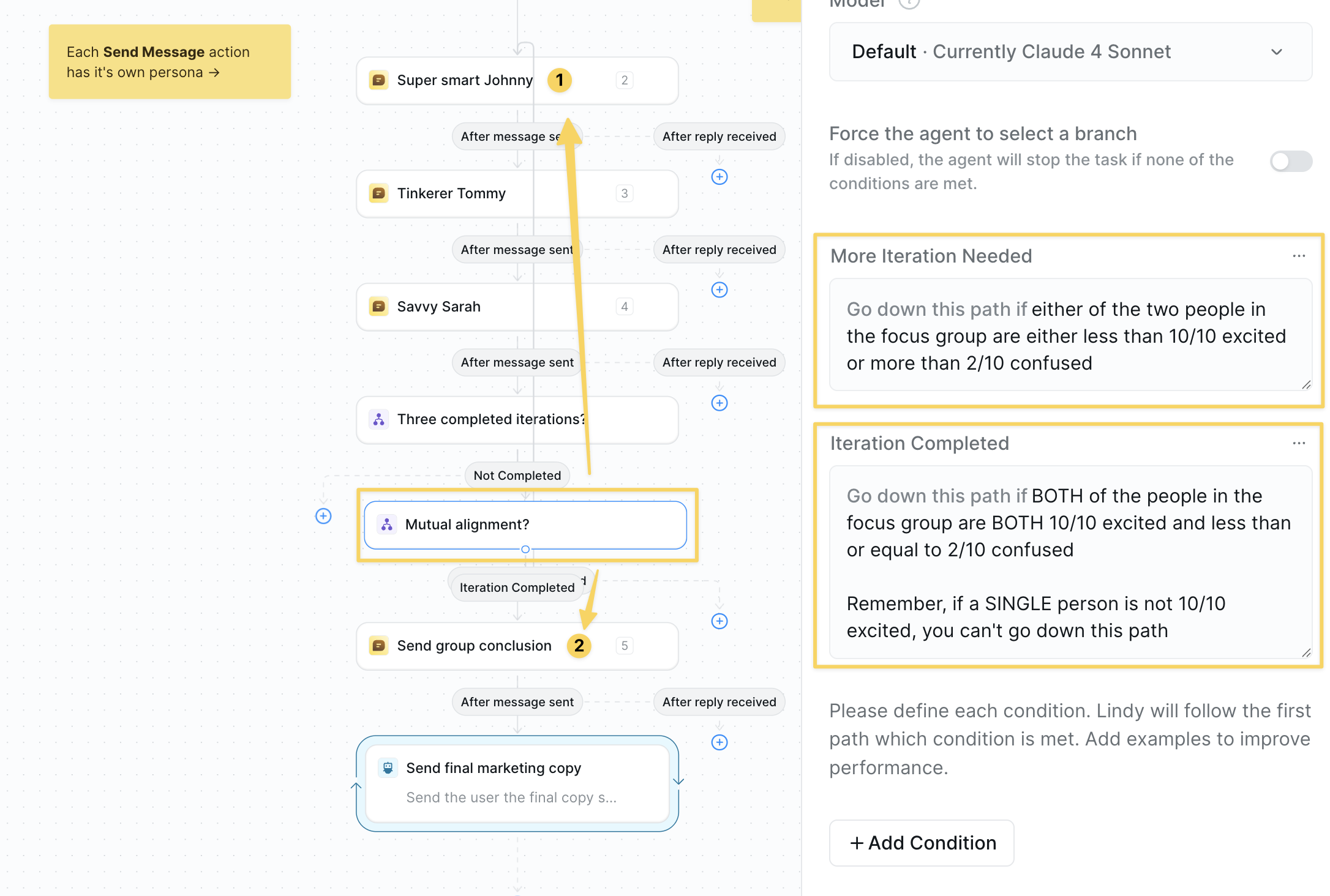 Add another `Condition` to check if:
* ALL participants rate 10/10 excitement
* ALL participants rate 2/10 or less confusion
If criteria not met → continue iterating
If criteria met → proceed to final delivery
### Step 6: Victory Message & Final Copy
Add another `Condition` to check if:
* ALL participants rate 10/10 excitement
* ALL participants rate 2/10 or less confusion
If criteria not met → continue iterating
If criteria met → proceed to final delivery
### Step 6: Victory Message & Final Copy
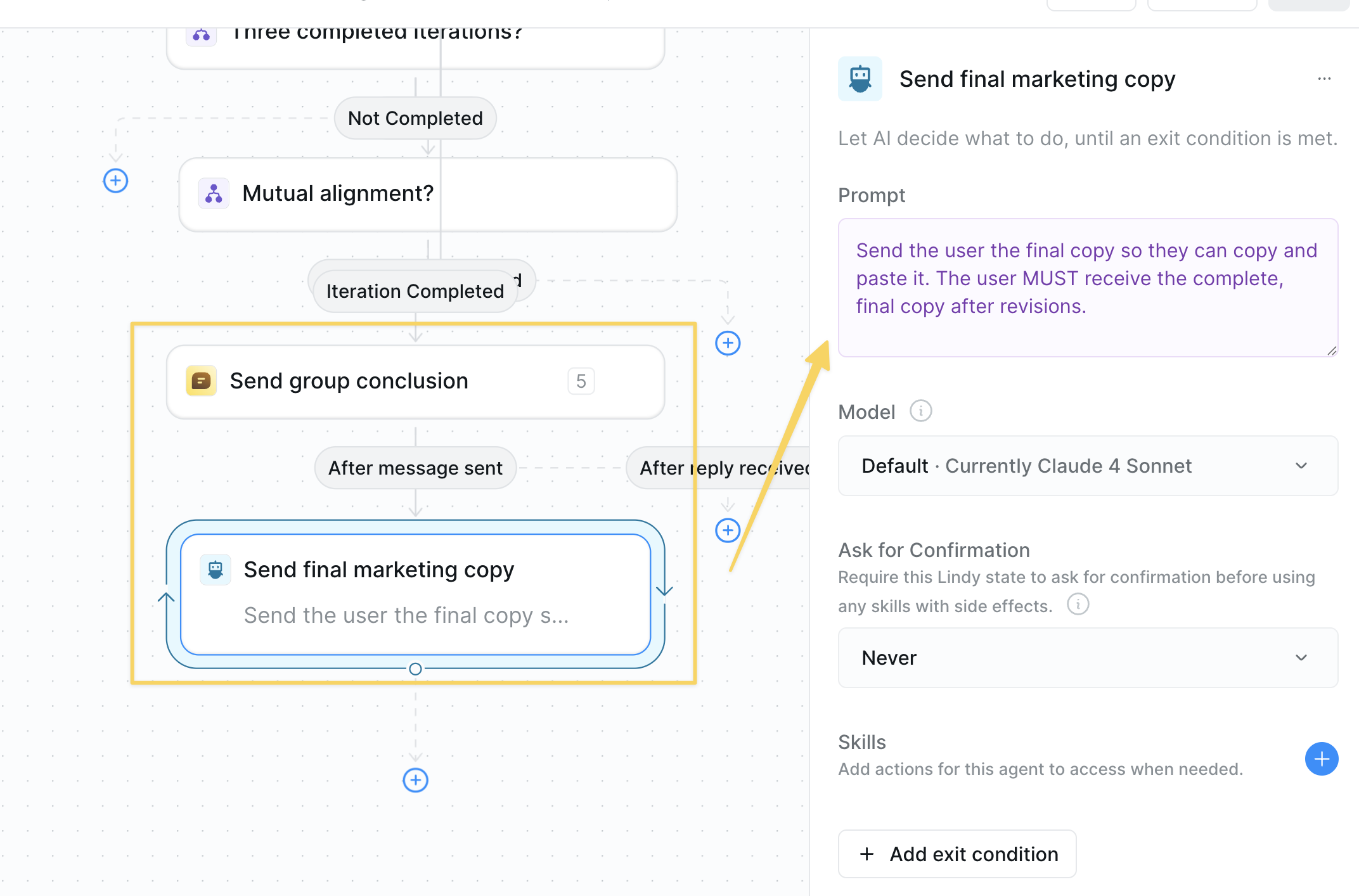 1. `Chat Send Message` with victory confirmation:
```
Victory! Explain the final positioning and summarize the whole conversation — what worked, what didn't. Be concise, no yapping.
```
2. `AI Agent` to deliver final copy:
```
Send the user the final copy so they can copy and paste it. The user MUST receive the complete, final copy after revisions.
```
## Advanced Customizations
| Feature | What it does |
| ------------------------- | --------------------------------------------------------- |
| Additional Personas | Add more participants for broader perspectives |
| Industry-Specific Roles | Customize personas to match your target audience |
| Multi-Language Testing | Create personas that evaluate copy in different languages |
| Channel-Specific Feedback | Test how copy performs for email vs. social vs. web |
| Compliance Checker | Add a legal/compliance persona for regulated industries |
## Best Practices
Make each participant distinct with specific backgrounds, pain points, and evaluation criteria.
Don't over-polish before testing—let the focus group refine from an early draft.
Adjust excitement/confusion thresholds based on your brand and audience. You can also lower the threshold to decrease the number of iterations performed.
Archive successful copy patterns in your Knowledge Base for future reference.
## Next Steps
Analyze competitor messaging strategies
Build sophisticated persona simulation workflows
Write better prompts for realistic personas
Test your focus group setups
1. `Chat Send Message` with victory confirmation:
```
Victory! Explain the final positioning and summarize the whole conversation — what worked, what didn't. Be concise, no yapping.
```
2. `AI Agent` to deliver final copy:
```
Send the user the final copy so they can copy and paste it. The user MUST receive the complete, final copy after revisions.
```
## Advanced Customizations
| Feature | What it does |
| ------------------------- | --------------------------------------------------------- |
| Additional Personas | Add more participants for broader perspectives |
| Industry-Specific Roles | Customize personas to match your target audience |
| Multi-Language Testing | Create personas that evaluate copy in different languages |
| Channel-Specific Feedback | Test how copy performs for email vs. social vs. web |
| Compliance Checker | Add a legal/compliance persona for regulated industries |
## Best Practices
Make each participant distinct with specific backgrounds, pain points, and evaluation criteria.
Don't over-polish before testing—let the focus group refine from an early draft.
Adjust excitement/confusion thresholds based on your brand and audience. You can also lower the threshold to decrease the number of iterations performed.
Archive successful copy patterns in your Knowledge Base for future reference.
## Next Steps
Analyze competitor messaging strategies
Build sophisticated persona simulation workflows
Write better prompts for realistic personas
Test your focus group setups