

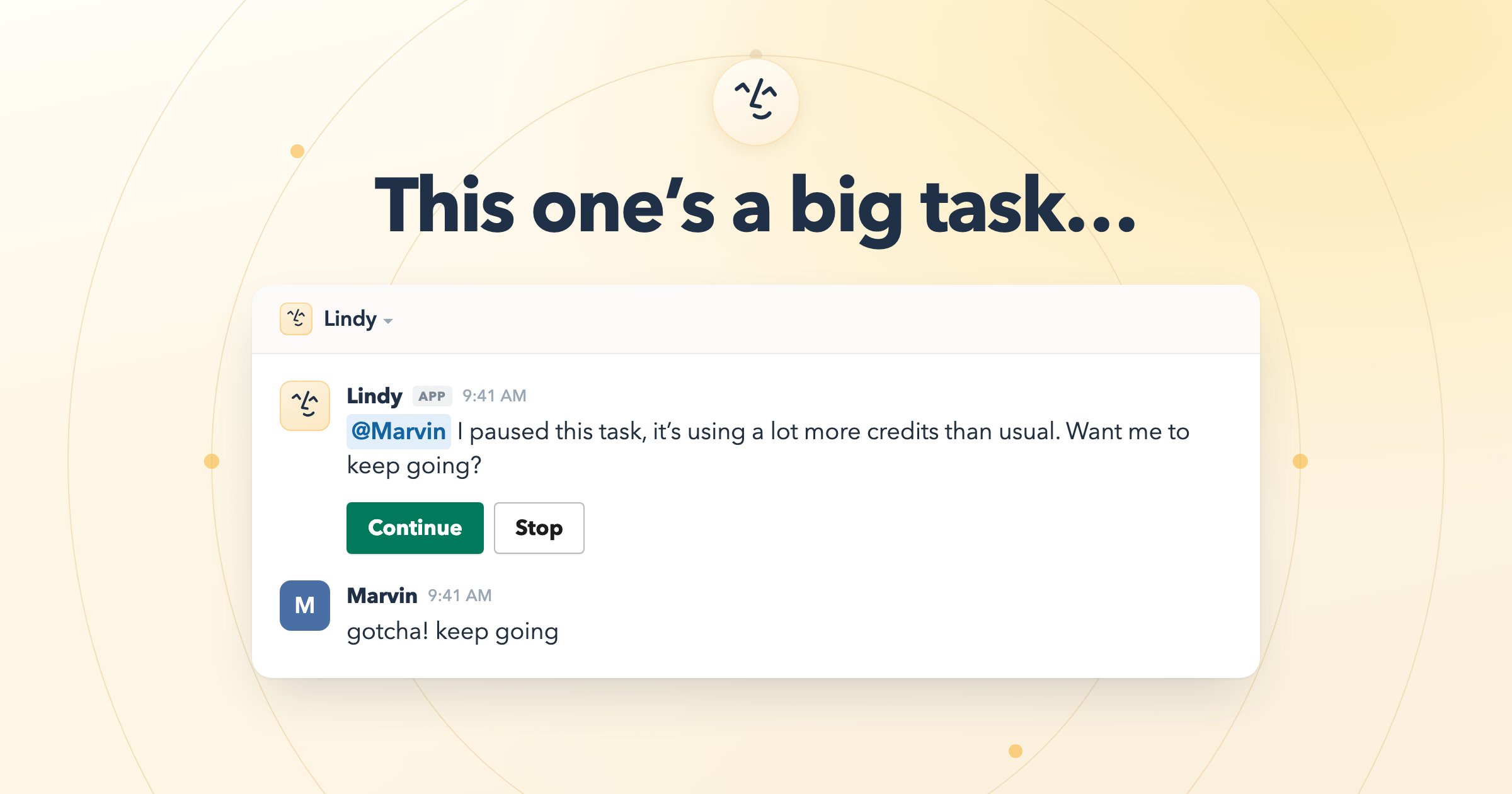
Usage Warning: Why Am I Seeing This?
Lindy paused a task because it’s using significantly more resources than usual. This is a protection for your team, not an error. When a task starts drawing more from the pool than expected, Lindy stops and checks in before continuing. It asks right where you delegated the work: in the Slack thread if you @mentioned it in a channel, or in your DM if you asked there. You can continue (the task finishes normally) or stop (no additional credits are used). If you stop, the thread stays open and you can pick it back up later.Credit Usage by Feature
Every plan covers every feature. Nothing here is gated. What follows is a general sense of what each kind of work draws from your pool.Your team’s Lindy, in your channels
Shared with the whole team, drawing on your approved team sources. This is where most of a team’s credits go, because everyone @mentions the same Lindy.Your personal Lindy, in your DMs
Private to each person, and much lighter. These run on their own to keep you ahead of your day.Both Lindys spend from the same pool. A busy channel where the whole team @mentions Lindy will move the number faster than any one person’s DMs.
Checking your usage
To see your workspace’s total, go to Settings → Billing and scroll to the usage section. To see it person by person, open Settings → Members. The Credits column shows what each teammate has drawn this cycle, and sorting by it is the fastest way to find out where your pool is going.Spend caps per teammate
Admins can cap how much any one person draws from the shared pool. It’s the main tool for keeping one heavy user from spending the team’s month.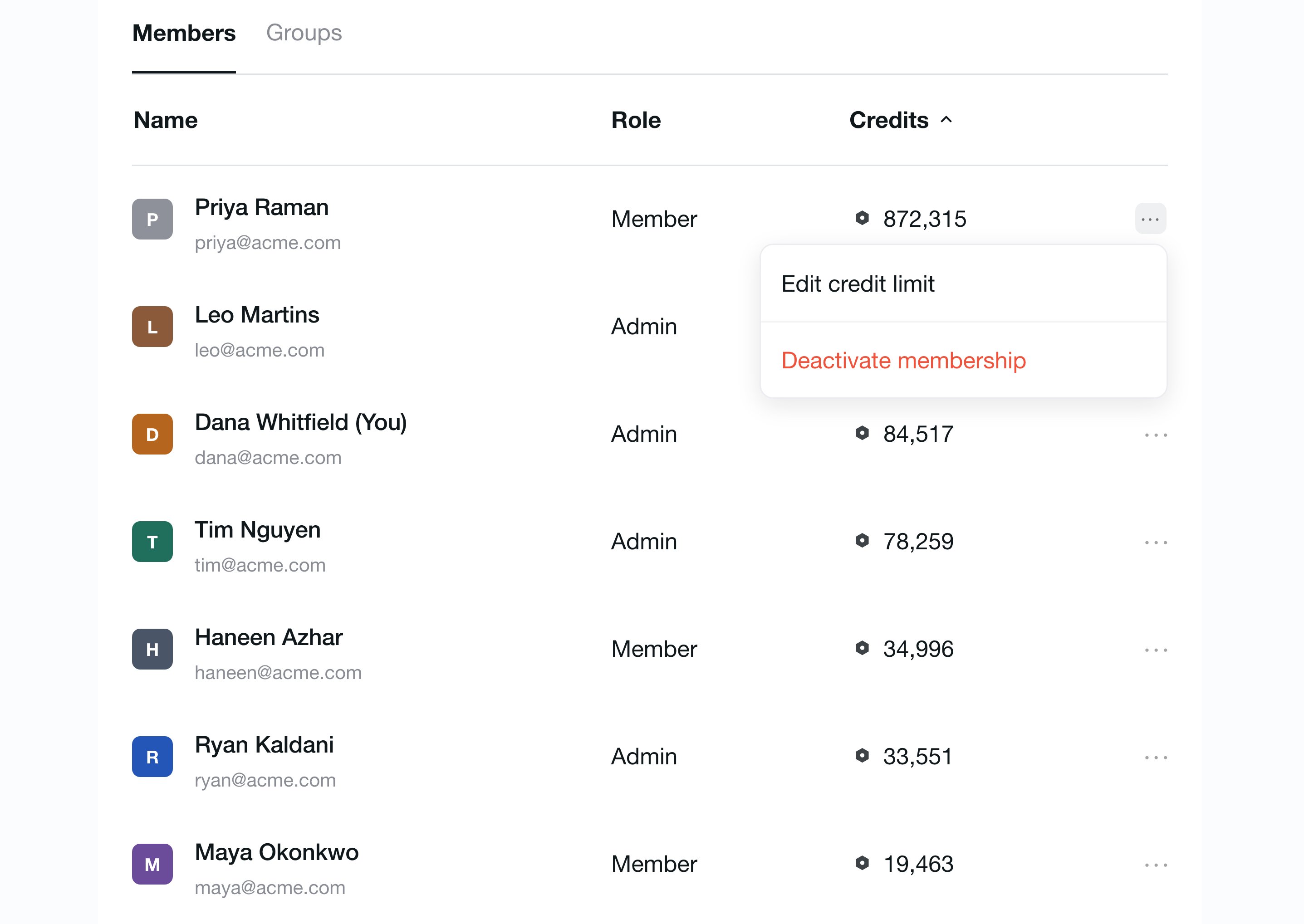
What Happens When Your Team Hits the Limit?
- Lindy pauses until your next billing cycle.
- Your data and settings are safe. Lindy won’t automatically restart paused tasks, but nothing is deleted. Anyone can manually restart their own work once the pool resets.
- Your pool resets monthly from your workspace’s signup date.
What if we need more before the pool resets?
What if we need more before the pool resets?
Admins have three options:
- Buy a top-up: extra workspace credits at $10 per 1,000 credits, in 1,000-credit blocks. Top-ups are a one-time buy and never touch your base plan’s credits.
- Upgrade the plan: go to Settings → Billing → Upgrade to move to a higher tier on a month-to-month basis. Every seat on the new tier adds more credits to the pool.
- Enable Overages: in Settings → Billing, toggle on Overages to let Lindy keep working past the limit. Overage usage is charged at 2x the cost of regular Lindy credits.
Does adding a teammate add credits?
Does adding a teammate add credits?
Yes. Credits belong to the workspace, not to each person, and every seat adds its tier’s allotment to the pool. A Plus seat adds 3,000, a Pro seat 15,000, and so on. Someone who joins by @mentioning Lindy in Slack gets a free first week before their seat converts to paid. See Lindy Teammate Billing.
Will paused tasks pick up automatically?
Will paused tasks pick up automatically?
No. When the pool resets, each person needs to manually restart anything that was paused. Nothing is lost: conversations, settings, and history are all preserved.
Credit Optimization
Most teams never come close to their limit. If you want to stretch the pool further, these are the levers that make the biggest difference, in rough order of impact.Scope your team sources tightly
Scope your team sources tightly
The shared Lindy searches everything you’ve approved. Point it at the channels and Drive folders that actually hold your team’s answers, not at the whole workspace.Open Settings → Lindy Teammate → Team sources and prune anything stale. A narrower set of sources is cheaper to search and gives better answers, so this is the rare lever that improves quality and cost at once.
Review team routines monthly
Review team routines monthly
Team routines run on their own schedule whether or not anyone reads the result, and a workspace-wide routine spends for the whole team every time it fires. They’re the easiest thing to set up and forget.Open the Routines page from the left sidebar and review both the Team and Personal tabs once a month. Flipping a routine off stops it without removing it, so you can turn it back on whenever you want. See Routines.
Start a new thread for a new topic
Start a new thread for a new topic
Every message in a thread re-reads everything above it, so a long-running thread gets more expensive with each turn. This matters more in a busy channel than in a DM, because the whole team keeps adding to it.Starting a fresh thread for an unrelated topic keeps every conversation lean. You lose nothing: what Lindy knows from your team’s sources carries across every thread.
Be specific about what you delegate
Be specific about what you delegate
Deep research is the row in the tables above whose cost genuinely varies, and vagueness is usually the reason. A precise brief tells Lindy when it’s done; an open-ended one doesn’t.
- Costs more: “@Lindy research Acme.”
- Costs less: “@Lindy give me five bullets on Acme’s funding history and their last two product launches.”
Pick the right model
Pick the right model
Advanced models earn their cost on hard reasoning and analysis. Routine work like summarizing, drafting, and lookups runs well on a cheaper one.Every plan gets every model, trial seats included, so this is purely a cost choice. Switch the model from the dropdown below the taskbar, then select Set as default to apply it to new conversations.
Remove seats you aren't using
Remove seats you aren't using
A seat stays billed until an admin removes it, and you keep it through the end of the current cycle with no mid-cycle proration. When someone leaves the team, remove them in Settings → Members.If a removed person @mentions Lindy again, it tells them it can’t help and pings an admin. It won’t quietly re-add them.
Check usage weekly
Check usage weekly
A quick look at Settings → Billing once a week turns an end-of-month surprise into a small adjustment you make on a Tuesday. Sorting Settings → Members by the Credits column is how you notice one person or one routine burning more than you expected.Worth knowing: if your team goes over and has Overages enabled, that usage is charged at 2x your plan’s standard rate.
Overages
If your team exceeds the pool’s limit, overage usage is charged at 2x your plan’s standard rate.Relevant Docs
Lindy Teammate Billing
Seats, trials, top-ups, and your shared credit pool
Set up Lindy
Get Lindy into your team’s Slack and connect your tools